Coming soon
The following features are coming in the next release of ThoughtSpot Cloud.
August 2026 26.8.0.cl
SpotterViz insight tiles Early Access
SpotterViz insight tiles are now Early Access (EA). Insight tiles display AI-generated text analysis on a Liveboard. You configure the tile with instructions that define how the data should be interpreted — including which signals to surface and what conditions should be flagged. Each time the Liveboard loads, the agent executes those instructions against the current data and produces a text output. The tile supports outputs ranging from a single summary sentence to a multi-step analysis, depending on how the prompt is written. To enable this feature, contact your administrator.
For more information, see Insight tiles.
Command palette enhancements
The command palette (Cmd + K on Mac / Ctrl + K on Windows and Linux) includes several enhancements in this release:
-
Smarter search results — Search results are now ranked by relevance, surfacing the most useful answers, Liveboards, and destinations based on your query and usage history.
-
Navigate with / filters — Type /navigate in the palette to scope results to application destinations, including sub-section headings. Navigation results respect your role and permissions, so you only see sections you can access.
-
Onboarding tips — First-time users see contextual guidance in the palette’s empty state, helping you discover what the command palette can do without leaving your current page.
-
Updated visual design — Refreshed color tokens bring the palette’s appearance in line with the latest ThoughtSpot design system.
For more information, see Command palette.
Continuous Liveboard PDF experience
The continuous Liveboard PDF experience is now generally available (GA). This feature eliminates page breaks and preserves the layout of the original Liveboard, ensuring the exported PDF remains true to the on-screen experience. For more information, see Download a Liveboard.
Timezone-aware keywords
Timezone-aware keywords are now generally available (GA). Time zone-aware keywords ensure that relative date filters in ThoughtSpot — like "today," "yesterday," and "last 7 days" — always reflect the correct time for each user, no matter where they are in the world. This ensures that all searches, Liveboards, and dashboards automatically show time-based data that matches local business hours. For more information, see Time-zone aware keywords.
Other features and enhancements
Spotter Analysts Early Access
Spotter analysts are now Early Access (EA). You can create Spotter Analysts-- focused, governed analysts that tailor Spotter to a specific team, use case, or domain. Instead of accessing the general Spotter experience, configure the context once: which data models the agent can see, custom instructions that shape its behavior, the connectors it can use, and who the workspace is shared with. Open a Spotter Analyst and you enter a pre-configured experience the moment you start. To enable this feature, contact your administrator. For more information, see Spotter Analysts.
SpotterModel
SpotterModel is now generally available (GA). You can use SpotterModel to generate comprehensive, optimized Models ready to use in your analysis. SpotterModel automates table selection, join creation, and column selection, while allowing you to review and customize each step.
For more information, see SpotterModel.
Spotter onboarding
You can now add potential first search options-- quick searches with preselected questions, deep analyses, or data knowledge prompts-- to guide first-time users of Spotter.
Test connection for Spotter connectors
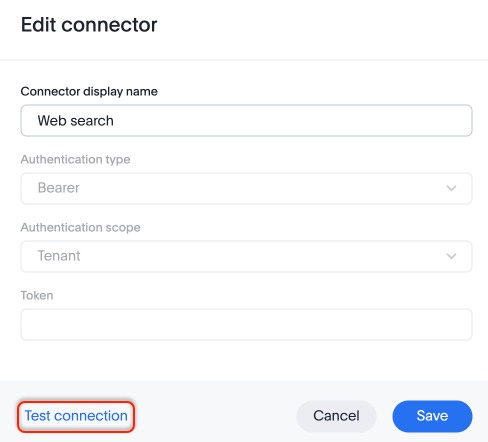
You can now validate that your MCP connectors are connecting and functioning, from the Spotter AI settings panel. When you configure a new connector from the Spotter AI settings panel, click Test connection to prompt a validation of the server connection, the tool listing, and the tool call. If the connection fails, you see a detailed error showing what needs to be done to fix the connection.
Manage permissions for Spotter connectors
You can now edit tool call permissions individually when you set up a Spotter connector. Although the default is that read-only tools are enabled for all users, and write/delete tools and interactive tools require user approval, you can individually change the needed permissions for each tool. You can mark each tool as Always allow, Needs user approval, or Always deny.
Admin settings enhancements
ThoughtSpot introduces a redesigned Admin settings experience with a cleaner, role-aware interface built to scale with multi-Org enterprise deployments. Settings are now grouped into focused categories — users, Orgs, features, appearance, and security.
Information architecture
The enhanced Admin settings portal reorganizes the administrative interface into four primary sections:
- Home
-
The foundational landing page for creating Orgs and Users, kept outside of general management. Houses the most frequently used administrative functionalities.
- Management
-
Contains overarching settings and feature management that apply across the entire instance or organization.
- Configuration
-
Houses specific feature settings for a given organization, organized via clean sub-tabs and accordions. Includes Application Settings, Search & SpotIQ, and Customization tabs.
- Monitor
-
A dedicated space for tracking system health, operational status, and granular object and usage adoption details.
Org and user management
-
Create, rename, and delete Orgs from one central location.
-
Users, Roles, Groups, and Provisioning are now subtabs under User Management.
-
Click any user to view their details (name, email, role, groups, and status) in an inline card without leaving the page.
-
When creating a group, assign roles, nest child groups, and add users in a single workflow.
-
Assign Org admins and manage users across Orgs without contacting your instance admin.
-
View all Org details — creation date, creator, users, groups, and enabled feature flags — in one place.
-
Separate interfaces for instance administrators and Org administrators keep each role’s view focused and relevant.
Feature management
-
Enable or disable Early Access and GA features per Org, with no impact on other Orgs and no system restart required.
-
Org admins can customize styles, features, and notifications for their Org independently of instance-level defaults.
-
Allocate self-service feature management to specific Orgs, giving Org admins control to toggle features for their own Org.
Configuration
-
Application settings, customizations, AI settings, and Search and SpotIQ configuration are consolidated in one location.
-
Settings are organized into collapsible sections.
-
The page has two sub-tabs: Application Settings (auth, security, email) and Customization (logos, colors, styles).
Monitor
-
System health, performance, stats, and adoption and usage data are available in a single location.
This feature will be gradually released to customer instances with the 26.8.0.cl release. For status of when your instance will receive it, or for assistance, contact ThoughtSpot Support.
Column aliases in reference questions and business terms
Reference questions and business terms now respect column aliases built in the underlying Model. For example, if you create column aliases in Spanish for a data model with English column titles, the reference question in the Memory sources page would display the alias for users with Spanish locales.
User-defined column aliases
Column aliasing for user-defined (UDF) columns is now generally available (GA). You define context-aware display names for columns in a Model, so that different users see the column names that are meaningful to them — based on their ThoughtSpot group, Org, or preferred language. A single Model can serve multiple client groups or locales without the need to maintain separate replicas, reducing complexity and memory overhead. To enable column aliasing for UDF columns, contact ThoughtSpot Support.
Split download permissions for Liveboards and schedules
Separate download permissions for Liveboards and schedules are now generally available (GA). The download privilege has been split into separate, more granular permissions to enhance data security and administrative control. Administrators can now assign download privileges for visual downloads (PDF/PNG) and data exports (XLSX/CSV) independently. These new permissions apply to both direct downloads and scheduled reports and are only available to customers who have enabled RBAC privileges.
Column security rules
Column security rules are generally available (Opt-in) in this release. To enable column security rules for your organization, contact ThoughtSpot Support.
Personalized views enhancements Early Access
ThoughtSpot now protects user-created personalized views when you migrate Liveboard TML across environments. Previously, importing an updated Liveboard TML from a development environment would overwrite all views in production, including those created by end users. The username and the email of the owner of each view is now displayed in the Liveboard TML so administrators can see who owns each view, and can transfer ownership by editing that info in the Liveboard TML. Personalized views now also have Object IDs, similar to tables and model references in the Liveboard TML. With this release, ThoughtSpot uses a smart merge approach. Smart merge is only possible using the TML import APIs. Using the API, you can opt in to smart merge by passing a new field as TRUE. The UI will continue to show the original merge logic. Views that exist only in production are preserved, new views from the source TML are added, and views present in both are updated.
To enable this feature, contact your administrator.
New connection experience
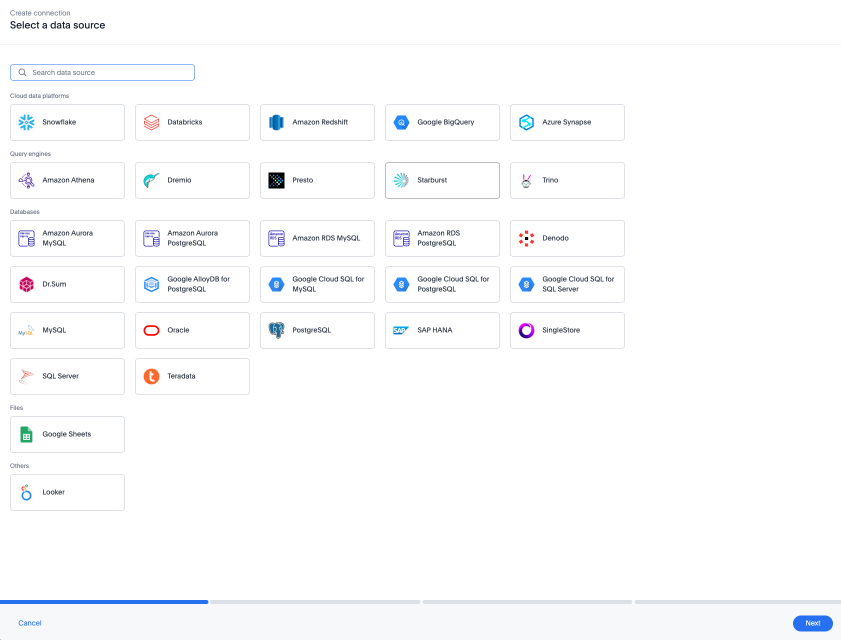
The new connection creation experience is now generally available (GA). We redesigned and streamlined the process to create a Connection. Set up your Connection in four easy steps by selecting a data source, configuring the Connection, selecting databases, and selecting tables.
For more information, see New connection configuration experience.
ClickHouse connection
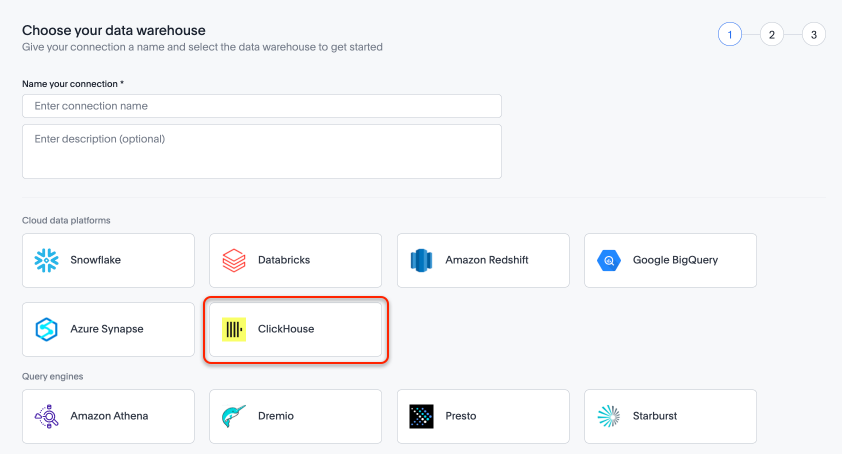
ClickHouse connections are now generally available (GA). For more information, see ClickHouse.
: SCAL-317357. docs jira: SCAL-318240
For the Developer
For new features and enhancements introduced in this release of ThoughtSpot Embedded, see ThoughtSpot Developer Documentation.