Coming soon
The following features are coming in the next release of ThoughtSpot Cloud.
September 2026 26.9.0.cl
Spotter 3 visual redesign
We have redesigned the experience in Spotter 3 to look more streamlined and conversational. No functional changes have been made to how Spotter defines its reasoning, the "thinking" behind the answer. The search bar options have been simplified, but no functionality has been removed.
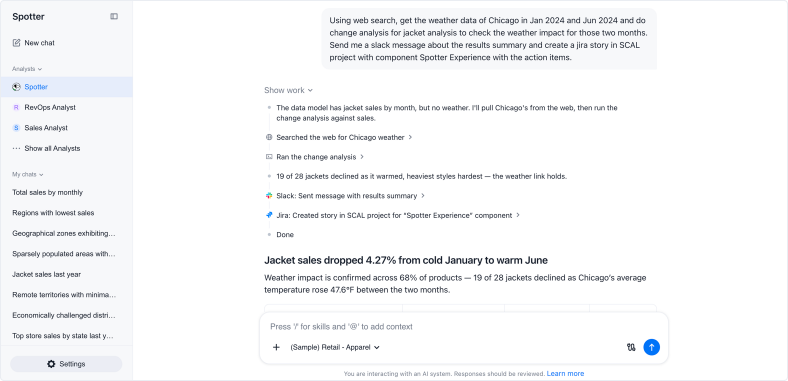
Multiple Model selection in Spotter Beta
You can now select multiple Models to search on in a single Spotter conversation. For example, you could select a Revenue Model and a Finance Model and ask a question that spans data from both. To enable this feature, contact ThoughtSpot Support.
Pin a chat in Spotter
You can now pin chats to the top of the view in the Spotter side menu, so they’ll be easy to find. Pinned chats are organized by which chat has the most recent activity — most recently interacted with, or most recently pinned.
Spreadsheet on live data Early Access
Spreadsheet puts a familiar, editable grid directly on your live data. Open any ThoughtSpot data model, table, or dataset, and every column and formula you add runs as a live query against the governed model, with no export and no stale copy. Formula columns persist as governed logic, while sorting, filtering, conditional formatting, and text and number formatting let you shape the grid on the fly. Save your work as an Answer that stays searchable, shareable, and governed like anything else in ThoughtSpot.
-
Columns and formulas on live data: Build new metrics with 70+ built-in functions. Every formula runs as a live query and persists as governed logic your team can reuse.
-
Shape your view instantly: Sort, filter, conditional formatting, and text and number formatting help you focus on what matters, applied live on the data.
-
Save as a governed Answer: Your spreadsheet becomes a searchable, shareable object with security and lineage intact, never a disconnected export.
-
Built for real datasets: Scroll seamlessly through large result sets and switch to full-screen mode for focused analysis.
To enable this feature, contact ThoughtSpot Support.
Search data query cancellation GA
ThoughtSpot query cancellation for Search data is now generally available (GA). You can now stop in-progress queries on your cloud data warehouse (CDW) when you change or abandon a search. This reduces unnecessary CDW spend and lets you iterate faster.
Previously, queries made using Search data continued running until timeout or completion even after you modified the search, navigated away, or edited an Answer. This release introduces two cancellation mechanisms:
-
Implicit cancellation
ThoughtSpot automatically sends a cancel signal to the CDW when your action clearly indicates you no longer need the current result. For example, when you change the search bar, navigate to a different page, or open an Answer for editing from a Liveboard or Spotter.
-
Explicit cancellation
A Cancel button is available on the Search data page for queries you want to stop manually.
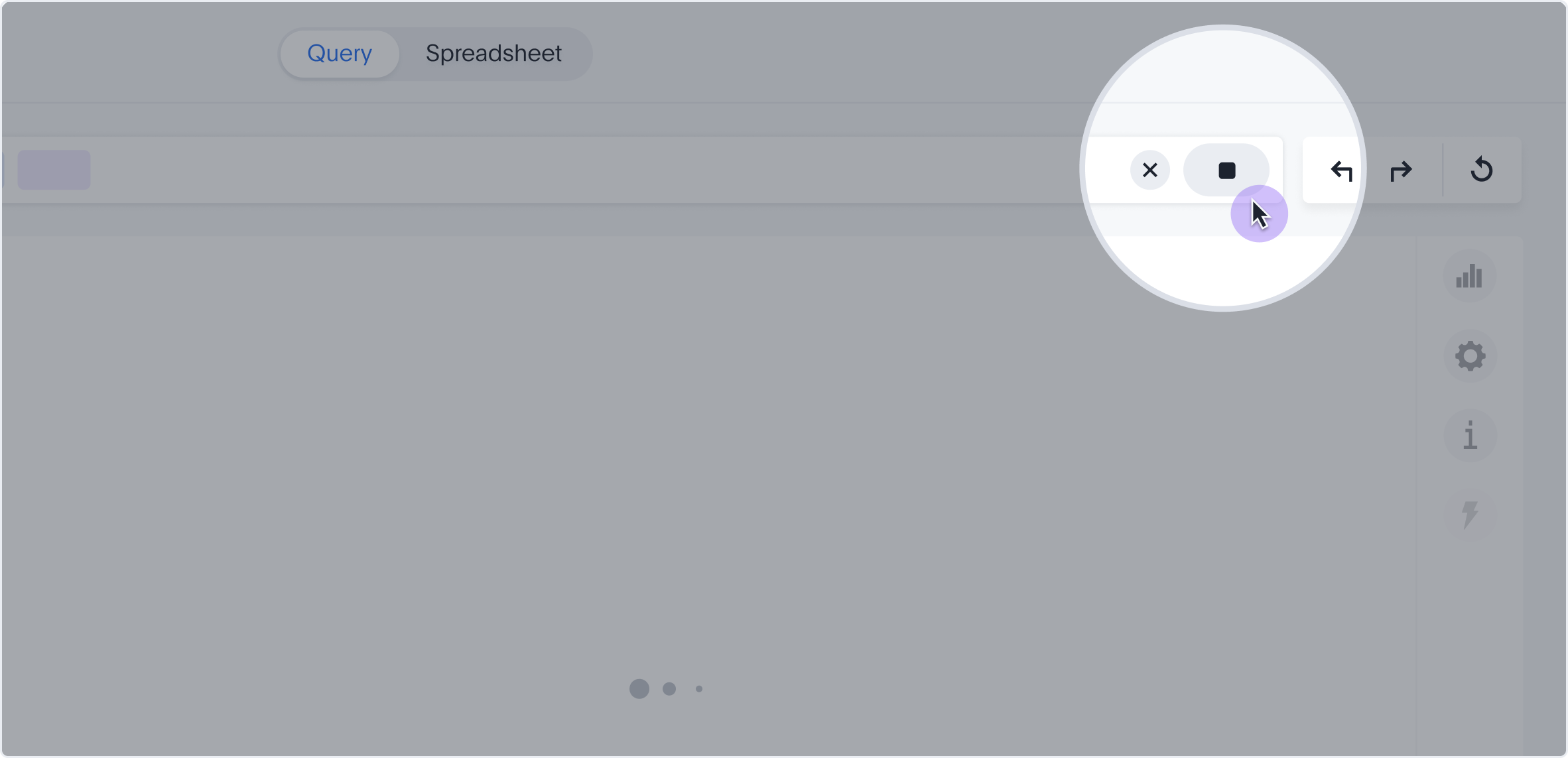
Custom and new charts library performance improvements
In this release, we improve load times for custom charts and charts in the new charts library. Previously, these chart types were only partially cached. ThoughtSpot now fully caches data for custom and Muze charts alongside other chart types, delivering faster and more consistent performance across all visualizations.
Gradient legends for charts
You can now encode a continuous measure, like profit margin or revenue, as a color gradient directly on new bar, scatter, and line charts. Instead of building a separate chart or table to surface a second variable, you can enable a gradient legend on any measure column and optionally set a "Vary by" measure to drive the color scale independently of the displayed value. This makes it faster to spot outliers, patterns, and directional trends at a glance. Hovering over a data point shows the exact value of the Vary by measure in the tooltip. This feature is compatible with the following charts in the new charts library:
-
Column (non-stacked)
-
Bar (non-stacked)
-
Line-column combo (non-stacked)
-
Scatter
-
Bubble
-
Donut
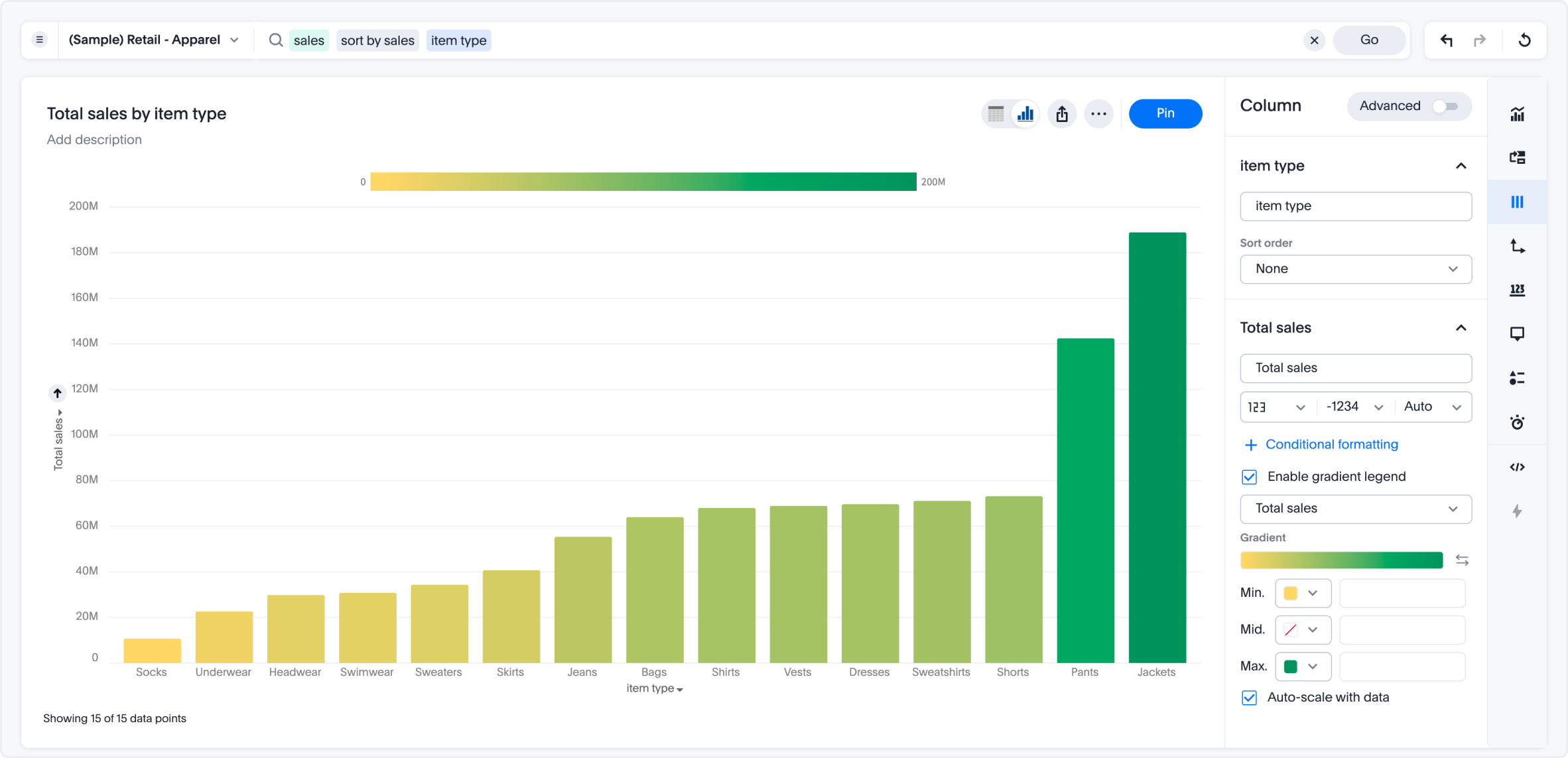
Outline color for chart marks
You can now use data to drive the outline (border) color of chart marks such as bars, arcs, and points. Bind a field to the outline color encoding to automatically generate an ordinal color palette or a continuous gradient, complete with legend and tooltip support. Outline width and dash style remain configurable per data point. Existing outline configurations are fully backward compatible.
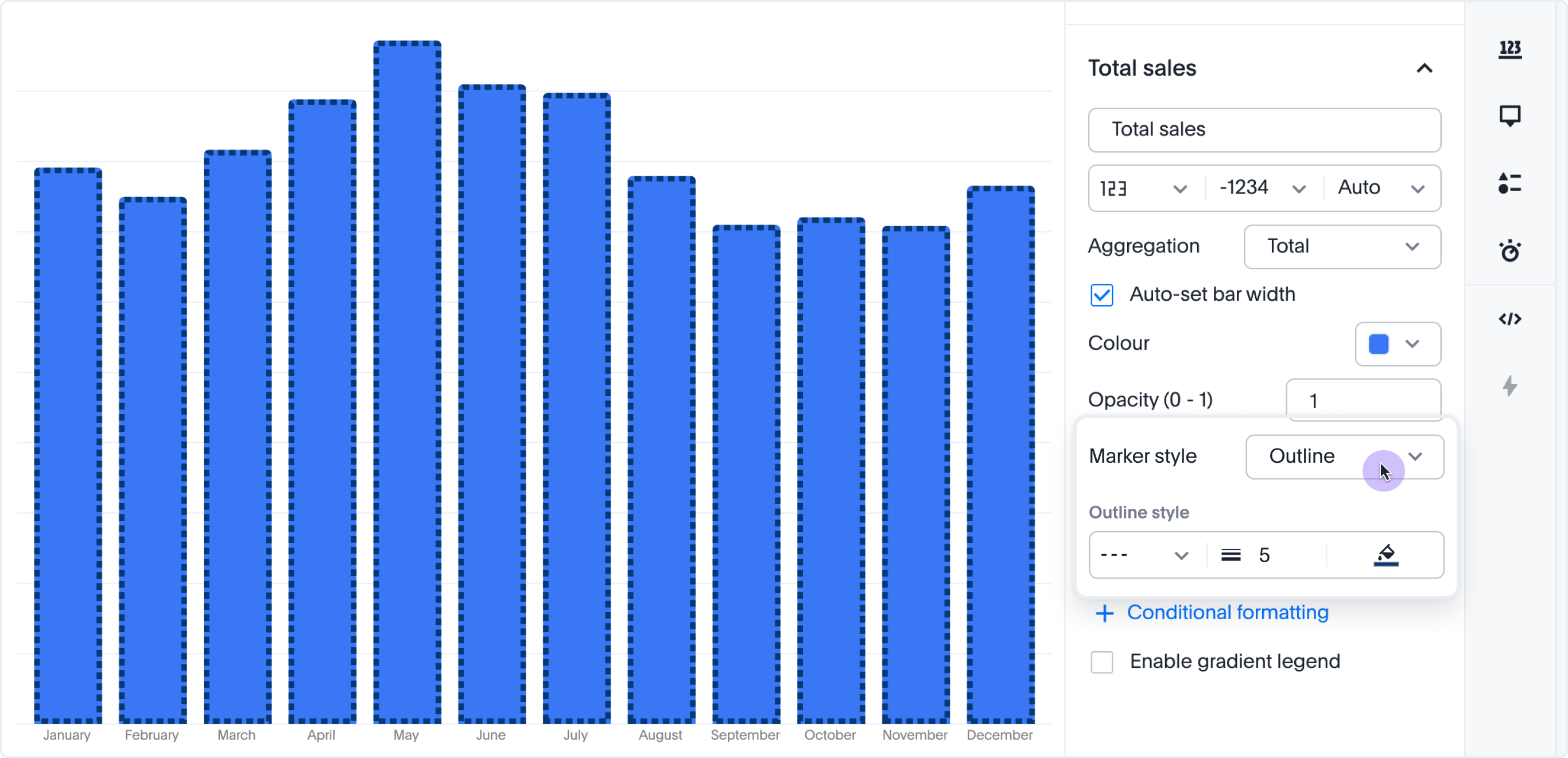
Unified horizontal scrollbar for charts and pivot tables
ThoughtSpot now renders a horizontal scrollbar across all chart types. For pivot tables, this removes the previous row-header column width cap, so attribute labels render at their full natural width instead of being truncated. The scrollbar behavior is consistent across chart types and viewport sizes.
Collections enhancements
ThoughtSpot adds two enhancements to Collections in this release.
-
You can now filter the content in a Collection using column headers, such as Type and Author. The filtering experience is consistent with the Answers and Liveboards list pages.
-
You can now star a Collection to mark it as a priority in your Collections view. Starred Collections stand out in the Collections list so you can quickly find the containers you are actively working in.
Other features and enhancements
Spotter memory GA
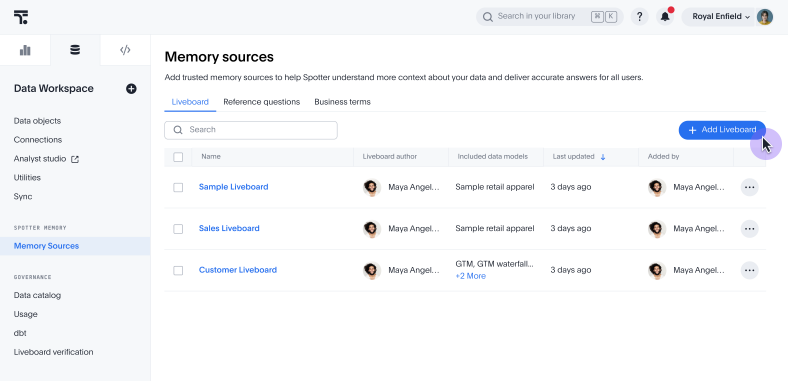
Spotter memory from Liveboards, personal memory, and memory from conversations are now generally available (GA). Additionally, we have added a regenerate option to refresh your memory in the Memory sources page in order to stay in line with changes to underlying Liveboards.
Remember this button in Spotter 3
We have replaced the previous + Add to memory button with a Remember this button. If you click Remember this below a Spotter answer, it triggers a command for Spotter to add the answer’s specifications directly to memory. You see a preview of the exact definitions it adds to conversational memory. Remember this is only supported for Spotter 3.
AI context redesign
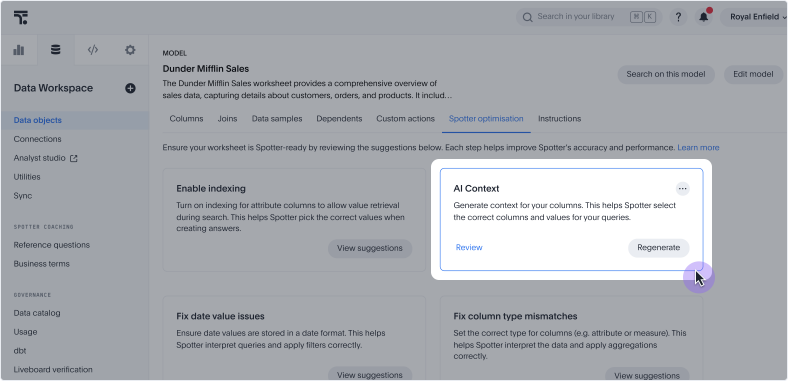
You can now prompt the creation of AI context from the Spotter optimization tab on a Model. Note that you must have edit access to a Model to create AI context. If you enable Spotter on a Model, it triggers AI context generation automatically.
Early Access flag management for cluster admins
Cluster admins can now view and manage Early Access flags that are not Org-aware directly from Admin > Feature Management > Early Access. Previously, these flags were only accessible via CLI and did not appear in the Feature Management UI.
Early Access flags that are not Org-aware appear as On/Off toggles. Toggling a flag applies the change cluster-wide, with no per-Org assignment required. Org-aware Early Access flags are unaffected and retain the existing per-Org assignment experience.
This feature is visible only to cluster admins. Org Admins do not see non-Org-aware flags in Feature Management.
Scheduled Liveboards: dedicated connection configuration
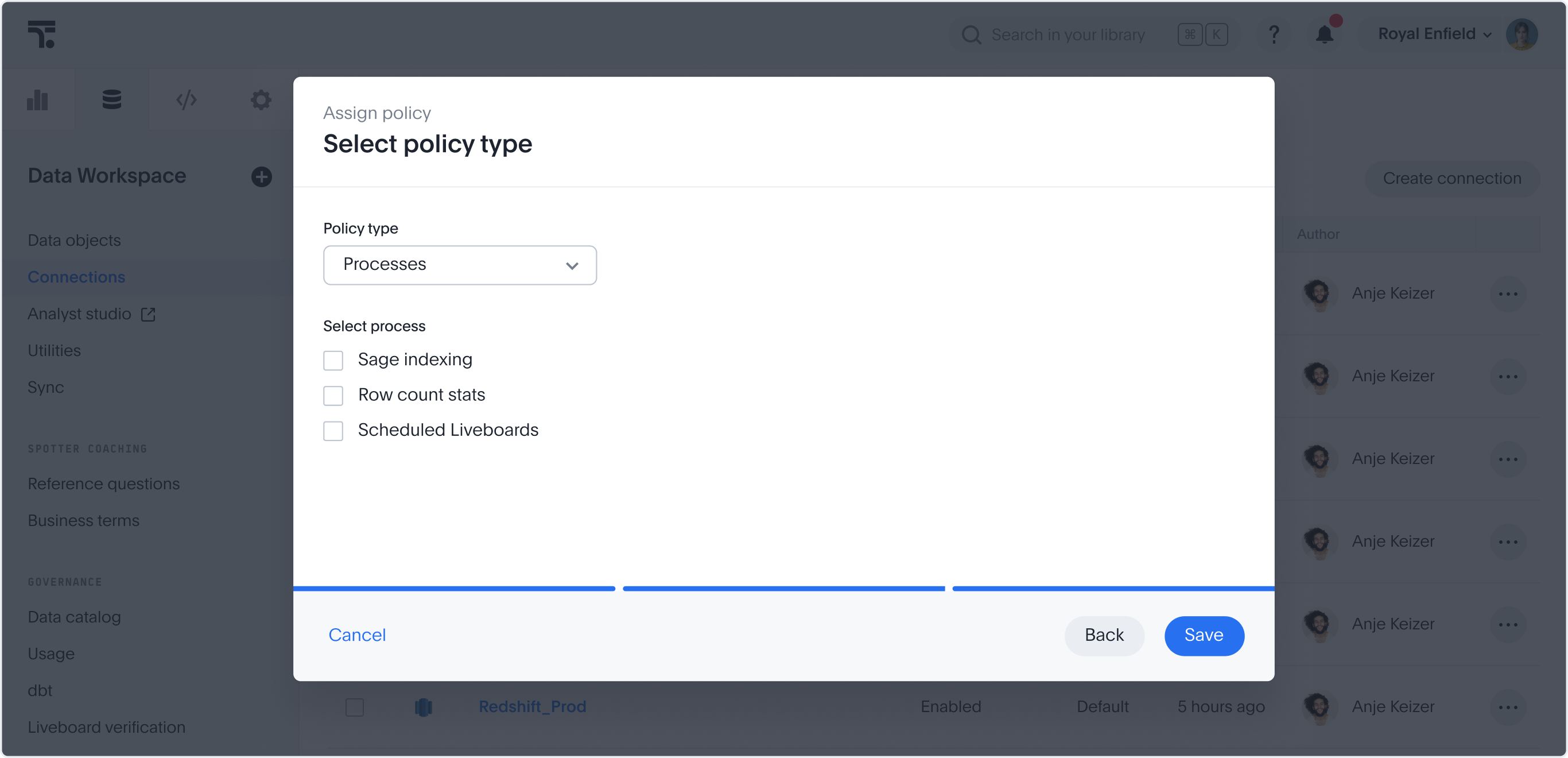
You can now add a Scheduled Liveboards process type to a connection configuration, so scheduled Liveboard queries can use a separate warehouse, credentials, or non-OAuth authentication method instead of the parent connection’s defaults.
Look for the new Scheduled Liveboards checkbox under the Processes policy type in Connection Configuration, alongside the existing Row count stats option.
Supported connectors |
Snowflake, Databricks, Google BigQuery |
Authentication |
Non-OAuth only |
Query routing |
Scheduled Liveboard tasks automatically route to this configuration |
Limits |
One configuration per process type; multiple processes can share a single configuration |
Manage and remove parameterization from the UI
Administrators can now manage and remove parameterization on tables and connections directly from the ThoughtSpot UI. From the Data objects or Connections page, administrators can remove variable bindings from one or more objects or use the new Manage Parameters option to view, edit, add, or remove individual field-to-variable mappings without starting over.
Aggregate-aware query execution GA
Aggregate-aware query execution is now generally available (GA). Search data automatically switches from detailed Models to associated aggregate Models based on query granularity, reducing cloud costs and improving query latency without affecting insight accuracy. For more information, see Aggregate-aware Model switching.
Databricks driver upgrade
We have upgraded the Databricks OSS driver to version 3.4.1.
For the Developer
For new features and enhancements introduced in this release of ThoughtSpot Embedded, see ThoughtSpot Developer Documentation.