What to do after coaching Spotter
To fine-tune Spotter’s understanding of your data, you will want to test and validate its responses after you coach reference questions and business terms. This article documents the steps you should take after coaching Spotter.
Step 1: Retest, validate, and save
Once your reference questions and business terms are in place, you will validate the coaching with comprehensive test queries, test with an internal pilot group for feedback, and refine and finalize your coaching.
Validate with comprehensive test queries
-
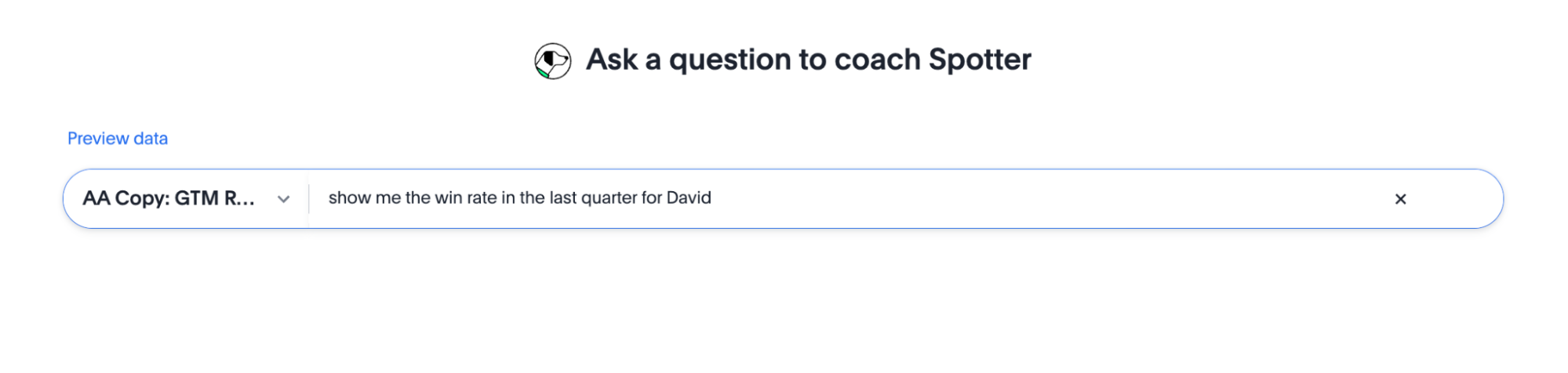
Run various sample questions (a set of test queries defined when you collected real questions and tested Spotter) to check if Spotter applies the logic correctly.
-
Test if the answer is being generated as you expected. For instance, if you coached “win rate” and ask for “win rate this quarter”, check if Spotter correctly applies the formula and adapts to “this quarter”.
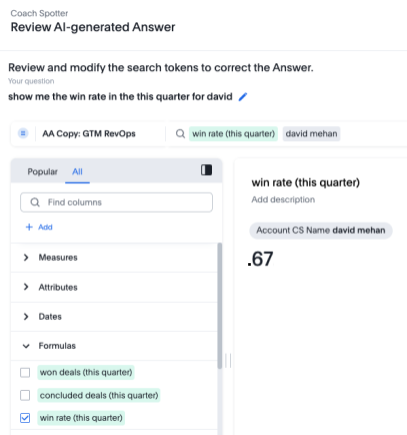
Here, you can see that three formulas (originally defined in the coaching) defined for win rate are automatically getting generated and updated to leverage “this quarter” instead of last quarter, with the correct date column for each.
You can now be more assured of Spotter applying this logic anywhere “win rate” is used, even in follow-up questions or comparisons.
-
Update and fine-tune your decisions based on these tests. If you are testing terms internally and don’t want to impact other user queries, keep it on user level. If you are ready for this to impact all queries on the data model, keep it on global level.
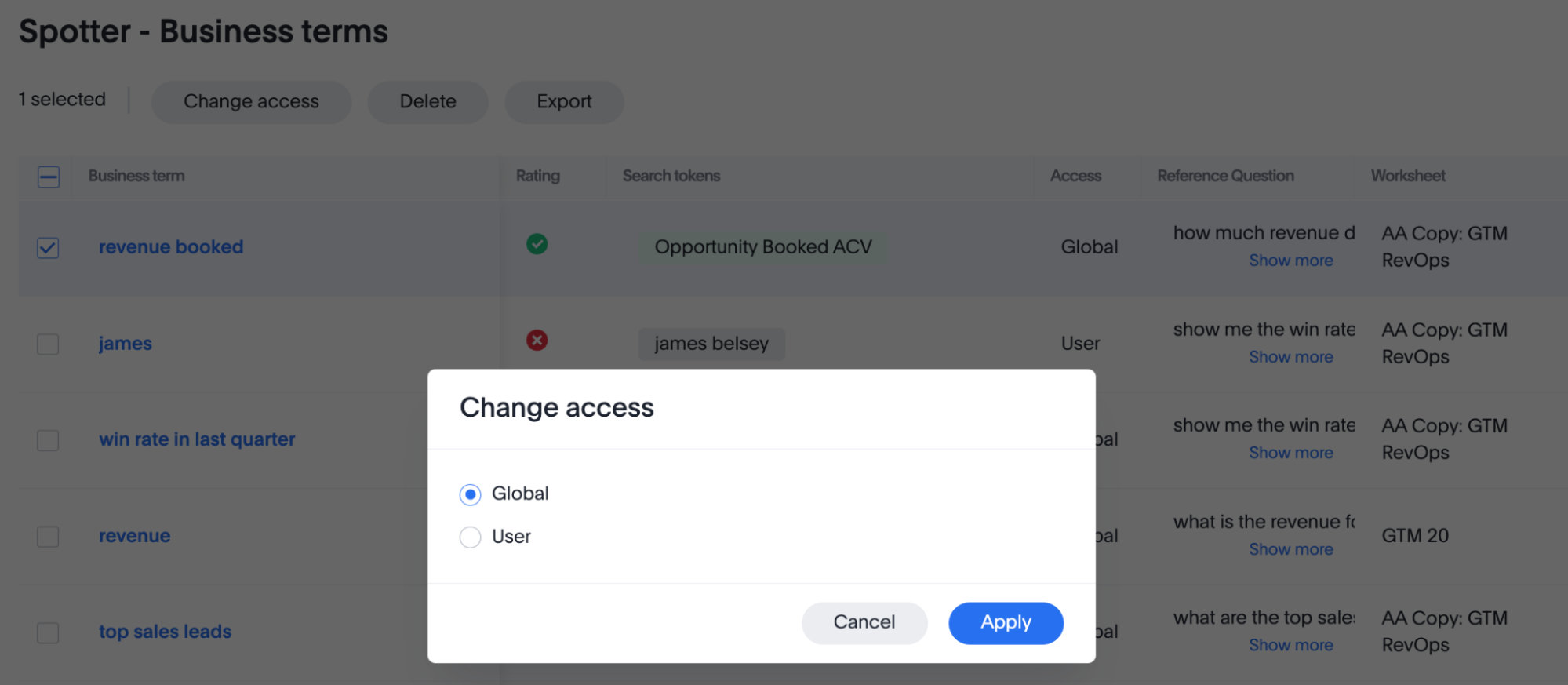
For more information on user and group level coaching, see Understand coaching levels.
Test with an internal pilot group for feedback
-
Engage a select group of internal users (ideally some of the target personas identified earlier or power users familiar with the data) to conduct pilot testing. This group is focused on validating the coaching and Spotter’s performance before it’s finalized.
-
Provide them with access to Spotter with the new coaching.
-
Encourage them to ask their typical business questions.
-
Review the types of questions they ask from the conversation log in the Spotter Conversations Liveboard.
-
Gather the users’ feedback on the accuracy and relevance of answers, ease of getting the information they need, and any confusing responses or unexpected behavior.
| If your selected users do not have Model editing access, their feedback remains on user level, affecting only their queries. |
Note that feedback, or upvoting or downvoting an Answer using the thumbs up and thumbs down icons below the Answer, is only visible to users reviewing the Spotter Conversations Liveboard. Submitting feedback on an Answer does not add coaching to the system, it just adds context to the conversations recorded in the system Liveboard.
Use TML for version control and safe testing
A best practice for safely validating your coaching, especially before a major launch or data model update, is to use the TML import/export feature. This allows you to:
- Achieve version control
-
Regularly export your existing coaching as a TML file. This serves as a backup and a "version" of your coaching that you can roll back to if needed.
- Test in isolation
-
You can create a copy of your data model for testing purposes. Then, use the TML import feature to quickly migrate all your existing coaching to this new, non-production data model.
- Validate changes safely
-
This isolated environment allows you and your internal pilot group to test new coaching, experiment with changes, and validate fixes without impacting the live Spotter experience for your general users.
Refine and finalize coaching
Based on the results from your test queries and the feedback from the internal pilot group, iterate on your coaching.
This may involve:
-
Potentially revisiting the data model if fundamental issues are identified.
-
Enriching metadata by modifying AI context in columns.
-
Adjusting reference questions as per user queries.
-
Modifying business term definitions.
-
Adding new coaching for unanticipated scenarios.
Continue this test-and-refine cycle until you achieve a satisfactory level of accuracy and usability.
Step 2: Prepare for launch
Once your coaching has been thoroughly tested and validated, the next crucial phase is to prepare for a smooth and effective rollout of the coached Spotter experience to your broader community.
- Leverage your pilot group as champions
-
Ask internal users from your pilot testing to act as champions for Spotter. Encourage them to share their positive experiences and assist colleagues, as their advocacy can significantly boost initial adoption.
- Develop and share user resources
-
Create concise user resources like a “Spotter FAQ” or a quick-start guide. Include a list of well-coached example questions relevant to their use cases to help users achieve early success with Spotter.
- Coach business users effectively
-
Conduct focused coaching sessions that teach users how to interact with Spotter for their specific business questions and workflows. Emphasize the importance of verifying the answers Spotter provides. Encourage users to critically assess this information. Instruct them how to provide feedback (by using available rating tools, and noting issues for the coaching team) or try rephrasing their question if an answer seems incorrect.
- Establish clear support channels
-
Clearly define and communicate how end users can get help with Spotter, whether for questions, technical issues, or improvement suggestions.
- Communicate the launch effectively
-
Formally announce Spotter’s availability to the target user groups. Highlight the benefits for their roles, explain how to access Spotter, and point them to coaching resources and support channels. Consider a phased rollout, starting with enthusiastic or high-impact teams.
Completing these preparation steps will significantly enhance the adoption, perceived value, and overall effectiveness of Spotter within your organization, setting the stage for a successful deployment.
Step 3: Launch, monitor, and iterate
Once you’re confident, launch the use case with your end users. Coaching doesn’t stop at launch; ongoing monitoring is key to improving accuracy and adoption.
Roll out Spotter according to your communication plan and monitor how Spotter is being used and how it’s performing. Use the Spotter conversations Liveboard to track key metrics such as:
-
Most common questions asked by users.
-
Perceived accuracy of responses (for example, through upvoted and downvoted answers or other feedback mechanisms).
-
Coverage gaps in your current coaching (that is, questions Spotter struggles with or answers incorrectly).
-
User adoption rates across different teams or personas.
-
Common terms or phrasing used by users that may not yet be part of your coaching.
The insights gained from monitoring, coupled with changes in your business environment, will guide your ongoing efforts to enhance Spotter.
- Usage-driven refinements (proactive and iterative)
-
Identify coaching opportunities by regularly analyzing the data and feedback gathered from monitoring.
| Pay close attention to “downvoted” conversations, queries where Spotter provided no answer, or instances where users rephrased their questions multiple times. These are excellent candidates for new reference questions, business term definitions, or refinements to existing coaching. |
- Event-driven updates (reactive and planned)
-
Beyond continuous usage-based refinement, plan to revisit and update your Spotter coaching in response to specific business or data changes. Key triggers include:
-
New business metrics, KPIs, or important concepts being introduced in your organization.
-
Changes in the definitions or calculation logic of existing metrics or business terms.
-
Significant modifications to your data model, or when new data sources, tables, or critical columns are added that users will want to query via Spotter.
-
Direct user feedback (outside of automated monitoring) that highlights consistent misunderstandings or areas for improvement.
-
Evolution in your overarching business strategy or reporting requirements, necessitating changes in how data is interpreted or presented.
-
| Use TML export for advanced analysis. |
While the Spotter Conversations Liveboard is excellent for monitoring, you can use the TML export functionality to analyze your coaching at scale. By exporting all your coaching (reference questions, business terms, and data model instructions), you can"
- Identify conflicting coaching at scale
-
Use an LLM or other analysis tools on the exported TML file to find contradictory coaching. This helps ensure that at no point are two different things being coached for the same concept, allowing you to rationalize your coaching.
- Analyze column usage
-
You can perform further analysis to see how many columns show up in multiple coaching examples. If a specific column is frequently a part of coaching, it strongly highlights the need to provide clearer AI context for it directly on the data model.
- Find redundancies
-
Identify and remove redundant formulas or similar business terms.
- Validate alignment
-
Share your global data model instructions along with your exported TML to confirm that your specific coaching examples are in line with your global rules.
By establishing a cycle of launching, actively monitoring, and iteratively refining your coaching based on both real-world usage and business evolution, you ensure that Spotter remains an accurate, relevant, and valuable tool.
Step 4: Troubleshoot common coaching scenarios
Even with careful data modeling and dedicated coaching, you might occasionally encounter scenarios where Spotter’s responses aren’t what you expect, or you might have questions about the best coaching approach. This section covers common issues and provides guidance.
| Issue | What to do |
|---|---|
Spotter uses the wrong column or value (for example, pick ship date instead of order date) |
This is a data model foundation problem.
|
Spotter answers incorrectly (for example, the formula is wrong, or the logic is flawed) |
|
A business term isn’t being applied |
Confirm that the exact phrase used in the question matches to the defined business term (for example, “win rate” is not the same as “win_ratio”). |
Conflicting results with slight variation |
You might have duplicate or conflicting coaching examples. For example, your AI context or data model instructions say "Exclude test accounts", but you coached a reference question that forgets to add that filter. Try to remove or clarify context in such situations. If stuck, contact ThoughtSpot Support. |
For more examples on how to refine your coaching, see How many examples and when?


