Browser caching for faster Liveboard loads
Browser caching for Liveboards reduces load times on repeat visits by storing a snapshot of Liveboard data in the user’s browser. When a user revisits a Liveboard, ThoughtSpot serves chart data from that cache instead of re-querying the data warehouse, eliminating the longest part of the wait.
Users can still manually refresh a Liveboard at any time to fetch the latest data. An indicator shows users when their data was last cached, so they always have visibility into the age of the data.
In the background, ThoughtSpot continues to fetch fresh data from the cloud data warehouse (CDW) on every load to update the cache for the next session. This means the cache is always one session behind.
| Cache updates happen in the background and do not affect the current session. |
Once caching is active for a Liveboard, users will notice the following changes:
-
Faster chart rendering on return visits. The data warehouse query is skipped. Charts still take a brief moment to render, but the overall wait is significantly reduced.
-
An indicator showing the timestamp of when the data was last cached. Cached data is at most 24 hours old.
-
A Refresh button that users can click to fetch the latest data from the data warehouse on demand. All existing Liveboard interactions continue to work exactly as before.
| Scheduled Liveboards and downloaded Liveboards always show live data and are never cached. |
| Will enabling caching change how much I’m billed? No. ThoughtSpot still queries the data warehouse in the background on every Liveboard load to refresh the cache for the next visit. Caching improves the user experience without reducing underlying query volume. |
Enable browser caching
Browser caching must be enabled on your cluster by ThoughtSpot support before the Admin Settings toggle is visible.
Enabling browser caching for Liveboards is a two-step process. Cluster administrators must first enable the feature for Org administrators, who can then configure which Liveboards are cached for their respective Orgs.
| When caching is enabled for a Liveboard, ThoughtSpot is authorised to extract data from the CDW and store it in the user’s browser cache on their machine. The data stored in the browser cache is not encrypted. This is only accessible to the user opening the Liveboard in their browser. |
Enable browser caching on your cluster
-
Sign in to ThoughtSpot as a cluster administrator.
-
Go to the Admin Settings tab.
-
Select All Orgs.
-
Under Application Settings select Homepage & App Experiences.
-
Select the toggle to Enable Cache Liveboards for faster loads.
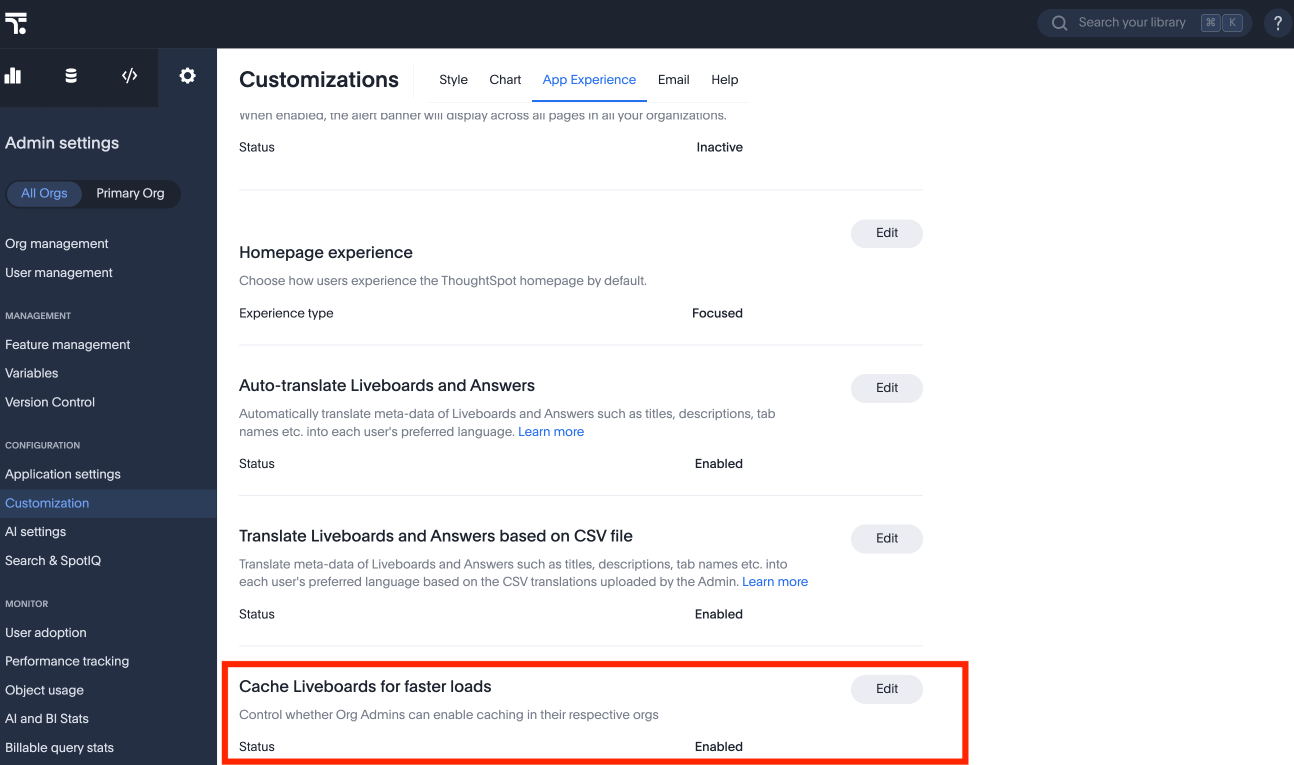
This makes the caching configuration visible to Org administrators across all Orgs. No Liveboards are cached yet at this point.
Configure which Liveboards to cache
-
Sign in to ThoughtSpot as an Org administrator.
-
Go to the Admin Settings tab.
-
Under Application Settings select Homepage & App Experiences.
-
Select the toggle to Enable Cache Liveboards for faster loads.
-
Choose one of the following options:
-
Enable for all Liveboards
Caching is applied across every Liveboard in the Org.
-
Enable for specific Liveboards
Select individual Liveboards to cache. Other Liveboards load normally.
-
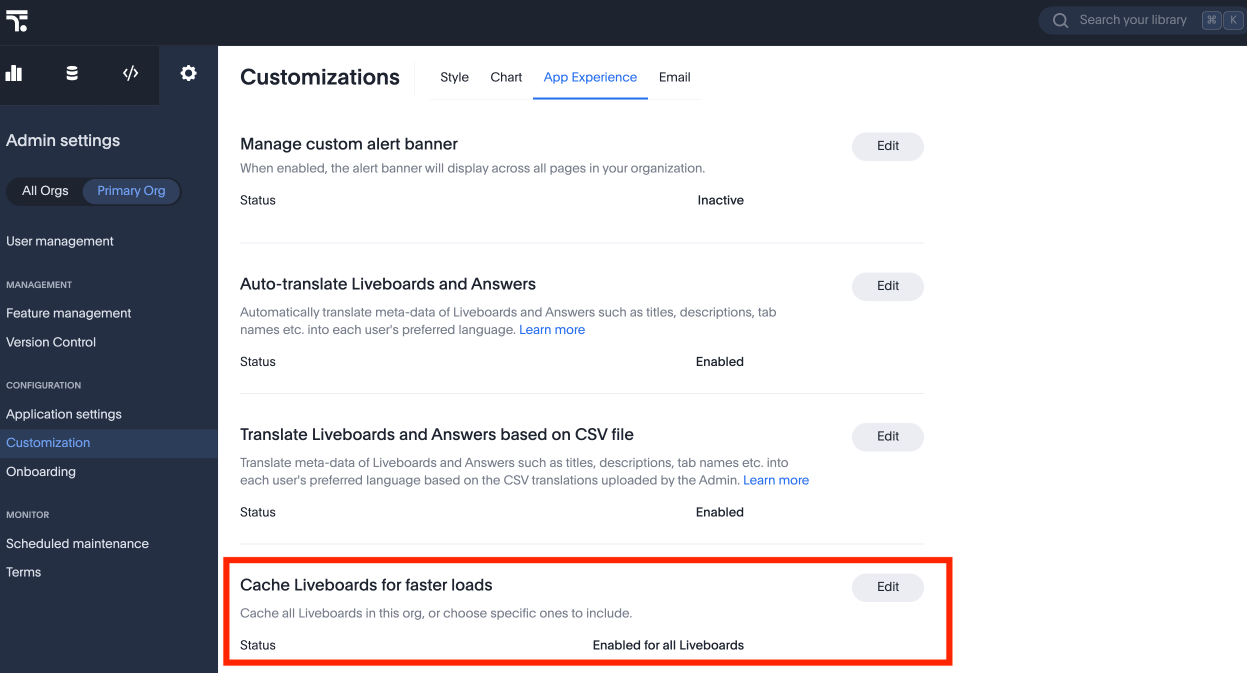
| Administrators can change or disable this configuration at any time. |
Important considerations
Data freshness:
-
Cached data is valid for up to 24 hours (the time-to-live, or TTL). This value is fixed and cannot be configured in the current release.
-
The cache is always one session behind. Every time a user opens a Liveboard, ThoughtSpot fetches fresh data in the background and stores it as the cache for the next visit. The data shown in the current session reflects what was fetched during the previous session.
User-specific cache:
-
The cache is private to each user and stored in their browser only. One user’s cache is not shared with or visible to other users.
Permissions are always enforced:
-
Browser caching never bypasses security rules. All row-level security, column-level security, and access controls are always respected. If a user’s permissions change, the Liveboard reflects those changes on the next load.
Automatic cache invalidation:
-
ThoughtSpot automatically invalidates the cache when any of the following occur:
-
A chart or visualization in the Liveboard is edited.
-
A Liveboard update is saved.
After invalidation, the next Liveboard load fetches fresh data from the data warehouse and rebuilds the cache.
-
Limitations
-
Custom charts and Muze visualizations are not cached in this release. They always load with the latest data from the data warehouse.
-
The cache TTL of 24 hours is not configurable in this release.
Frequently asked questions
-
What happens if a user’s browser storage is full?
ThoughtSpot handles this automatically. If browser storage is low, expired cache entries are cleaned up first. If caching still cannot complete, the Liveboard loads normally from the data warehouse. The user simply does not get the speed benefit for that session.
-
Can I disable caching for a specific Liveboard?
Yes. Org administrators can exclude individual Liveboards from caching, or disable the feature entirely for their Org at any time in Admin Settings.
-
Can I disable caching for a cluster?
Yes. Cluster administrators can disable caching for a cluster at any time in Admin Setting.
-
Does caching affect scheduled Liveboards or PDF downloads?
No. Scheduled Liveboards and downloaded Liveboards always show the latest data fetched directly from the data warehouse.