Date filters for Answers and Liveboards
We have increased the possible range of dates you can use to filter your Answers and Liveboards. Previously, when adding a date using the filter from the side bar, users were limited to the following conditions: On (=) <date>, On or after (>=) <date>, Before (<) <date>, and Between <date> and <date>. Now, we support rolling time windows, as well as fixed date ranges.
Last period and this period
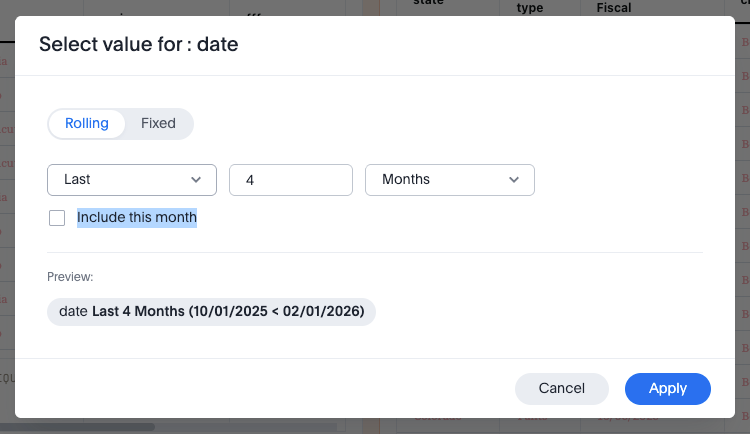
You can now include the current period within a date filter chip, when selecting a rolling date filter. This allows you to define a date range such as "last four months, including this month." This rolling date filters enhancement applies to both Liveboard and Answer filters.
Supported date options for Answers and Liveboards
For a complete list of the date options ThoughtSpot supports for Answers and Liveboards, see the following options:
-
Rolling time windows. Note that in this context, s/m/h/D/W/M/Q/Y means seconds/minutes/hours/days/weeks/months/quarters/years.
-
Yesterday
-
Today
-
Tomorrow
-
This s/m/h/D/W/M/Q/Y
-
Last s/m/h/D/W/M/Q/Y
-
Next s/m/h/D/W/M/Q/Y
-
Before this/last/next s/m/h/D/W/M/Q/Y
-
After this/last/next s/m/h/D/W/M/Q/Y
-
On or after this/last/next s/m/h/D/W/M/Q/Y
-
On or before this/last/next s/m/h/D/W/M/Q/Y
-
Week to date e.g. 05/15/2023 < 05/22/2023
-
Month to date e.g. May
-
Quarter to date e.g. 04/01/2023 < 05/22/2023
-
Year to date e.g. 2023
-
-
Specific calendar dates or date ranges.
-
Is between
-
Is not in between
-
Is on
-
Is not on
-
Is after
-
Is on or after
-
Is before
-
Is on or before
-
In the month and year e.g. Jan 2020
-
In the quarter and year e.g. Q1 2020
-
In the year e.g. 2020
-