Coming soon
The following features are coming in the next release of ThoughtSpot Cloud.
November 2026 26.11.0.cl
Spotter on Liveboards Early Access
You can now open Spotter from a Liveboard, and Spotter is now grounded in the context of that Liveboard — its tabs, visualizations, and the effective filters and time ranges applied to each chart. You can ask questions like "why did revenue drop in Q3?" or "summarize what you see on this Liveboard" and Spotter reads the actual live data behind each visualization to answer, without you having to re-specify your filters or date range. Multi-step tasks — such as building a forecast, running a why analysis, and charting the result — now stay in a single conversation context across Spotter and Liveboard, with each step tracked so long tasks remain on course. To enable this feature, contact ThoughtSpot support.
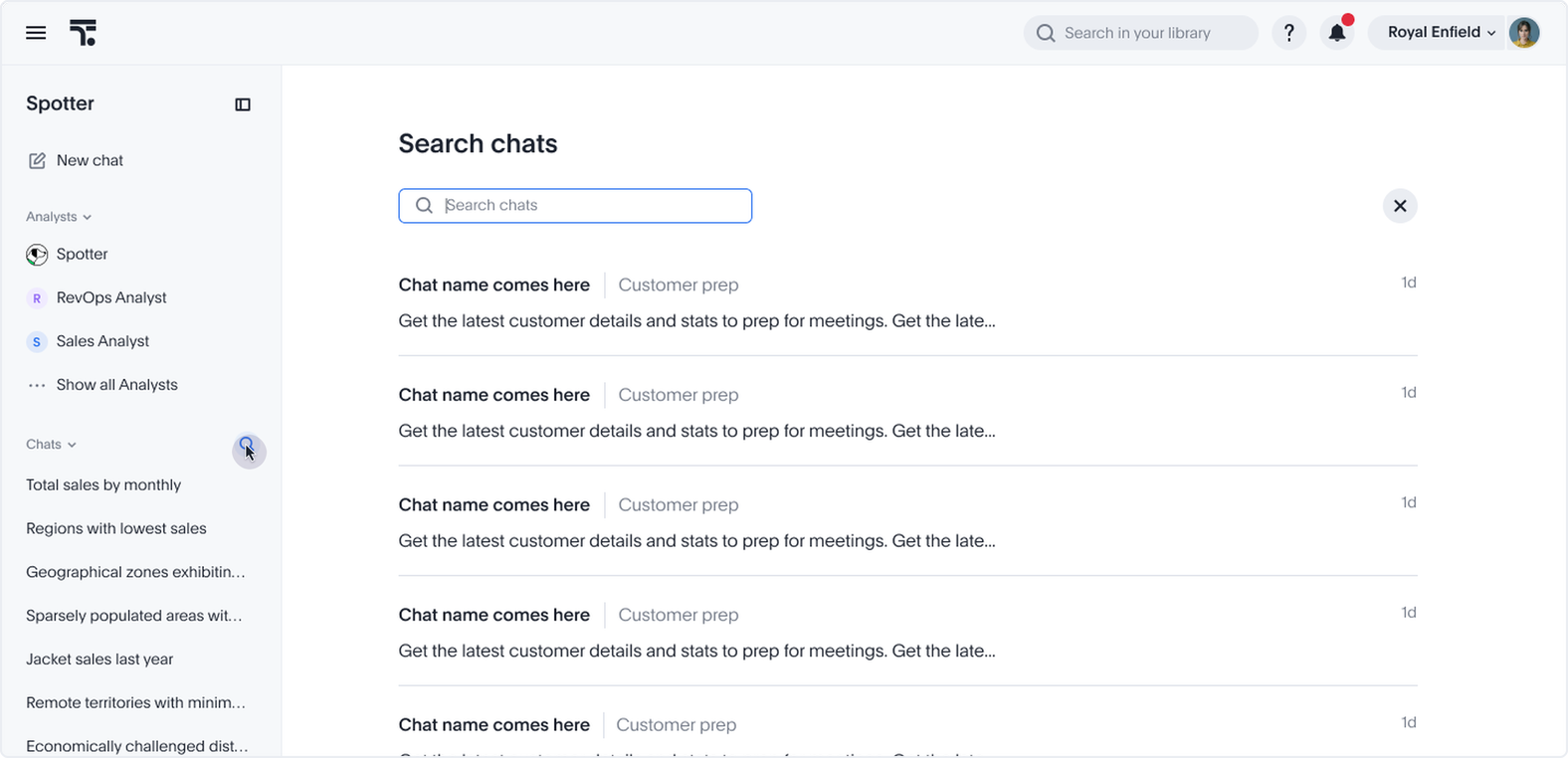
Search your Spotter chats Early Access
You can now search for Spotter chats within the Spotter sidebar, and in the search bar in the top navigation. This makes it easier to find specific chats, and resume a conversation where you left off. To enable these features, contact your administrator.
SpotterViz file upload Early Access
You can now upload a Tableau workbook (.twb, .twbx), or supported file type (.png, .jpg, .jpeg, .gif, .webp, or .pdf) to SpotterViz, and instruct the agent to create a Liveboard based on the file. You can request styling, visualization order, and filters within the SpotterViz interface. To enable this feature, contact your administrator.
Spotter 3 scheduling Early Access
You can now request Spotter to send you scheduled updates on particular answers, without leaving your chat. Simply write, "Send me updates on this answer every Monday," and Spotter will email you updates as requested. To enable this feature, contact your administrator.
Writeback for Spreadsheet Beta
ThoughtSpot Spreadsheet view now supports writeback, allowing analysts to enter and publish data directly to the cloud data warehouse without leaving ThoughtSpot. In Spreadsheet view, you can create input tables alongside your Answer, define key columns to set the grain, and add editable or formula-based columns. Edits are held in session state until you click Publish to Warehouse, ensuring that no unintended writes occur. Published data is immediately available for Search, Liveboards, and Spotter queries. To enable this feature, contact ThoughtSpot support.
Improve portability of personalized Liveboard views GA
You can now migrate personalized Liveboard views between environments, such as from development to production, without losing user customizations. This release introduces:
-
Smart Merge TML import: A new
enable_personalized_view_upsertfield on the existing TML import endpoint (POST /api/rest/2.0/metadata/tml/import) preserves personalized views during Liveboard TML import, instead of overwriting them. -
Ownership metadata in TML: Personalized views now include an
authorblock in TML withusernameanduser_emailattributes, allowing administrators to transfer view ownership during migration.
Emails for failed schedule jobs GA
ThoughtSpot now automatically sends a failure notification email to the Liveboard schedule author whenever a scheduled job fails, eliminating the need for the author to check the run history manually.
Other features and enhancements
Admin panel changes for Spotter on Liveboards GA
ThoughtSpot introduces Spotter on Liveboards — a redesigned Spotter that is available across Liveboards, the Homepage, embedded ThoughtSpot, REST API, MCP, Slack, and Teams from a single toggle. Administrators can choose the experience under Admin > ThoughtSpot AI > Choose Spotter 3 Liveboard Experience. New clusters default to the New experience with Spotter 3 enabled; existing Spotter 3 clusters remain on the Classic experience after upgrading to 26.11 and can switch to New at any time. The Spotter 3 capabilities section now shows only the settings relevant to the active experience, and every setting defaults to enabled on new clusters.
Monitoring for Spotter Early Access
Administrators can now monitor Spotter usage and review conversations from the Spotter settings menu. Two options are available:
-
Monitor metrics: Opens a Spotter usage metrics Liveboard in a new tab.
-
Monitor all chats: Opens a side panel with a searchable, filterable, and sortable list of all Spotter conversations in your organization.
Administrators can preview conversations, download the list as a CSV, and filter by user, agent, data source, date range, and more. Selecting a conversation opens a detailed view of the full message history, tool calls, and execution timings.
To enable Spotter chat monitoring, contact ThoughtSpot support.
Spotter benchmark platform GA
Users with admin or Can manage Spotter privileges can now access a platform to evaluate Spotter’s answers to specific queries for latency and accuracy, from within Spotter. The Benchmark tab allows you to see an overview of past query runs, create your own sample query and specify the correct answer in text or SQL, run those specific queries, and compare the results of selected query runs.
AI Context generation on Model save Early Access
Models now generate AI Context automatically once saved. This includes Models created manually, and those created in SpotterModel. To enable this feature, contact your administrator.
Generate memory from Liveboards in Model GA
You can now access memory generation for Liveboards from the Spotter optimization tab on a Model. Click View added Liveboards to see all Liveboards with current memory on the Memory sources tab.
Writeback for cloud data warehouse GA
ThoughtSpot writeback tables are now generally available (GA).
For more information, see Writeback.
Data Cache for modeled sources GA
ThoughtSpot now supports model-level caching with Data Cache. Data Cache copies frequently queried data from your cloud data warehouse into ThoughtSpot-managed storage, so eligible queries are served from the cache instead of running on your warehouse. This means faster answers and lower warehouse compute costs. Once Data Cache is enabled for your cluster, data model editors can turn on caching for individual Models from the new Caching tab in the Model editor. No SQL changes, TML edits, or manual configuration are required. ThoughtSpot automatically routes queries to the cache when the requested data is available, and falls back to your live warehouse when it isn’t, so results are always correct. To enable this feature, contact ThoughtSpot support.
Publishing tables and views GA
You can now publish, unpublish, and manage publishing for tables and views directly from ThoughtSpot, using the same workflow previously available for Models.
dbt MetricFlow integration - Google BigQuery and Amazon Redshift support Early Access
ThoughtSpot introduces support for Google BigQuery and Amazon Redshift as underlying cloud data warehouses (CDWs) in dbt MetricFlow. To enable this feature, contact your administrator. For more information, see Integrate with dbt MetricFlow.
Snowflake Semantic View integration Early Access
ThoughtSpot now preserves your custom model configuration when you re-sync a Snowflake Semantic View integration, so your column descriptions, formatting, custom calendars, geo configuration, and Spotter optimization settings are no longer overwritten on each sync. ThoughtSpot expands Semantic View coverage to include measures with dimension filters, hierarchies, and parameterized queries, so more of your Snowflake Semantic View definitions map directly into ThoughtSpot Models without manual adjustment. Formula and parameter associations are re-applied automatically after a sync, reducing manual reconciliation after each Snowflake Semantic View update. To enable this feature, contact ThoughtSpot support.
Web URL support for Object ID Early Access
ThoughtSpot now supports custom, human-readable Object IDs (object_id) directly in Web URLs. Instead of relying solely on system-generated GUIDs, you can use stable, readable identifiers to navigate, share, and embed ThoughtSpot assets across environments. Existing GUID-based URLs continue to work unchanged.
To enable this feature, contact ThoughtSpot support.
Handling queries post Org deletion GA
Previously, deleting an Org in ThoughtSpot stopped user-initiated queries immediately, but background processes — including scheduled Liveboard reports, alerts, and search indexing — continued to run warehouse queries against the deleted Org’s connections for up to 7 days during the deletion grace period, resulting in unexpected warehouse spend. ThoughtSpot now stops all warehouse query execution for deleted Orgs immediately at deletion time. Deleted Orgs remain restorable during the grace period; the query block is automatically lifted if an Org is restored.
Language support for Polish, Romanian, Turkish, and Ukrainian GA
We have added language support for Polish, Romanian, Turkish, and Ukrainian.
MySQL driver upgrade GA
We have upgraded the MySQL driver to version 8.4.0.
Snowflake driver upgrade GA
We have upgraded the Snowflake driver to version 4.3.2.
For the Developer
For new features and enhancements introduced in this release of ThoughtSpot Embedded, see ThoughtSpot Developer Documentation.