Understand RBAC and privileges
ThoughtSpot Role-Based Access Control (RBAC) helps an administrator manage roles and privileges that are assigned to users and groups in ThoughtSpot. A role is a collection of privileges. A privilege allows users to perform certain actions while preventing them from performing other actions. RBAC enhances the granularity of permissions that determine the access and capabilities of users and admins.
Roles can be assigned to groups. A group can have one or more roles assigned to it. When multiple roles are assigned to a group, the privileges available to users within that group are a union of the privileges in each role assigned to the group.
|
RBAC will be enabled by default on ThoughtSpot instances in phases, starting with ThoughtSpot Cloud version 26.10.0.cl. To check if your instance has Roles enabled, go to Admin settings > User management > Orgs view. If the Roles tab is visible, RBAC is enabled for your instance. For more information, contact ThoughtSpot support. |
| Once you enable RBAC it cannot be disabled. |
Roles and privileges
A role is a collection of privileges. The role and its assigned privileges list the actions that can be performed, such as Can administer ThoughtSpot or Can upload user data. Roles can be high-level, like Super Admin, or specific based on your organization’s structure and requirements. Roles are configured and then assigned to groups.
ThoughtSpot delivers some standard roles to help you transition to RBAC.
With RBAC is enabled on your instance, administrators can grant granular privileges to implement fine-grained access control to ThoughtSpot features, objects, and metadata. For example, on ThoughtSpot instances without RBAC enabled, members of the groups with administration privileges can view and administer users, groups, and roles. With RBAC enabled, you can assign granular privileges and restrict application-wide access only to super admin users.
| ThoughtSpot privilege (without RBAC enabled) | ThoughtSpot RBAC roles |
|---|---|
Can administer ThoughtSpot Grants administration permissions to manage users and groups on instances that do not have the RBAC feature enabled. |
RBAC allows multiple roles with granular privileges for administration control User administration: Can manage Users Group administration: Can manage Groups Role administrator: Can manage Roles Org administration: Can manage Orgs Authentication administration: Can manage Authentication Application administration: Can manage Application settings |
Previously, administrators were part of the administrator group, and data managers were part of the can manage data group. Members of the groups would have view and edit access to all data. In some organizations these functions are broken out in a more granular way between different users. Roles allow you to assign the specific roles and privileges required without including those that are not needed.
| ThoughtSpot RBAC includes a Super Admin role that includes all of the privileges previously included in the Administrator group to help you migrate to RBAC. Users with this privilege can access all cluster data. This privilege should only be granted in exceptional circumstances. |
Understanding Role Assignment (Without RBAC Roles)
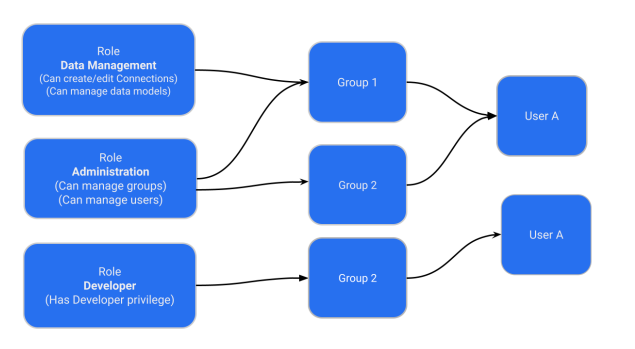
Administrators can create a role with a specific set of privileges and assign this role to a group. Users inherit role privileges from the groups to which they are assigned. To assign a role to a user, administrators must assign the role to a group and ensure that the intended users are added to this group. The following figure illustrates the role and group assignment in ThoughtSpot:
| Roles are unique to an Org and can be created only within the context of an Org. |
RBAC roles
The following are descriptions of each of the RBAC roles.
Administrative privileges
| Role | Description |
|---|---|
Can manage Orgs |
Applicable to ThoughtSpot instances with Orgs. User with Can manage Orgs can create and manage objects, groups and users in their respective Orgs. NOTE: Without RBAC enabled, Can manage Orgs has super admin privileges. With RBAC enabled, this role gives privilege only to perform CRUD operations on Orgs. |
Can manage Users |
Allows administrators and users to create, view, update and delete users. |
Can manage Groups |
Allows administrators and users to create, view, update and delete groups. |
Can manage Roles |
Allows administrators and users to create, view, update and delete roles. |
Can manage Authentication |
Allows administrators and users to manage authentication and the authorization process for ThoughtSpot users. |
Can manage Application settings |
Allows administrators and users to manage cluster-wide application settings, activation and de-activation of feature on an instance. |
Can view System activities |
Allows administrators and users to manage system activities. |
Can view Billing Information |
Allows view access to billing information. |
Can Enable or Disable Trusted Authentication |
Allows users with Super Admin privilege to enable or disable trusted authentication for applications embedding ThoughtSpot content. |
Can manage tags |
Allows administrators and users to create and edit tags. |
Can manage Analyst Studio |
Allows administrators and users to manage Analyst Studio for ThoughtSpot users. |
Object access control privileges
| Role | Description |
|---|---|
Can share with all users |
Allows users to share objects with all the users and groups in ThoughtSpot. |
Data control privileges
| Role | Description |
|---|---|
Can create/edit connections |
Allows administrators and users to add new data connections or edit existing connections to external data warehouses. |
Can manage data models |
Allows users to create, edit, delete and manage Models, Tables, and Views. |
Can manage custom calendars |
Allows users to create, edit, or delete custom calendars. |
Can upload user data |
Allows users to upload data to ThoughtSpot. |
Can administer and bypass RLS |
Allows access to the following operations:
For more information, see Row-level security. |
Application control privileges
| Role | Description |
|---|---|
Has SpotIQ privilege |
Allows access to the SpotIQ feature in ThoughtSpot. |
Has developer privilege |
Allows users to access the following features and workflows:
|
Can schedule for others |
Allows users to create scheduled Liveboard jobs for other users. NOTE: If your cluster has RBAC v2 object-control privileges enabled, the Can administer schedules privilege supersedes Can schedule for others and grants broader org-wide schedule management. |
Can Manage Sync settings |
Allows for set up of secure pipelines to external business apps and syncing of data using ThoughtSpot Sync. |
Can use Spotter |
Allows access to ThoughtSpot Spotter features. |
Can manage catalog |
Allows users to create, edit, and manage a data connection to Alation, and import metadata. |
Can invoke Custom R Analysis |
Allows invoking R scripts to explore search answers and share custom scripts. |
Can verify Liveboard |
Allows Liveboard users to verify Liveboard access requests and mark a Liveboard as verified. |
Can create Liveboards Early Access |
Allows users to create, copy, edit, save, delete, and rename Liveboards; pin Answers to Liveboards; rename pinned Answers; request Liveboard verification; and export, edit, update, and import Liveboard TML. When this privilege is revoked, the Create Liveboard button is hidden and all Liveboard edit options in the Liveboard header are hidden. This privilege cannot be assigned to a role unless the role also includes Can create Answers. |
Can create Answers Early Access |
Allows users to access Search Data; create, save, copy, and delete Answers; create formulas, parameters, query sets, and cohorts; save Answers as Views; use custom actions; and export, edit, update, and import Answer TML. When this privilege is revoked, Search Data is hidden from navigation, the search bar is disabled, and all Answer creation and editing options are hidden. |
Can analyze data Early Access |
Allows users to use Explore, Drill Down, AI Highlights, Change Analysis, and Show Underlying Data (including editing columns within it). When this privilege is revoked, all analysis options are hidden from Answers and Liveboards. |
Can administer schedules Early Access |
Grants CRUD access over all schedules in the Org, not just those the user created. Users with this privilege can also view all recipients, override download-format restrictions within schedule contexts, and supersede the "Can schedule for others" privilege. Self-service scheduling of a user’s own schedules is not affected by this privilege — all users retain it by default regardless. |
Can use Analyst Studio |
Allows access to Analyst Studio features. |
Can manage version control |
Allows users to connect Git branches to ThoughtSpot for version control. |
Data download control privileges
ThoughtSpot’s granular download privileges improves data security controls. You can assign download privileges for visual downloads (PDF/PNG) or data exports (XLSX/CSV) separately. These download privileges are respected for scheduling.
| Role | Description |
|---|---|
Can download visuals |
Allows users to download visual downloads (PDFs of the Liveboard or PNG files), including images from Spotter Answer cards. |
Can download detailed data |
Allows users to download data exports (XLSX, CSV, or PDFs of table Answers), including CSV files from Spotter. Spotter PDF reports also require Can download visuals. |
| Users who previously did not have download privileges will not be assigned the new download privileges. Administrators can assign them manually. Users who previously had download privileges will automatically be assigned both new privileges. |
| If a user without download privileges previously created a schedule, and they are not granted the new download privileges, the schedule will be paused automatically. |
Can Download Visuals coverage:
-
PDF downloads for Liveboard
-
PNG downloads for:
-
Pinned Answer if it is a chart
-
Saved/unsaved individual Answer if it is a chart
-
Explore Modal if it is a chart
-
Change Analysis Modal if it is a table
-
Spotter Answer if it is a table
-
-
PDF and PNG schedules for Liveboard
-
Report and schedule public APIs. For more information, see ThoughtSpot Developer Documentation.
Can Download Detailed Data coverage:
-
XLSX and CSV downloads for:
-
Liveboard
-
Pinned Answer
-
Saved/unsaved individual Answer
-
Explore Modal
-
Change Analysis Modal
-
Spotter Answer
-
[CSV only] Show Underlying Data
-
-
PDF downloads for:
-
Pinned Answer if it is a table
-
Saved/unsaved individual Answer if it is a table
-
Explore Modal if it is a table
-
Change Analysis Modal if it is a table
-
Spotter Answer if it is a table
-
-
XLSX and CSV schedules for Liveboard
-
Report and schedule public APIs. For more information, see ThoughtSpot Developer Documentation.
Migrating to RBAC
ThoughtSpot delivers roles corresponding to each privilege previously available as part of the existing groups. Existing groups are retained. When migrating, for each existing group privilege, a new role is created with the corresponding privileges assigned, and the existing groups are mapped to the corresponding new role.
For example, where an existing cluster has a group GroupA with privilege Has Developer Privilege, when RBAC is enabled, a role is created _Developer that has all granular privileges representing Has Developer Privilege assigned and GroupA has the _Developer role assigned.
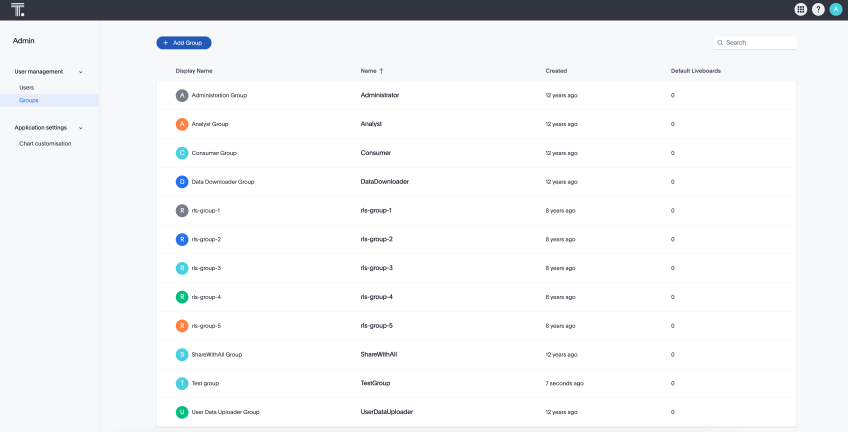
The following image shows how Groups appear in the UI:
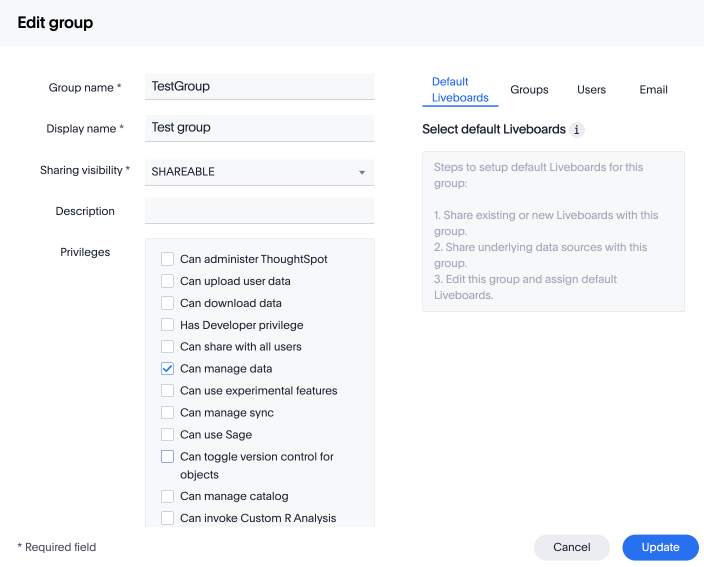
Without RBAC enabled, you will see the following privileges:
With RBAC enabled, you will see the following privileges:
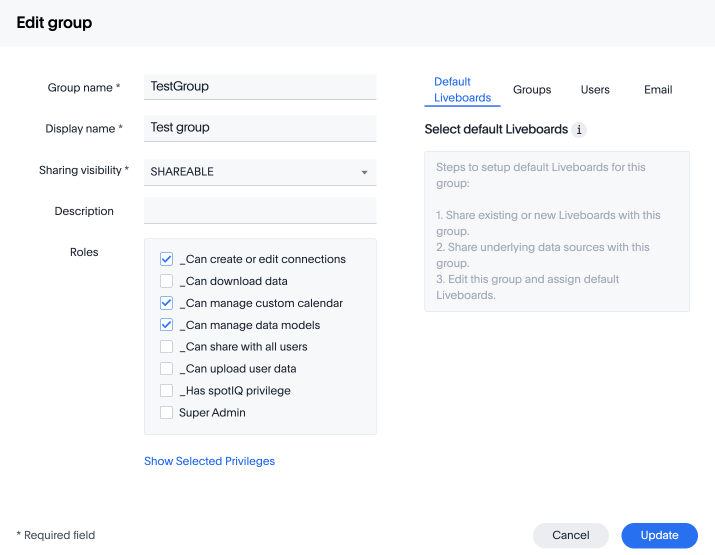
| There are no changes made to the existing privileges. Existing privileges are mapped to roles which are assigned to the new granular privileges which make up the old monolithic privilege. |
Create, edit, or delete a role
ThoughtSpot has customizable RBAC management for assigning privileges to roles. Before adding users to groups, you can create custom roles if necessary and assign them to groups. Each role includes a set of privileges for its users.
Create a role
To create a role, follow these steps:
-
Go to the Admin settings tab.
-
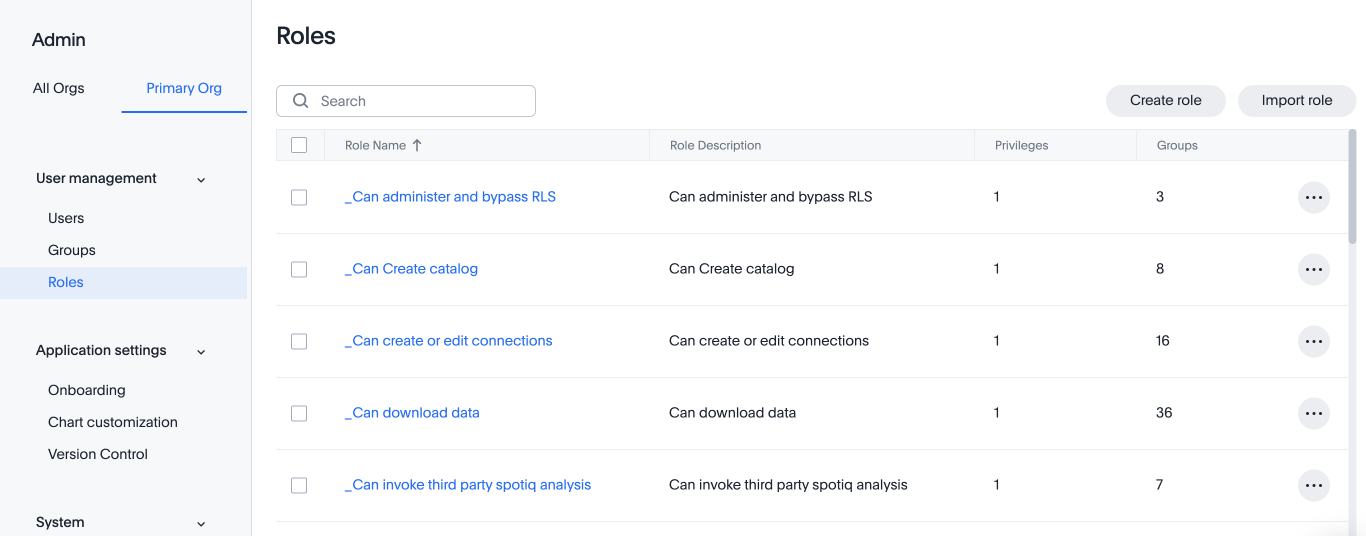
Select Roles from the User management section in the side navigation bar.
-
Select the Create role button on the right side of the screen.
-
In the Create role modal, enter the details for the new role:
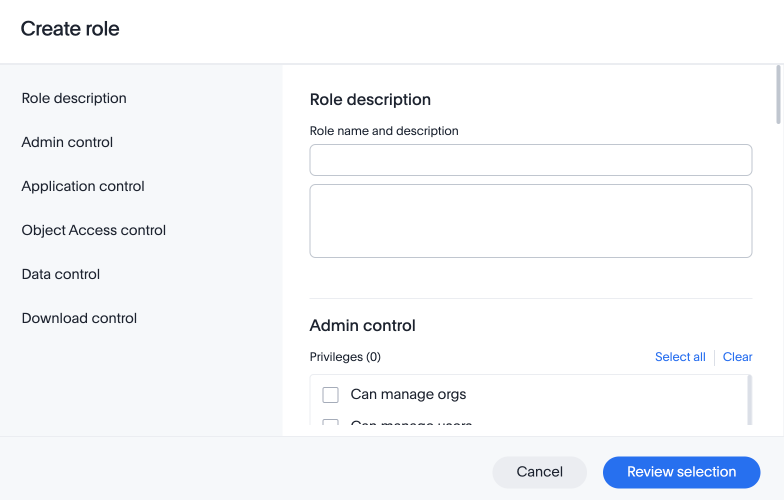
- Role name
-
Enter a unique name for the role.
- Role description
-
Optionally, enter a description.
- Privileges
-
Check the privileges you want to grant to the role.
The granular privileges provided by ThoughtSpot are grouped. For example privileges related to data management are grouped under Data Control. The controls and associated privileges are listed in the modal. Users can either scroll down to access each one, or click on the relevant section title on the left side to access the desired group and associated privileges.
-
Click Review selection to continue.
-
Review your selections, and click Save to create the new role.
If you give a new role a role name which is the same as that of an existing role, you will see and error about the duplication of role with a suggestion to change the role name when you click Save. 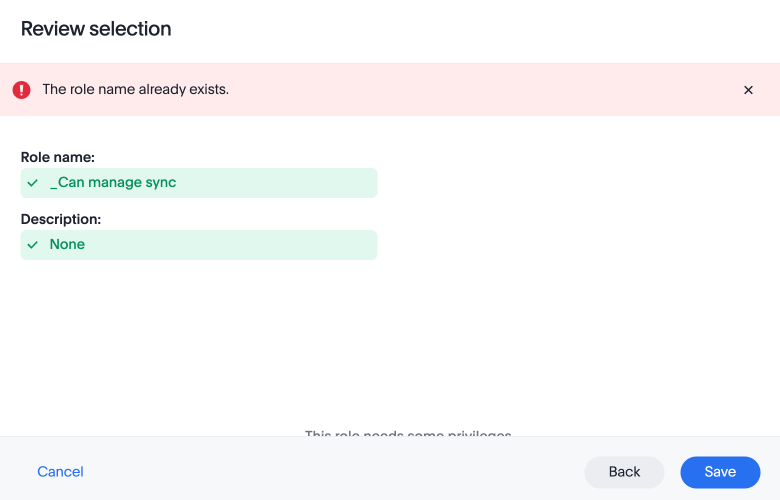
Edit a role
To edit a role, follow these steps:
-
Go to the Admin settings tab.
-
Select Roles from the User management section in the side navigation bar.
-
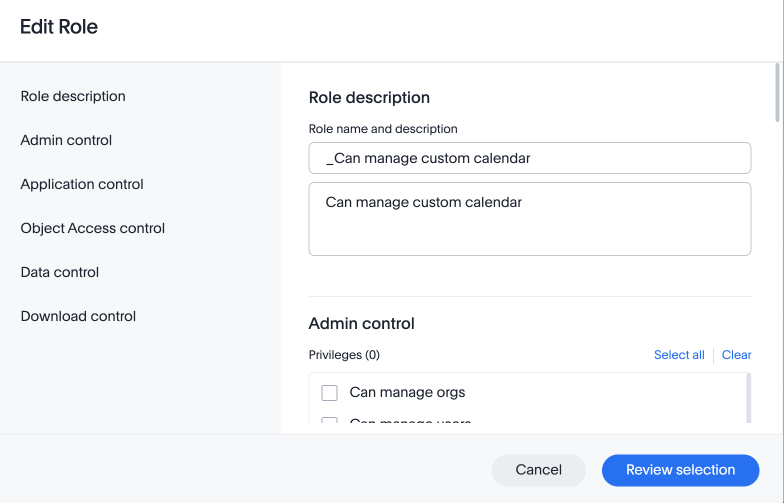
Click on a role name, or click More options and select Edit to edit the role.
-
In the Edit role modal, make your desired changes.
-
Click Review selection to continue.
-
Review your changes, and click Save.
Delete a role
To delete a role, follow these steps:
-
Go to the Admin settings tab.
-
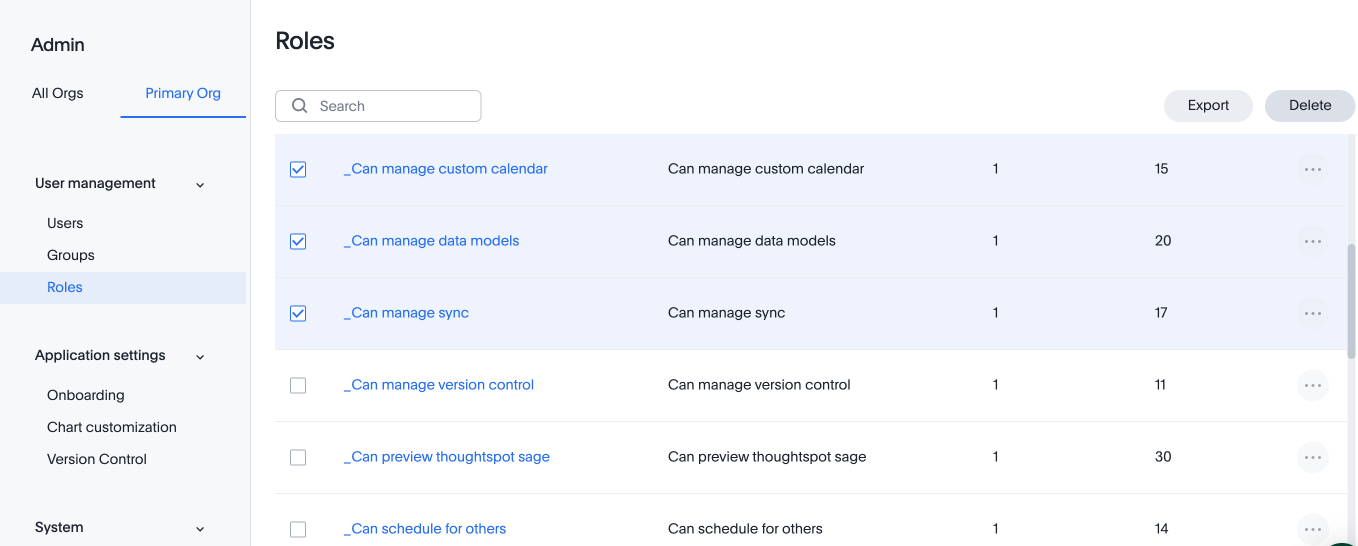
Select Roles from the User management section in the side navigation bar.
-
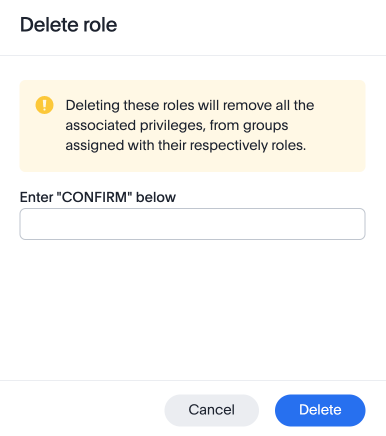
To delete multiple roles at the same time, select the checkboxes next to the role names and click the Delete button.
-
Type CONFIRM and click Delete to delete.
Assign roles to groups
Once you have created roles, you can assign them to groups to manage privileges for your users. For more information about assigning roles to groups, see Understand groups and privileges Create, edit, or delete a group.
You can now import and export users, groups, and roles using TML. Use this feature to facilitate migration from cluster to cluster or org to org. You can use this feature to migrate complex user configurations from ThoughtSpot Pro to ThoughtSpot Essentials while minimizing errors and redundancy.
| Import and export of roles is only applicable to clusters with RBAC enabled. |
Export a role using TML
To export a role using TML, do the following:
-
Go to the Admin settings tab.
-
Select Roles from the User management section in the side navigation bar.
-
From the More options menu, select Export.
-
Alternatively, you can select multiple roles by selecting the checkbox next to the roles you want to export and click the Export button.
The selected roles are exported as a TML file.
Import a role using TML
To import a role using TML, do the following:
-
Go to the Admin settings tab.
-
Select Roles from the User management section in the side navigation bar.
-
Click the Import role button.
-
On the Import role page, select the .tml file for the role that you want to import.
-
On the Import page, select the role that you want to import and click the Import button.
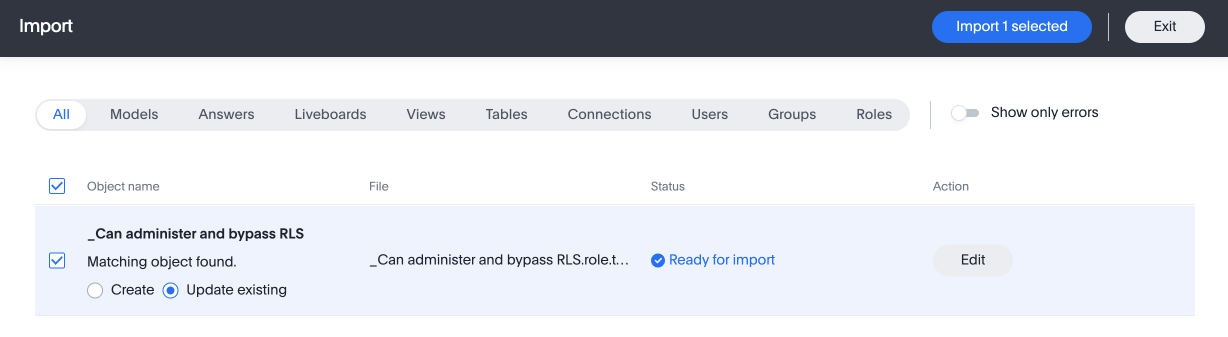
The Import Status page appears with the status of your import.
We highly recommend that you register for the following free courses in ThoughtSpot University that cover the information in this article, and watch the following lessons:
User & Group Management course: Watch the Group and Role Management lesson.
Permissions course: Watch the What is RBAC? lesson.
Multi-Tenancy with Orgs course: Watch the RBAC with Orgs lesson.
See other training resources at ThoughtSpot University.

