Coming soon
The following features are coming on May 7 in the next release of ThoughtSpot Cloud.
May 2026 26.5.0.cl
SpotterViz Early Access
ThoughtSpot can now automatically create Liveboards based on your prompts, populating them with relevant visualizations and KPIs. In response to your prompt, ThoughtSpot evaluates available data sources, creates visualizations, and lays out the information for you. After creating a Liveboard, you can enter more prompts in SpotterViz at any time to revise and refine it. To enable this feature, contact your administrator.
About your cluster
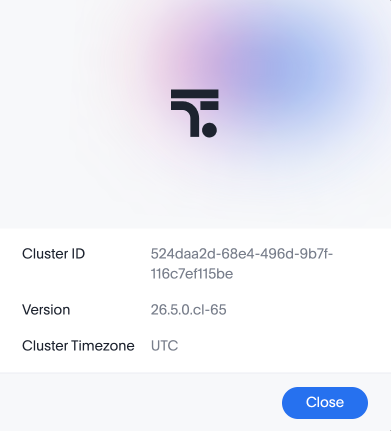
The new About menu item in the Help menu is now generally available (GA). This feature allows you to see the Cluster ID, Version, and Cluster Timezone for your cluster.
Edit an Answer in a Liveboard
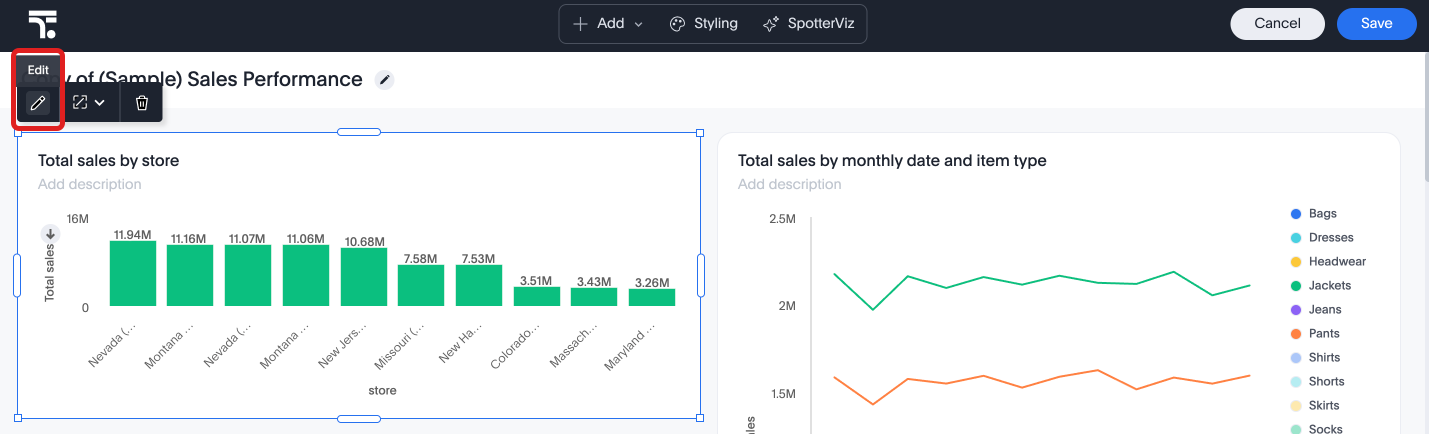
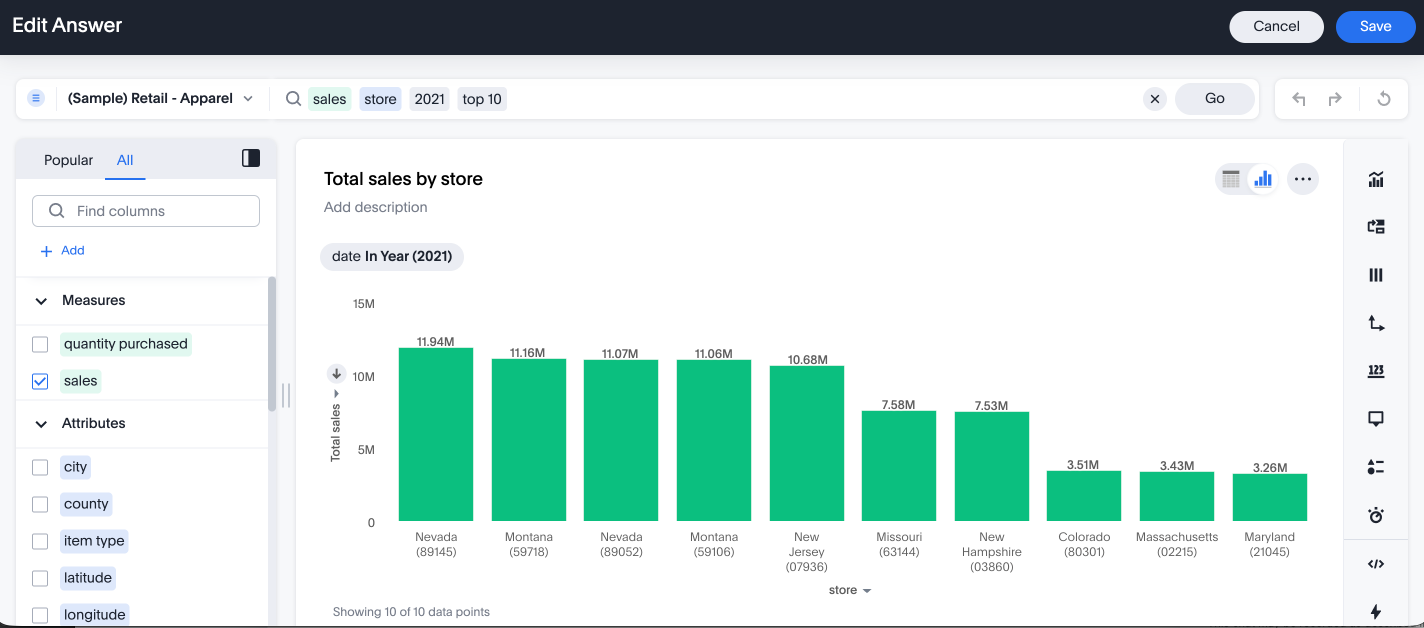
Editing an Answer in a Liveboard is now generally available (GA). This feature adds an Edit button to the Answer toolbar in a Liveboard in edit mode. Click Edit  to open the Edit Answer page, where you can modify columns, filters, and formulas. You can save or cancel changes without leaving the Liveboard.
KPI chart settings
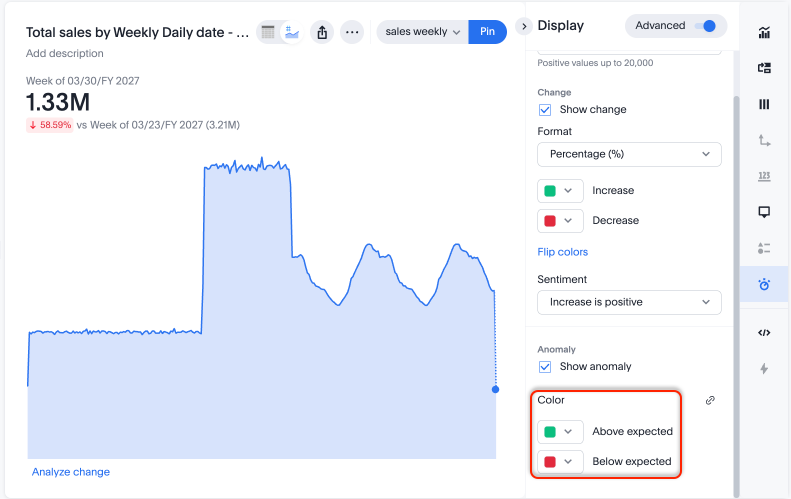
ThoughtSpot introduces more granular controls for KPI charts. You can now:
-
Set different colors for anomalies, indicating whether they are above or below the expected value.
-
Choose to display null data as 'zero' or 'no data found'.
Collections
Collections are now generally available (GA). Collections in ThoughtSpot are organizational containers that can group and manage different ThoughtSpot objects into nested hierarchies similar to folders on a computer. These objects can be Liveboards, Answers, data models, tables, and even other Collections. Collections help with content organization, curated and structured content sharing, and collaboration. Additionally, you can assign different levels of access permissions for users you share your Collections with.
TML support for Collections
You can now use ThoughtSpot Modeling Language (TML) to export Collections along with their hierarchy. Additionally, you can import Collections into new environments while retaining their complete folder structure.
Customizable home page announcement
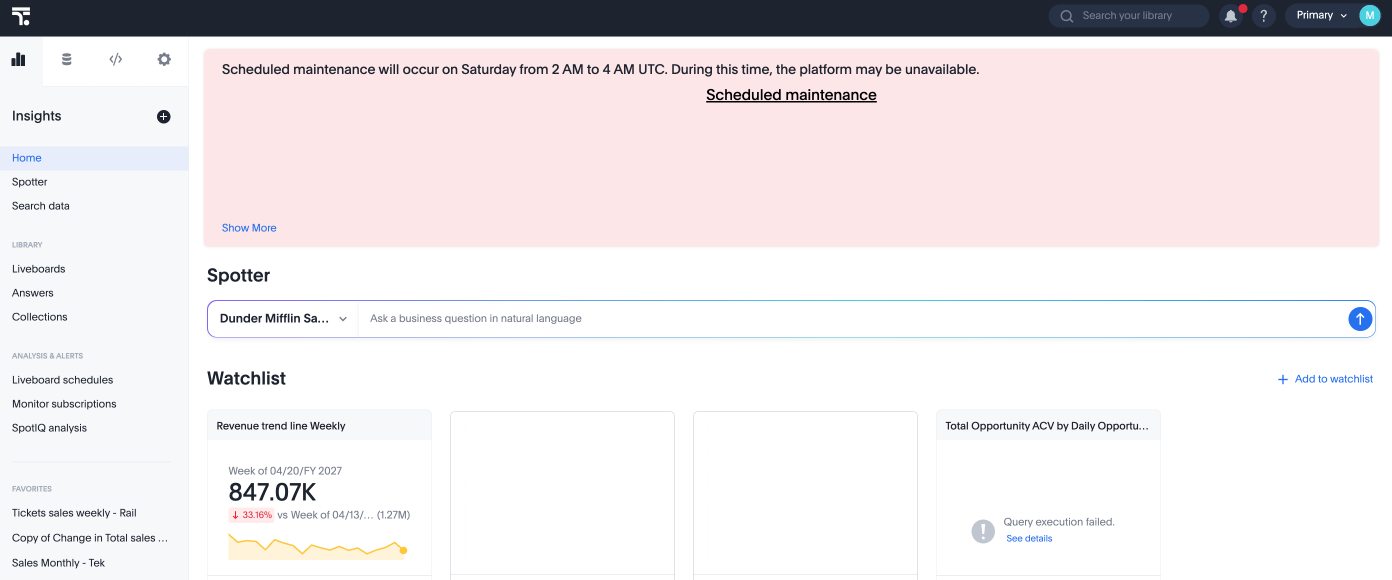
ThoughtSpot introduces the option to add a custom note tile to the home page where administrators can communicate important information, such as scheduled maintenance or new features to their users. This feature is generally available (GA).
Continuous Liveboard PDF experience
The continuous Liveboard PDF experience is now generally available (GA). This feature eliminates page breaks and preserves the layout of the original Liveboard, ensuring the exported PDF remains true to the on-screen experience.
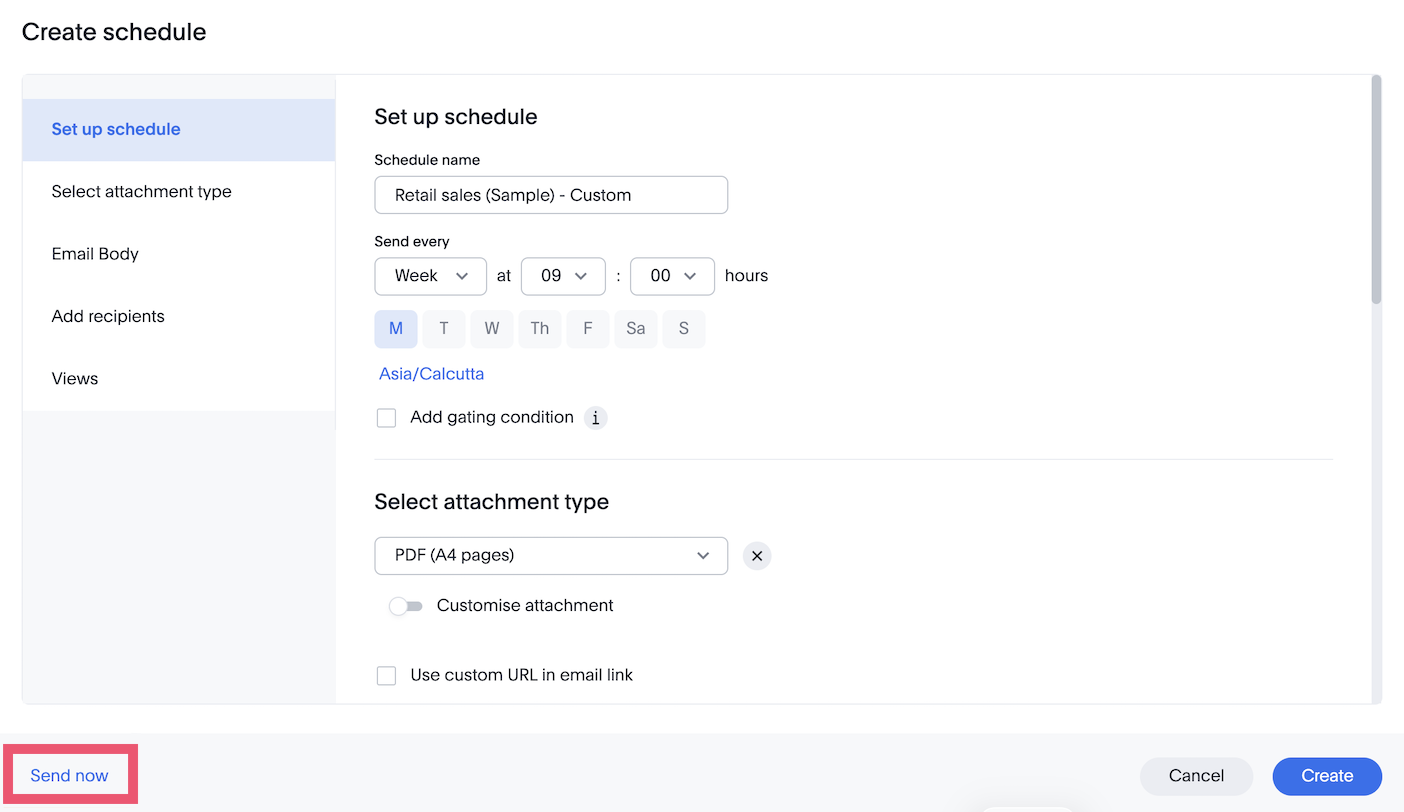
Send now option in scheduling Early Access
You can now send Liveboard schedule emails immediately. Unlike recurring schedules, you can now trigger immediate delivery for a one-time email or send an existing schedule instantly without altering its cadence. To enable this feature, contact your administrator.
Other features and enhancements
Spotter Memory Early Access
Spotter can now build its own memory to improve answer quality over time. Memory can be generated in two ways:
- Learn from conversation
-
If you have coaching access, anything you ask Spotter to remember is saved as a rule and applied to future sessions. For example, telling Spotter that "active users" means users with at least three sessions.
- Learn from Liveboard
-
Generate memory from your trusted Liveboards, capturing the business rules and query patterns behind your visualisations.
To enable this feature, contact your administrator.
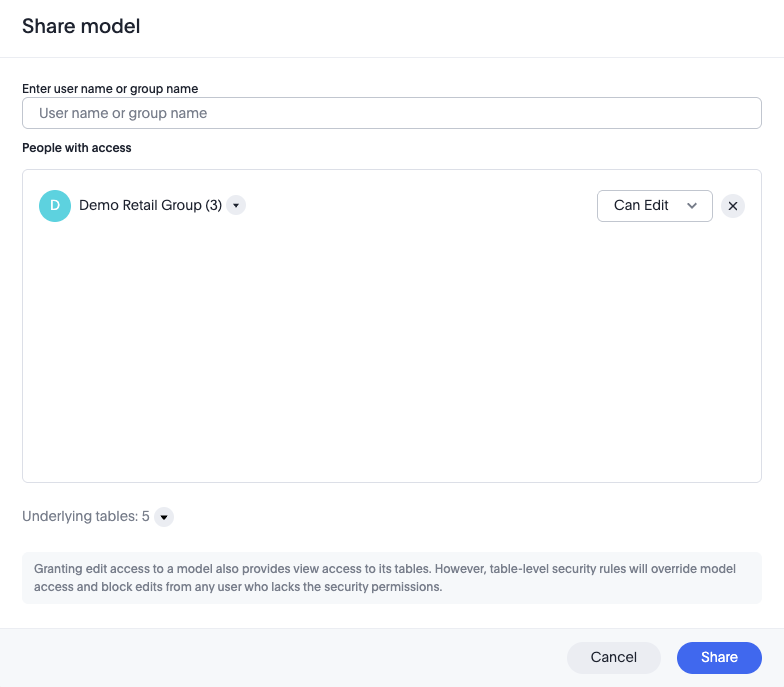
Model sharing enhancement Early Access
The Model sharing enhancement is now Early Access. When you share a Model with Edit access, the system automatically grants View access to all underlying tables and Views referenced by that Model. This eliminates the need to manually share access to dependent objects, significantly reducing the effort required to manage permissions and ensuring a smoother sharing experience. To enable this feature, contact your administrator.
For more information, see Share Models.
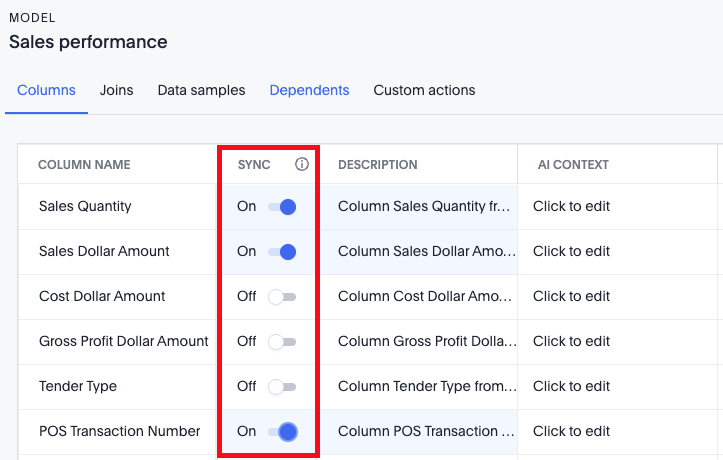
Column property sync Early Access
Column property sync is now Early Access. You can now keep parts of a Model in sync with their underlying tables. Previously, column properties were not automatically synchronized with the same columns at the Model level. As a result, the link for some column properties could break when the tables used for the Model were updated. If there were multiple Models on the same table, for changes like renaming a column or updating a description, you would have to go into each Model and update the values individually. To enable this feature, contact your administrator.
For more information, see Model column property sync.
Login Activity Tracking
ThoughtSpot now has a new data model, Login Activity Tracking, to capture login activity of the users for their ThoughtSpot instance. Administrators can leverage this data model to build custom monitoring Liveboards, providing visibility into login timestamps, success rates, and additional session details.
Publishing workflow
Publishing from the primary Org is now generally available (GA). Publishing allows you to create an object in the Primary Org and publish it directly to target Orgs without generating duplicate copies. You can also unpublish objects across Orgs.
For more information, see Publishing objects between Orgs.
Snowflake Semantic Views integration Early Access
ThoughtSpot introduces Snowflake semantic integration. This allows you to import external semantic model definitions from Snowflake Semantic Views that are then converted into fully functional, native ThoughtSpot Models. This eliminates the need to manually recreate Models and ensures consistency. To enable this feature, contact your administrator.
dbt MetricFlow integration Early Access
ThoughtSpot introduces support for ratio metrics in dbt MetricFlow that allow you to import semantic definitions like formulas, measures, dimensions, and metrics from dbt. This eliminates the need to maintain separate models in dbt and ThoughtSpot. For more information, see Integrate with dbt.
Row-level security support in explore workflow filters
ThoughtSpot now support for row-level security in explore workflow filters is now generally available (GA). Search suggestions continue to leverage the index functionality.
For Analyst Studio
ThoughtSpot Analyst Studio user and group sync
ThoughtSpot has improved how users and groups are synced between ThoughtSpot and Analyst Studio. The following improvements are included to help you to administer and secure Analyst Studio:
-
When a new Analyst Studio Workspace is created, users and groups in the linked ThoughtSpot Org are created in Analyst Studio.
-
Users and groups created in ThoughtSpot are also created in Analyst Studio.
-
Analyst Studio privileges are determined based on the privileges available to the user in ThoughtSpot.
-
User group membership in ThoughtSpot is accurately reflected in Analyst Studio as well.
-
If a group is deleted from ThoughtSpot, the group is also deleted from the Analyst Studio Workspace.
-
If a user is deleted from ThoughtSpot or loses access to Analyst Studio, the corresponding Analyst Studio user also loses access to the Analyst Studio Workspace.
Dataset rename and deletion sync
Datasets from Analyst Studio that you rename or delete in ThoughtSpot are now renamed or deleted in Analyst Studio. If you rename a Dataset in Analyst Studio, the name changes in ThoughtSpot. If you attempt to delete an Analyst Studio Dataset with dependent objects (Answers, Liveboards) in ThoughtSpot, you see a message warning you not to delete.
For the Developer
For new features and enhancements introduced in this release of ThoughtSpot Embedded, see ThoughtSpot Developer Documentation.