Coming soon
The following features are coming on April 1st in the next release of ThoughtSpot Cloud:
April 2026 26.4.0.cl
AI auto-translation for Liveboards and Answers
We now support locale-specific translations for all written text on saved Answers and Liveboards, including downloaded and scheduled PDFs, and downloaded PNGs of visualizations. Translations are matched with the locale chosen in the user profile. Note that admins must enable AI auto-translation for your instance.
Pivot tables in Liveboard exports Early Access
ThoughtSpot introduces support for exporting pivot tables in XLSX format. This feature ensures that pivot tables retain their full visual formatting and structural integrity when exported as XLSX files from a Liveboard. To enable this feature, contact your administrator. NOTE: This features does not apply to individual Answer downloads.
Other features and enhancements
SpotterModel Beta
You can now use SpotterModel to generate comprehensive, optimized Models ready to use in your analysis. SpotterModel automates table selection, join creation, and column selection, while allowing you to review and customize each step.
Spotter connector permissions
Spotter asks for permission before using integrated tools like Slack or Confluence in a conversation, specifying exactly which action it will take and the tool it will use. You can choose to allow once, allow in the current conversation, or deny. This allows you full control of Spotter’s actions.
Deactivate a Connection
You can now deactivate Connections directly within ThoughtSpot, suspending all activity on that Connection until it’s re-enabled.
Variables
Variables are now generally available (GA). ThoughtSpot introduces variables to allow you to substitute values for specific properties of an object and enable dynamic data propagation across Orgs in ThoughtSpot. You can create variables of the following types: table mapping, connection property, and formula variable. In addition, you can delete, search, edit, and rename the variables. Note that you can create variables in ThoughtSpot, or by using APIs. If you are using APIs, you can also create connection property per principle variables. For more information, see Custom variables.
Formula variables
Formula variables are now generally available (GA). Formula variables can be of any data type that ThoughtSpot supports, and can be associated with a single value or list of values. Formula variables created in the primary Org can be shared with other Orgs. A formula variable created in a non-primary Org is only visible in that Org. For more information, see Formula variables.
Column property sync Beta
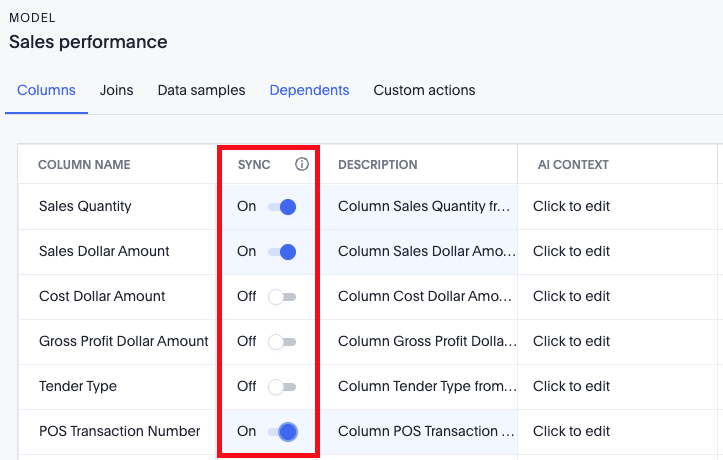
ThoughtSpot now allows you to choose whether you want to keep parts of a Model in sync with the underlying tables in the cloud data warehouse (CDW). Previously, as tables from the CDW were updated with new information from the CDW, it would cause the link for some column properties from the table to the Model to break. If there were multiple Models on the same table, for changes like renaming a column or updating a description, you would have to go into each Model and update the values individually. To enable this feature, contact ThoughtSpot Support.
Answer-level Sets Early Access
ThoughtSpot introduces Sets at the Answer level to answer query-on-query questions by generating and consuming Query Sets within a single Answer flow. Users with edit permissions on an Answer can view and modify the associated Sets.
| These Sets are Answer-specific and only saved if the Answer object is saved. |
To enable this feature, contact your administrator.
Non-equi join modeling support Beta
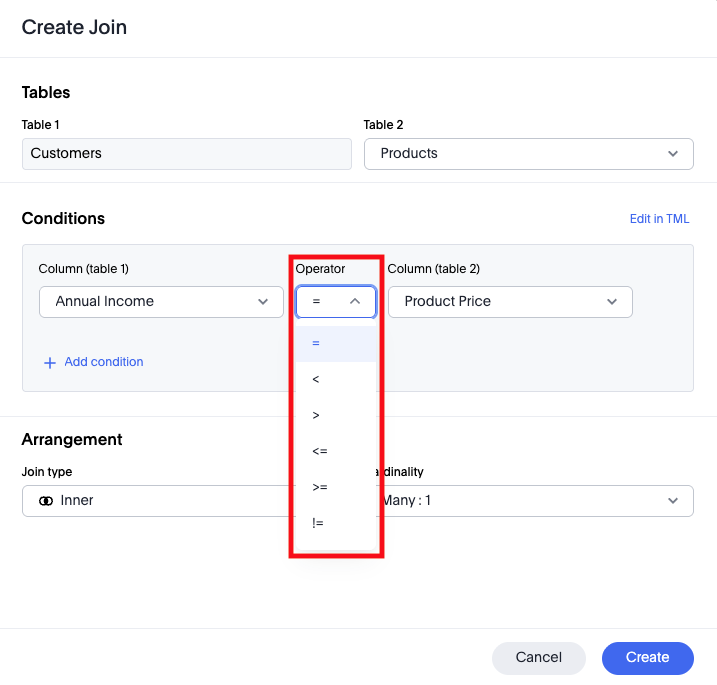
In this release, we add support for non-equi joins when modeling in the ThoughtSpot UI which reduces modeling time. Up to now, only equi (=) joins were supported in the UI, which limited modeling flexibility. Beginning in this release, you can use the following non-equi joins in the UI: <, >, <=, >=, and !=. To enable this feature, contact ThoughtSpot Support.
Support removal of logo from emails
Customers can now hide the header logo in ThoughtSpot notification emails, eliminating the need to upload a placeholder image.
Aggregate-aware Model switching Beta
ThoughtSpot introduces aggregate-aware query execution. This is a transparent query optimization feature where Search Data automatically switches from detailed Models to associated aggregate Models. This provides a mechanism to manage and reduce cloud costs and improve query latency while maintaining insight accuracy.
Aliasing dimension and fact tables in Models
Aliasing dimension and fact tables is now generally available (GA). Previously, table aliases were only supported for role-playing dimensions, or when a single physical dimension is referenced multiple times in a fact table, with each reference linking to a logically distinct role for the dimension. Now, we support table aliases for chasm trap models, and aliasing the primary fact table. Note that data security (row-level and column-level security) applies to the aliased table as well as the original table. We also now support progressive filters for table aliases.
For more information, see Role-playing dimensions.
Link parameters across Models
Linking parameters across Models is now generally available (GA), and enabled by default for all users. Liveboard creators can link parameters of the same type across multiple different Models. This reduces the repetitive effort required for Liveboard users to individually set identical parameters for each Model.
For more information, see Link parameters across Models.
Suggestion settings column
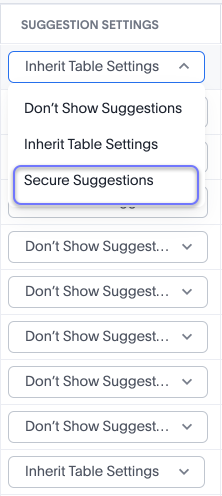
Suggestion settings are now generally available (GA). We have added the Suggestion Settings column to Models. This is used in conjunction with row-level security to ensure that values displayed in sample values and Spotter flows are secured.
Where columns require that strict row-level security is applied to sample values and Spotter, then set the Suggestion Settings column as Secure Suggestions.
For more information, see Suggestion settings.
Skip indexing large tables
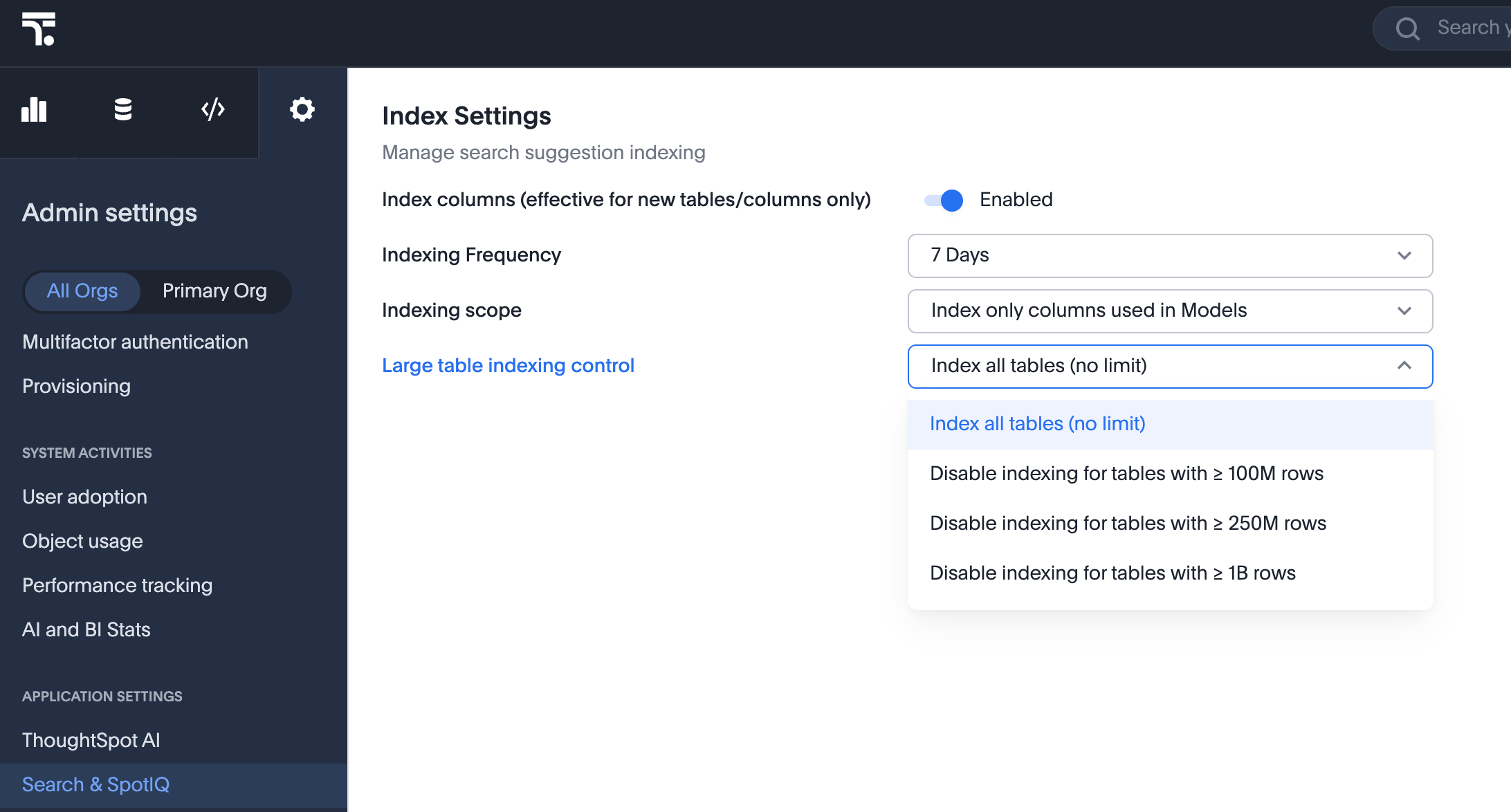
Admin users can now specify to skip indexing for tables of a certain size. By default, ThoughtSpot does not set a limit on the size of tables it indexes. You can choose to Index all tables, Disable indexing for tables with ≥ 100M rows, Disable indexing for tables with ≥ 250M rows, or Disable indexing for tables it ≥ 1B rows.
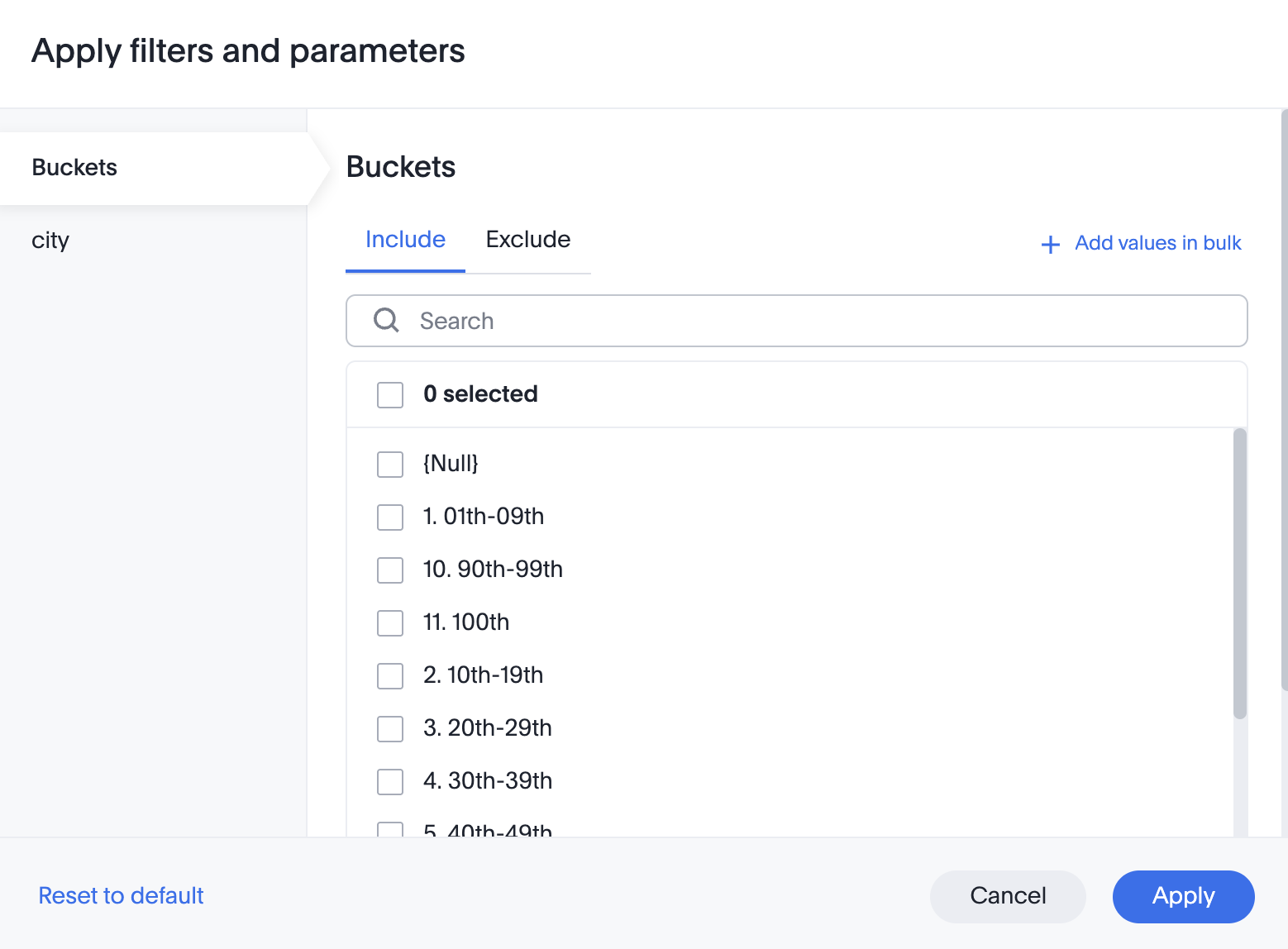
Centralized filter window Early Access
You can now adjust multiple Liveboard filters together in a single, centralized filter window. Instead of changing and applying each filter separately and reloading the page, you can combine your changes and apply them together.
dbt MetricFlow support
ThoughtSpot introduces support for dbt MetricFlow that allows you to import semantic definitions like formulas, measures, dimensions, and metrics from dbt. This eliminates the need to maintain separate models in dbt and ThoughtSpot.
Row-level security variable TS_WILDCARD enhancement
You can now set variables in row-level security as TS_WILDCARD_ALL, which grants access to the data, and TS_WILDCARD_NONE, which denies access. Previously, ThoughtSpot only supported the TS_WILDCARD_ALL designation, and you had to set the variable as a value or list of values to control access.
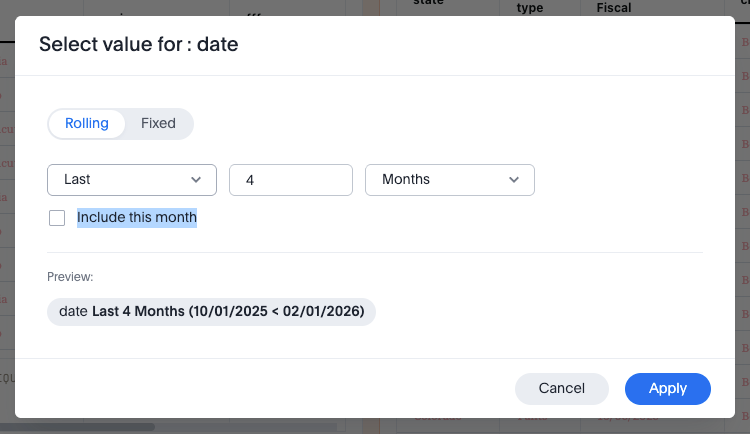
Rolling date filters: last period and this period Early Access
You can now include the current period within a date filter chip, when selecting a rolling date filter. This allows you to define a date range such as "last two months, including this month." This rolling date filters enhancement applies to both Liveboard and Answer filters.
Add object to Collections from list pages
You can now add objects to Collections directly from your Answers, Liveboards, and Data list pages by clicking Add to Collection at the top of the list page. This eliminates the need to go to the Collections page for adding an object to a Collection.
For the Developer
For new features and enhancements introduced in this release of ThoughtSpot Embedded, see ThoughtSpot Developer Documentation.