Coming soon
The following features are coming in the next release of ThoughtSpot Cloud
June 2026 26.6.0.cl
Spotter 3 general availabilitySpotter 3 is generally available (GA) starting in the 26.6.0.cl release and is enabled by default. 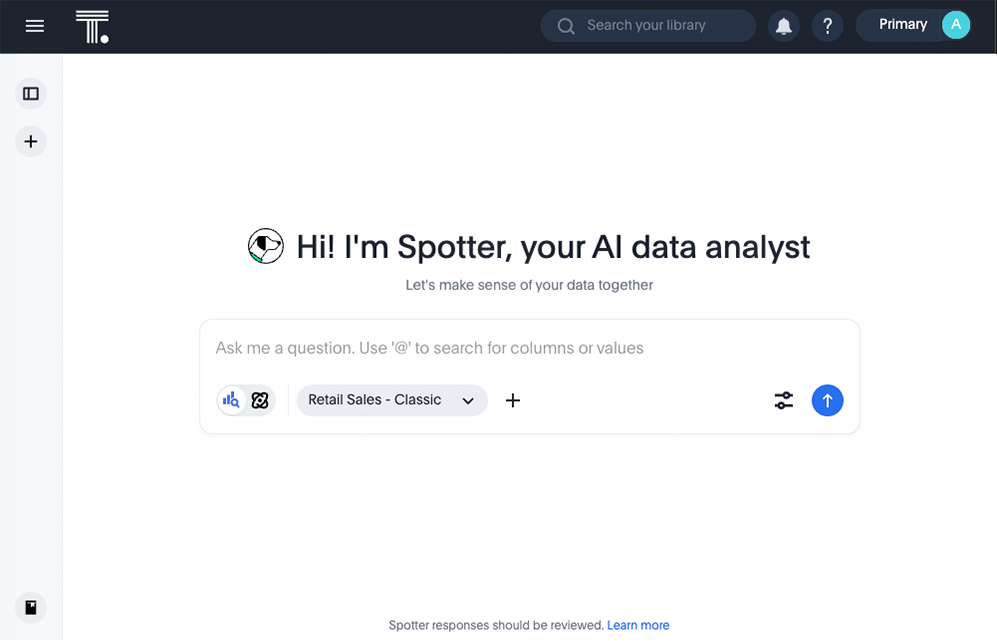 |
Spotter CSV upload support
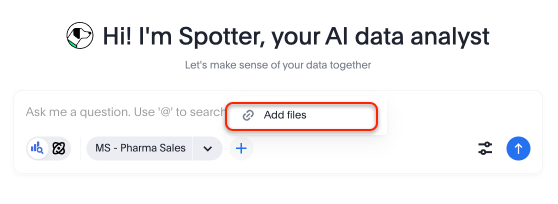
You can now upload CSV files directly to Spotter, enabling ad-hoc data analysis without requiring a pre-built data model. This feature makes it faster to explore and get insights from external data files directly in the Spotter interface. Simply click the + icon next to the Model selection button in the search bar and select the file you plan to upload. Note that the files you upload remain only in your conversation, and are not stored in ThoughtSpot. Files persist in your conversation for up to an hour. The size limit is 5 mb per file, 10 files per message.
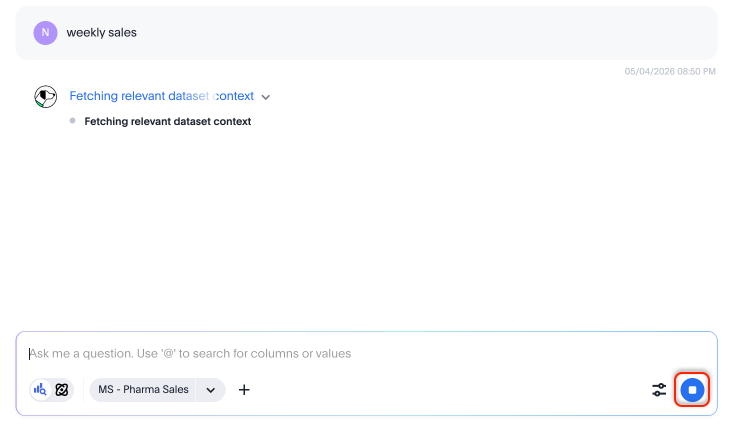
Spotter answer stop button
You can now stop in-progress answer generation in Spotter, giving greater control over query execution and improving the experience when you need to revise a query.
SpotterViz enhancements
We have made the following enhancements to SpotterViz:
-
When you create a new Liveboard and SpotterViz is enabled, the Liveboard opens in edit mode.
-
You can now drag the SpotterViz window to resize it.
-
While SpotterViz is working, you can add additional prompts.
SpotterViz charting skills
You can now make the following types of changes by prompting SpotterViz:
- Visual editing
-
Use titles of charts to reference and modify specific visualizations, groups of visualizations, or tabs.
- Bulk formatting
-
Apply changes across multiple objects simultaneously.
- Structural transformation
-
Change visual representations (chart types, axes, stacking).
- Cosmetic styling
-
Fine-tune colors, labels, legends, and branding.
Command palette Early Access
You can now access anything in ThoughtSpot from a single keystroke. The command palette (Cmd + K on Mac / Ctrl + K on Windows and Linux) is a global command center that unifies navigation, search, and actions across the ThoughtSpot platform. Instead of switching between menus, list pages, and contextual controls, you can find content, trigger workflows, and navigate to any part of the product — all from one place.
With the command palette, you can:
-
Search across Liveboards, Answers, Models, and more in one place.
-
Launch a new Answer, Liveboard, or Spotter chat.
-
Jump to any section of ThoughtSpot directly, including Home and Admin settings.
-
Type your data question and send it straight to Spotter.
-
Press forward slash (
/) to filter your search by Liveboards, Answers, Admin Settings, Create, Spotter, Models, Tables, and Collections.
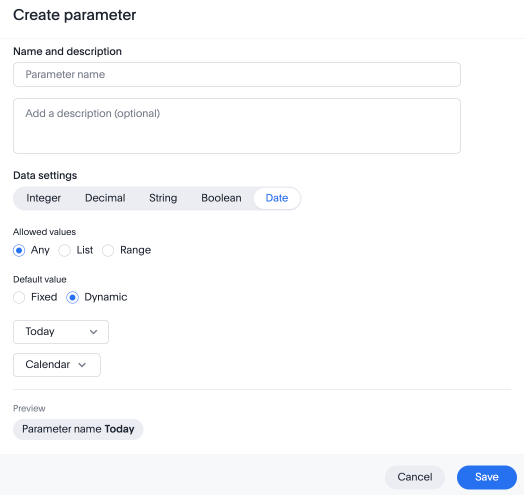
Dynamic values for date type parameters
You can now configure dynamic date type parameters when creating parameters, meaning that you can specify a dynamic rule like "start of current month", which updates with the current date rather than remaining static (for example, "June 14th").
Models in object search Beta
Models are now fully discoverable through ThoughtSpot’s unified search. Whether you’re using the global search bar or the search results page, Models appear alongside Answers and Liveboards — making it faster and easier to find the data foundation your analyses are built on. To enable this feature, contact ThoughtSpot Support.
Centralized filter window
The centralized filter window is now generally available (GA). This feature introduces a single, unified interface for managing all filters in a Liveboard. Users can use this to view, update, and apply multiple filters at once, rather than interacting with each filter individually. This feature supports bulk filter changes, clear and reset actions, and provides a streamlined workflow for complex analyses. This improves efficiency, especially when working with Liveboards containing many filters or when users need to adjust several dimensions simultaneously.
Other features and enhancements
Spotter instructions
Administrators and Org administrators can now configure instructions at the agent level to customize how Spotter responds to queries across your organization. Spotter instructions let you tailor Spotter’s behavior for specific use cases, ensuring more consistent and relevant AI-generated answers. You can use Spotter instructions to specify output defaults like format and currency, tell Spotter how to handle ambiguous queries, and set guardrails for sensitive data. For example, you can say, “If the user doesn’t specify a breakdown, default to department, region, and location. Always compare year-over-year.”
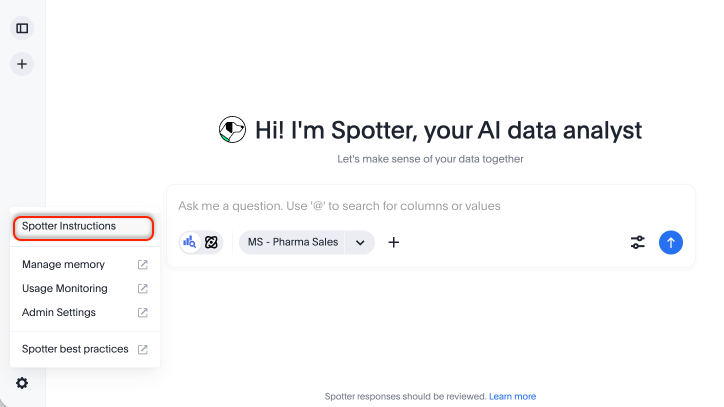
To configure Spotter instructions, click the gear icon in the lower left corner of your Spotter conversation and select Spotter instructions.
SpotterModel Early Access
You can now use SpotterModel to generate comprehensive, optimized Models ready to use in your analysis. SpotterModel automates table selection, join creation, and column selection, while allowing you to review and customize each step. To enable this feature, contact your administrator.
For more information, see SpotterModel.
Memory from Liveboards enhancements
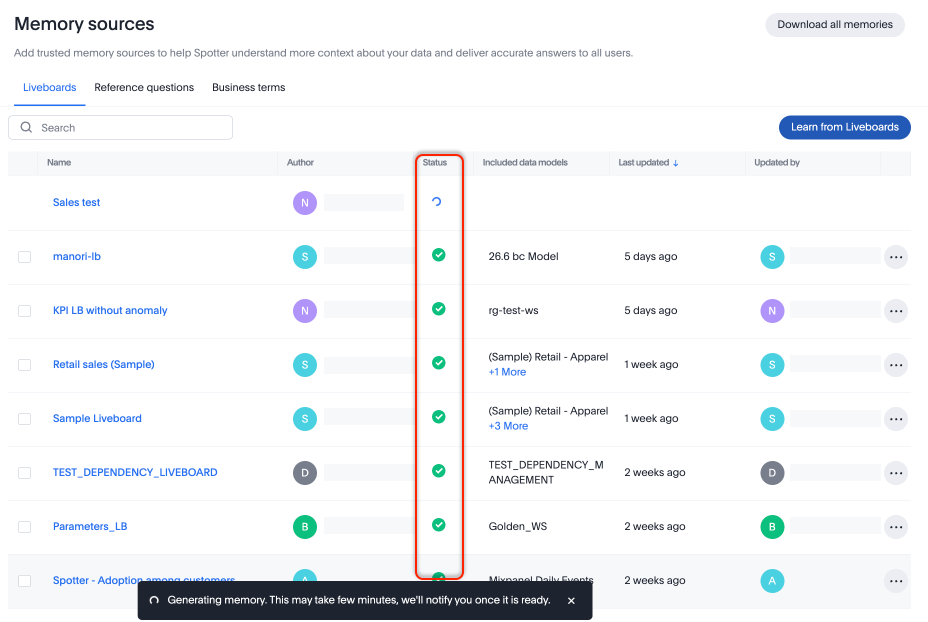
You can now reference the Status field in the Memory sources page to see whether your memory has been generated. ThoughtSpot also notifies you once the Liveboard memory is fully generated. To enable memory from Liveboards and conversations, contact your administrator.
Snowflake Semantic Views resync Early Access
You can now resync Snowflake Semantic Views integrations when the Snowflake semantic model or uploaded definition changes. Administrators can manage and resync Semantic Views as needed to reflect changes made in Snowflake. To enable this feature, contact ThoughtSpot Support.
Connect to Iomete Early Access
You can now connect to Iomete cloud data warehouses. To enable this feature, contact your administrator.