Publishing objects between Orgs
Publishing allows administrators to efficiently manage and distribute ThoughtSpot objects across multiple Orgs.
Unlike the deployment method that relies on TML import and Git integration, publishing allows administrators to create an object in the Primary Org and publish it directly to target Orgs without generating duplicate copies. It also allows dynamic customization of the underlying Table or Connection properties using variables.
ThoughtSpot allows administrators to create and assign variables, parameterize object properties, and publish objects from the Primary Org to other Orgs.
When to use publishing
ThoughtSpot recommends using the publishing feature if you have a multi-tenant ThoughtSpot instance with Orgs where your deployment requires the same metadata objects across different Orgs.
ThoughtSpot also allows publishing content to different instances or Orgs via TML import and Git integration. The Publishing feature automates some of these procedures and simplifies content propagation for large-scale deployments.
The following table lists the key differences and use cases for both these methods.
Publishing |
TML Import/Git-based Deployment and publishing |
Recommended for multi-tenant instances requiring standardized and re-usable content |
If a tenant Org requires unique customizations that cannot be handled by variables, use TML-based deployment to create and maintain a separate object for that Org. |
Allows publishing content from the Primary Org to different Orgs within an instance |
Allows publishing content to Orgs within a ThoughtSpot instance, or from one ThoughtSpot instance to another |
Maintains a single source of the object and publishes content to Orgs without creating a duplicate object |
Creates a separate copy per Org / per instance and can result in a higher memory usage. |
Allows customizing data properties with variables |
Creates new copies per Org or instance and thus allows full customization of objects. |
No change to metadata object IDs and references. Hence, GUID mapping is not required. |
Requires GUID mapping. |
Parameters and variables
ThoughtSpot provides predefined system variables such as 'ts_username' and 'ts_groups', which can be used for data security. Additionally, you can configure the following types of variables:
-
Table variables: can be used for table mapping properties such as schema name, database name, table name.
-
Connection property variables can be used for data connection properties such as accountName, warehouse, user, password, role and so on.
-
Connection and principal mapping variables: can be used for modifying connection properties for a specific principal object such as a user or user group. This means you can set different values for connection properties, such as warehouse, role, user, and password,depending on the user or group accessing the connection.
-
Formula variables: can be used in formulas when implementing Row Level Security (RLS) rules. Formula variables enable dynamic, context-aware security and personalization in data access.
Parameterizing tables and connections
You can define variables for tables and connections. This allows different Orgs to use different physical tables or connection properties at runtime. Parameterizing a table or connection lets you reuse the same data model across different environments — such as development, staging, and production — without having to manually update your configuration each time. Instead of hardcoding values like database names, schema paths, or connection credentials, you can define them as parameters that can be swapped out on demand.
To parameterize a table, do the following:
-
Navigate to the Data workspace tab.
-
In the Data objects page, select the checkbox for the table you want to parameterize.
-
In the Parameterize Table window, select a Field name and a Variable.
-
(Optional) Add more field names by clicking +Add another field and specifying a variable.
-
Click Parameterize.
To parameterize a connection, do the following:
-
Navigate to the Data workspace tab.
-
In the left-hand navigation, click Connections.
-
In the Parameterize Connection window, select a Field name and a Variable.
-
(Optional) Add more field names by clicking +Add another field and specifying a variable.
-
Click Parameterize.
You can unparameterize a table or connection later if you need to. For more information, see Unparameterize metadata objects.
User access to objects
ThoughtSpot administrators with access to all Orgs can publish content from the Primary Org to other Orgs on a ThoughtSpot instance. The administrators will also require edit access to the object and the underlying data source in the Primary Org.
The visibility of a published object in an Org depends on its sharing settings. Org administrators can view the objects published in their Org and grant view access to other users in their Org by sharing the object.
Publishing workflow
To publish an object from the Primary Org to another Org, complete the following steps.
-
Navigate to the object that you want to publish in either the Data workspace tab or in a list view of Liveboards, Answers, or Data workspace > Data objects.
-
Click the More menu and select Publish.
-
On the Publish Model page, select the Orgs that you want to publish the object to.
If you select an object that contains sources that are not parameterized, you will see a warning that all users across Orgs will see the same data. -
Optionally, you can choose to parameterize any unparameterized sources by selecting Parameterize next to the associated source.
-
Select a Field and Variable to map a variable to field names to parameterize the table with dynamic values.
-
Click Parameterize.
-
-
Click Publish.
Publishing from object lists
You can publish, unpublish, and manage the publishing state of Answers, Liveboards, and Models directly from the list page view without having to open each object individually.
| Publishing is a multi-Org feature. These actions are only visible in multi-Org environments where object publishing is enabled. You must be in the primary Org and be a cluster administrator to see the publish and unpublish actions. |
The Publish, Unpublish, and Manage publishing options are available in the row-level action menu on the Answers, Liveboards, and Data Workspace list pages.
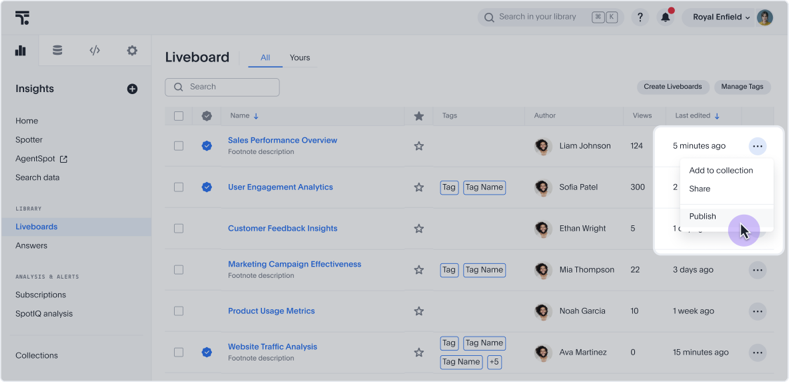
The publish and unpublish options allow you to select target Orgs, handle dependents, and confirm the action.
| For Models, the publish action is not available for objects authored by a superuser or system user. |
Single-object actions:
-
Publish — available on unpublished objects
-
Unpublish — available on published objects
-
Manage publishing — available on objects that are already published, allowing you to add or remove orgs
Bulk actions:
When you select multiple objects of the same publish state, the action bar displays the relevant action. For example, selecting multiple unpublished objects shows Publish in the action bar. The bulk action is hidden if the selection contains a mix of published and unpublished objects, or more than one already-published object.
Publishing coaching to Orgs
ThoughtSpot now supports publishing Spotter coaching to Orgs. In addition to Org admins, now non-admin users with Spotter coaching management access on published data models in secondary Orgs can provide coaching access permissions to other users. They can also export/import coaching TML and share the data model with other users. Previously, coaching was Org-specific. Coaching changes made in the primary Org are synced with the secondary Orgs where the Model is published.
Limitations
-
Only ThoughtSpot administrators with access to all Orgs can publish objects.
-
Objects can only be published from the Primary Org to other Orgs.
-
In the target Orgs, published objects are available in read-only mode. The original object in the Primary Org remains editable only by the cluster administrator.