Integrate Databricks Metric Views
ThoughtSpot integrates with Databricks Metric Views, allowing you to leverage semantic models defined in Databricks in ThoughtSpot. This enables centralized metric and business logic management in Databricks, while providing a seamless analytics experience in ThoughtSpot, by leveraging Databricks’s semantic layer. The integration is designed for flexibility, efficiency, and to improve data governance and discoverability.
Users with can manage data privileges can manage and resync Metric Views as needed to reflect changes made in Databricks.
| The Databricks Metric Views is in Early Access. To enable this feature, contact ThoughtSpot support. |
Features:
-
Connect directly to Databricks Metric Views from ThoughtSpot.
-
Import semantic models, including metrics, formulas, and column descriptions, into ThoughtSpot.
-
Use imported semantic views as data models for building dashboards, SpotIQ queries, and analytics.
-
Column-level metadata and documentation from Databricks are automatically pulled into ThoughtSpot.
| This integration is separate from dbt integration; you can choose to use either or both, depending on your data modeling strategy. |
Prerequisites
Please confirm that the user has access to all underlying tables referenced by the semantic view.
Integrating with Databricks
-
Define Metric Views in Databricks:
-
Create semantic views in Databricks using their native tools.
-
Add business logic, metrics, and column descriptions as needed.
-
-
Connect ThoughtSpot to Databricks:
-
In ThoughtSpot, navigate to the Data workspace and choose Semantic integrations. Click Add integration.
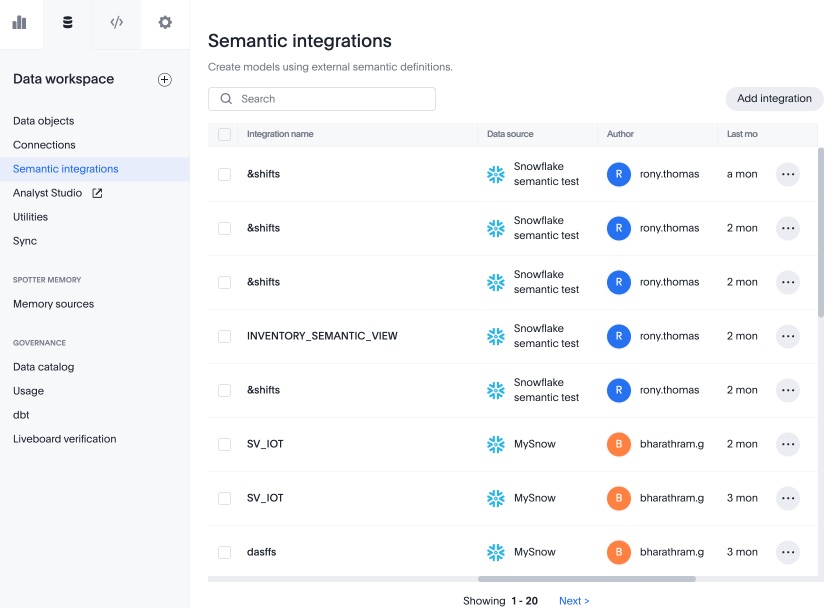
-
Add a name and description and choose the Databricks connection type. Click Next
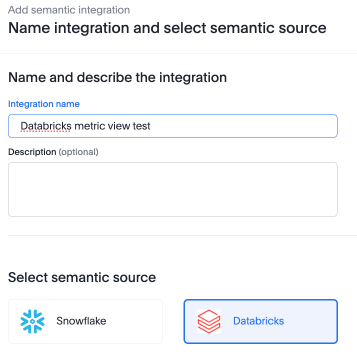
-
Select the connection name, catalog, schema, and metric view and click Add integration.
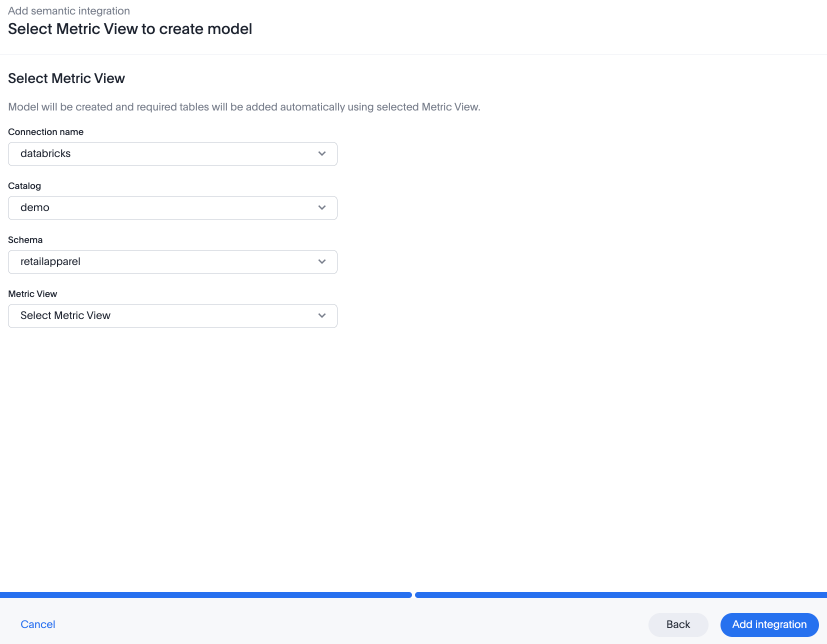
-
ThoughtSpot will import the semantic view, including all defined metrics and metadata. A screen displays all formulas defined in the Metric View. You can choose to review and edit the formulas, which ThoughtSpot redefined from YAML to TML format, or save your semantic view as is.
-
-
Use in ThoughtSpot
-
The imported semantic view appears as a data model in ThoughtSpot. If the Metric View in Databricks changes, you can navigate to the data model in ThoughtSpot, click the More menu
 , and select Import semantic updates to resync.
-
Build dashboards, run queries, and use SpotIQ on top of the imported model.
-
All business logic and metrics defined in Databricks are available for analytics in ThoughtSpot.
-
When a semantic view is imported, tables are imported into ThoughtSpot using the aliases defined in the semantic view. If a table already exists in the connection with a different name, it is automatically renamed to match the alias during the semantic view import.
Model elements retained during resync
-
Column settings
-
Every column property except column type and aggregation, only if the source doesn’t set that property itself:
-
format pattern, currency
-
geo config (including custom geo file)
-
index type / index priority (not on Snowflake formula columns: always reset to "Don’t index")
-
synonyms (only if the source defines no synonyms for that column; no merge, the source list wins)
-
synonym type
-
SpotIQ preference, Search IQ preference
-
calendar, custom sort order, default date bucket, time-bucket restriction
-
additive, attribution dimension, mandatory, mandatory token filter, strict date column
-
value casing, AI context, hierarchical column name, column use cases
-
-
Description: only if the source has no description for that column.
-
Data panel folder assignment: only if the source sets none.
-
-
Formulas and parameters
-
Formulas you added keep their name, expression, column type, aggregation and column settings.
-
All parameters.
-
-
Model level
-
Spotter enabled, Search enabled, RLS bypass, progressive joins: always.
-
Model filters: only if every column they reference still exists (others are dropped silently, log only).
-
Custom action associations: always.
-
Join type and cardinality: only for joins the source still defines (same tables and same join condition).
-