How Spotter uses context
Every Spotter answer is built from four kinds of context: instructions that set behavior, data model semantics that give the data meaning, memory that establishes how your business answers, and external context from the sources your admin has connected. This page shows what Spotter fetches and how it turns it into an answer.
What Spotter assembles before it answers
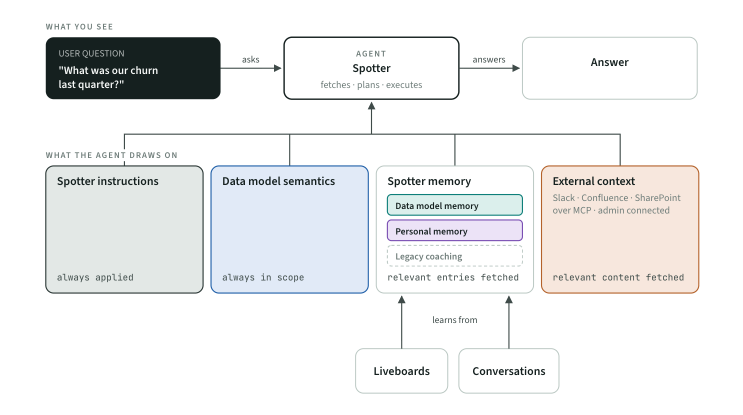
| Kind | Written as | Answers the question | When it reaches the agent |
|---|---|---|---|
Behavior |
Spotter instructions, Analyst instructions |
How should the agent act, for everyone? Tone, format defaults, what to decline, what to always add |
Always, on every answer |
Meaning |
Column synonyms, column AI Context, other Model metadata |
What is this column, and how are its values written? |
Always in scope; used to pick the right columns for the words in the question |
Logic |
Data model memory, personal memory |
How does this business answer this question? Definitions, filters, steps, and what Spotter knows about you |
Fetched by relevance, per question |
Knowledge |
Connected sources such as Slack, Confluence, SharePoint |
What does this question need that lives outside ThoughtSpot? |
Searched by relevance, like memory, across the sources an admin has connected |
Memory learns from Liveboards and conversations. Row-level and column-level security sit underneath all four kinds and are never context.
Next
-
When sources disagree: the order Spotter applies these elements when they conflict.
-
Where to write context: which surface each fact belongs on.