Coming soon
The following features are coming in the next release of ThoughtSpot Cloud.
October 2026 26.10.0.cl
Spotter analyst builder GA
The Spotter analyst builder is now generally available (GA). In this chat-based interface, you can describe the analyst you would like to use, and Spotter translates your requests into instructions for the agent. Spotter Analysts are also GA in this release.
For more information, see Spotter analysts.
Spreadsheets GA
The spreadsheet interface puts a familiar, editable grid directly on your live data. Save your work as an Answer that stays searchable, shareable, and governed like anything else in ThoughtSpot.
-
Columns and formulas on live data: Build new metrics with 70+ built-in functions. Every formula runs as a live query and persists as governed logic your team can reuse.
-
Shape your view instantly: Sort, filter, conditional formatting, and text and number formatting help you focus on what matters, applied live on the data.
-
Save as a governed Answer: Your spreadsheet becomes a searchable, shareable object with security and lineage intact, never a disconnected export.
-
Built for real datasets: Scroll seamlessly through large result sets and switch to full-screen mode for focused analysis.
For more information, see Spreadsheet.
Spotter connector marketplace GA
Spotter now features a browsable catalog with more than 100 third-party connectors, making it easier than ever to discover and add third-party data integrations. Every user can browse, search, and explore available connectors, including one-click options like Slack and Web Search, plus connectors for services like Microsoft Teams that guide you through setup. Your administrator or users with the CanManageSpotter privilege can add and configure connectors for your organization. If you don’t see a specific MCP server in the catalog, any MCP-compliant server can still be added manually. The Spotter marketplace connectors are available to all users in Spotter by selecting Settings > Connectors. This feature will be rolled out in the first weekly patch after the 26.10.0.cl release.
Charts added to the new charts library GA
The new charts library expands to add Pareto, Waterfall, and Heatmap charts, bringing enhanced analytical flexibility and modernized styling across search, Spotter, and Liveboards. This release introduces support for multi-panel trellis and faceting modes, new multivariate axis configuration logic, and expanded customization options — including independent color controls for increment and decrement bars on Waterfall charts, refined gradient and label positioning on Heatmaps, and enhanced axis formatting on Pareto charts.
Liveboard contextual filtering Early Access
Liveboard creators can now scope filters and parameters to a specific tab or group, instead of applying them globally across the entire Liveboard. This makes it easier to build focused, information-dense Liveboards where consumers can analyze a specific area without inadvertently affecting unrelated visualizations. To enable this feature, contact your administrator.
When a Liveboard with tab or group filters is imported into a cluster where this feature is disabled, the scoped filters are removed on import.
For more information, see Liveboard filters.
Liveboards with column-security rules GA
The enhanced behavior of Liveboards built with column security rules is now generally available (GA). If users restricted by column security access the Liveboard, they can see and interact with the Liveboard filters and visualizations, but cannot edit the Liveboard as a whole. If such inaccessible columns are used as filters in the Liveboard, the Liveboard will no longer be blocked. Schedules now honor column security rules, and each recipient receives their own report based on their column security rule assignments.
For more information, see Column security rules on Liveboards.
Other features and enhancements
Spotter connector user group sharing GA
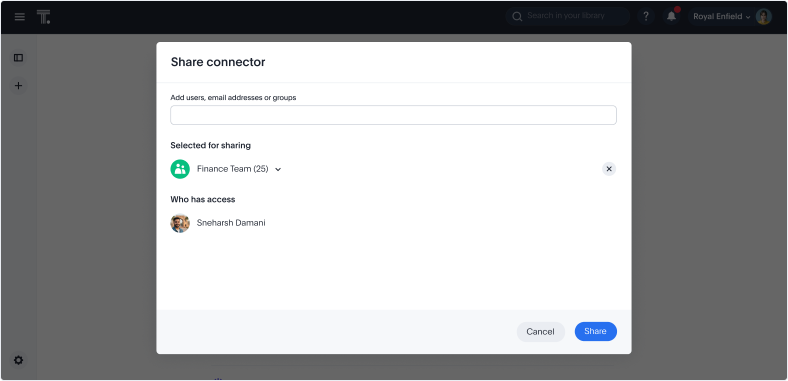
We’ve added more granular controls for sharing of Spotter connectors in ThoughtSpot. Previously, if an administrator enabled a Spotter connector like Slack, it was shared with all users across all Orgs. Now, if you add a connector, you can choose whether to share it with certain users and groups, and it will be hidden by default from all other users and groups. You can still only add or edit connectors from the primary Org, but you can share connectors within any Org.
Liveboard dependency management GA
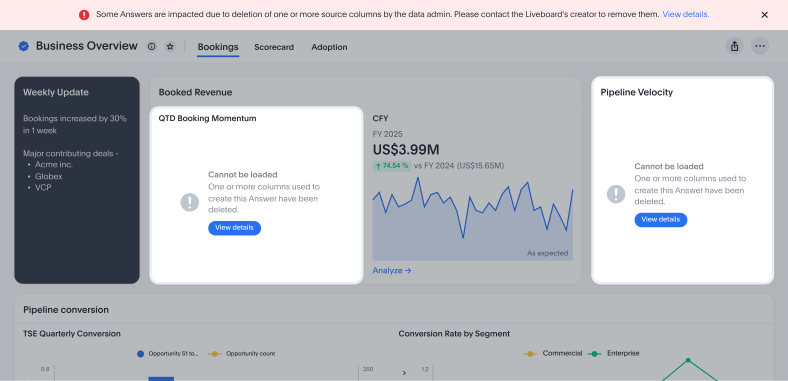
Liveboard dependency management is now generally available (GA). Admin users can now delete data model columns even if they’re in use on Liveboards. When a data model column that a Liveboard depends on is deleted, ThoughtSpot now detects the impact and shows you exactly what’s broken instead of displaying a generic error or silently failing.
Writeback for Snowflake Beta
Writeback with input tables allows you to create and edit tables directly in ThoughtSpot, where you can add new columns and update values. Data is saved back to your cloud data warehouse so you can use these tables across Answers and Liveboards. Currently, we support Snowflake cloud data warehouses. This feature supports planning, and operational workflows, removing the need for spreadsheets or manual uploads. Only users with edit permissions can make changes, and all edits are tracked for governance. To enable this feature, contact ThoughtSpot support.
For more information, see Writeback.
Muze Studio AI Beta
Muze Studio now includes an AI-powered chat assistant that lets you build and refine custom charts using natural language. Simply describe the visualization you want, or ask follow-up questions to iterate on it, and the AI generates the configuration for you directly inside the Muze Studio editor. A built-in "Show work" timeline lets you trace each step the AI took, giving you full visibility into how your chart was constructed. Muze Studio AI is available in Beta on ThoughtSpot Cloud and can be enabled by ThoughtSpot support.
Publishing from object lists GA
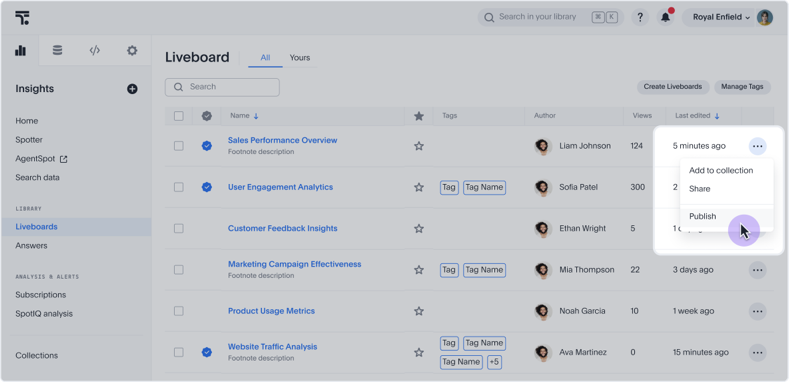
Publishing, and publishing from object lists are now generally available (GA). You can now publish, unpublish, and manage the publishing state of Answers, Liveboards, and Models directly from the list page view without having to open each object individually.
The Publish, Unpublish, and Manage publishing options are available in the row-level action menu on the Answers, Liveboards, and Data Workspace list pages. The publish and unpublish options allow you to select target Orgs, handle dependents, and confirm the action.
Publishing is a multi-Org feature. These actions are only visible in multi-Org environments where object publishing is enabled. You must be in the primary Org and be a cluster administrator to see the publish and unpublish actions.
For Models specifically, the publish action is not available for objects authored by a superuser or system user.
Connection-level query timeout GA
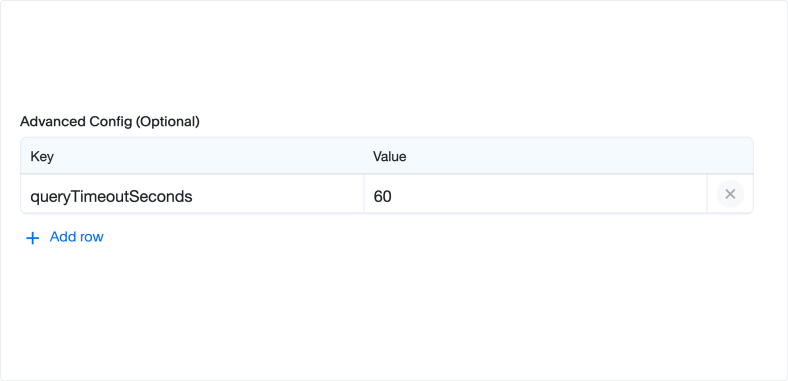
You can now set query timeout in the Advanced Config setting in Connections, where you can define how many seconds a query should run for before it automatically times out.
Act As (User Impersonation) Early Access
ThoughtSpot administrators can now impersonate a specific user to troubleshoot issues directly, without requiring screen shares or shadow accounts. To initiate a session, the administrator first requests the user to configure their Act As preferences on their profile page, where the user sets the permitted time window for impersonation. Sessions expire automatically at 60 minutes, and the administrator can end the session at any time using the Exit session button. The user receives email notifications when a session starts and ends. All actions taken during the session are captured in audit logs.
This feature is available for users with the new Admin Portal enabled. Administrators can enable it from Feature Management > Early Access.
Databricks Metric Views integration Early Access
Databricks Metric Views integration is now available in ThoughtSpot. This integration allows you to connect directly to Metric Views defined in Databricks and use them to automatically create Models in ThoughtSpot. You can import Metric Views, including metrics, formulas, and column metadata, and immediately use them for building Liveboards, running queries, analytics, and Spotter. Users with Can manage data privileges can manage and resync Metric Views as needed to reflect changes made in Databricks. To enable this feature, contact your administrator.
Data workspace page GA
The new Data workspace page is now generally available (GA). It now uses a modernized object table, making it easier to find, filter, and manage your data objects in one place.
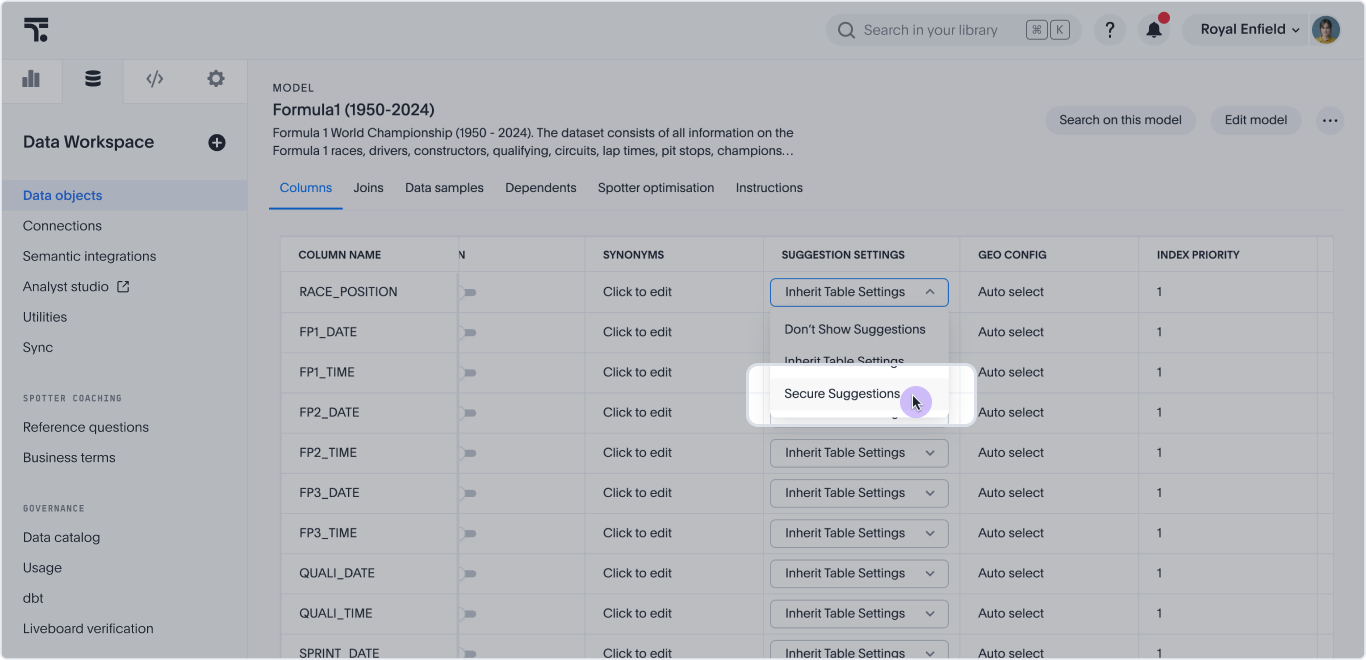
Secure suggestions in saved filter values Beta
ThoughtSpot now enforces row-level security (RLS) on saved filter values in Answers and Liveboards. When a filter chip displays values from a column marked as Secure Suggestions in the data model, ThoughtSpot checks whether the current user has RLS access to those values before displaying them.
When filter values are cleared due to RLS enforcement, the user still sees data, but only the rows their RLS policy permits. An empty filter chip on a secured column does not mean no data; it means the saved filter values were not applicable to this user and the RLS policy is the active constraint.
To enable this feature, contact ThoughtSpot support.
Object IDs in template variables Beta
You can now define object IDs for variables in TML or the API. Object IDs now support multi-tenant objects. Use object IDs in tandem with GUIDs that identify objects in TML. You can use object IDs to identify objects that you export in TML and import to other Orgs, removing the need to completely recreate objects between Orgs.
Amazon Athena driver upgrade GA
We have upgraded the Amazon Athena driver to version 3.8.0.
For the Developer
For new features and enhancements introduced in this release of ThoughtSpot Embedded, see ThoughtSpot Developer Documentation.