Using an App in AgentSpot
Learn how to find, open, and interact with Apps in AgentSpot to explore and filter data from across your organization.
What is an App?
An App is an interactive, multi-source data experience built on top of your organization’s data sources that brings together data from across your organization — ThoughtSpot models, Google Workspace, Microsoft 365, Jira, Slack, Salesforce, and more — into a single, governed, shareable product that anyone on your team can use. For the full list of supported connectors, refer to AgentSpot connector reference.
Unlike a report or a dashboard, Apps are highly interactive — you can click on components to filter views, drill into underlying detail, and explore the data without needing to know SQL or use a BI tool.
Apps are:
-
Multi-source — a single App can pull data from ThoughtSpot models and any supported connector — including Google Workspace, Microsoft 365, Jira, Slack, and Salesforce — simultaneously, blending it all into one coherent experience. Refer to AgentSpot connector reference for the full list.
-
Governed — all data is scoped to the user viewing the App; row-level security (RLS) and column-level security (CLS) from ThoughtSpot models are enforced automatically, and connector data (such as Jira) is always scoped to the individual user’s own access
-
Interactive — filter by quarter, click on a card to see underlying detail, and explore the data in ways that go well beyond a static report
-
Shareable — publish an App once and share it with specific users or your entire organisation
|
Because data is always scoped to the person viewing the App, users can only see data they already have permission to access. No additional access controls need to be configured in the App itself. |
Where to find Apps
From the AgentSpot home page, you can find Apps on the AgentSpot home screen in two places:
My Apps
The My Apps section on the AgentSpot home page shows:
-
Apps published by you
-
Apps published by your teammates that have been shared with you
This is your primary view for Apps you use day-to-day.
| If you or your team have not created any apps or no apps have been shared with you yet, you can browse apps available in your Org. |
Browse Apps
Click Browse apps to explore the full catalogue of Apps that people across your organization have created and published. Use this to discover Apps built by other teams that may be relevant to your work. By default, the From My Org is selected displaying the Apps from your Org.
| If you have created apps or apps have been shared with you, you can access them by clicking the From my Org section. |
Each App card shows a heart with a like count. Click the heart to like an App you find useful, and click it again to remove your like. On the From My Org tab, Apps are ordered with the most-liked first, so the Apps your organization values most appear at the top.
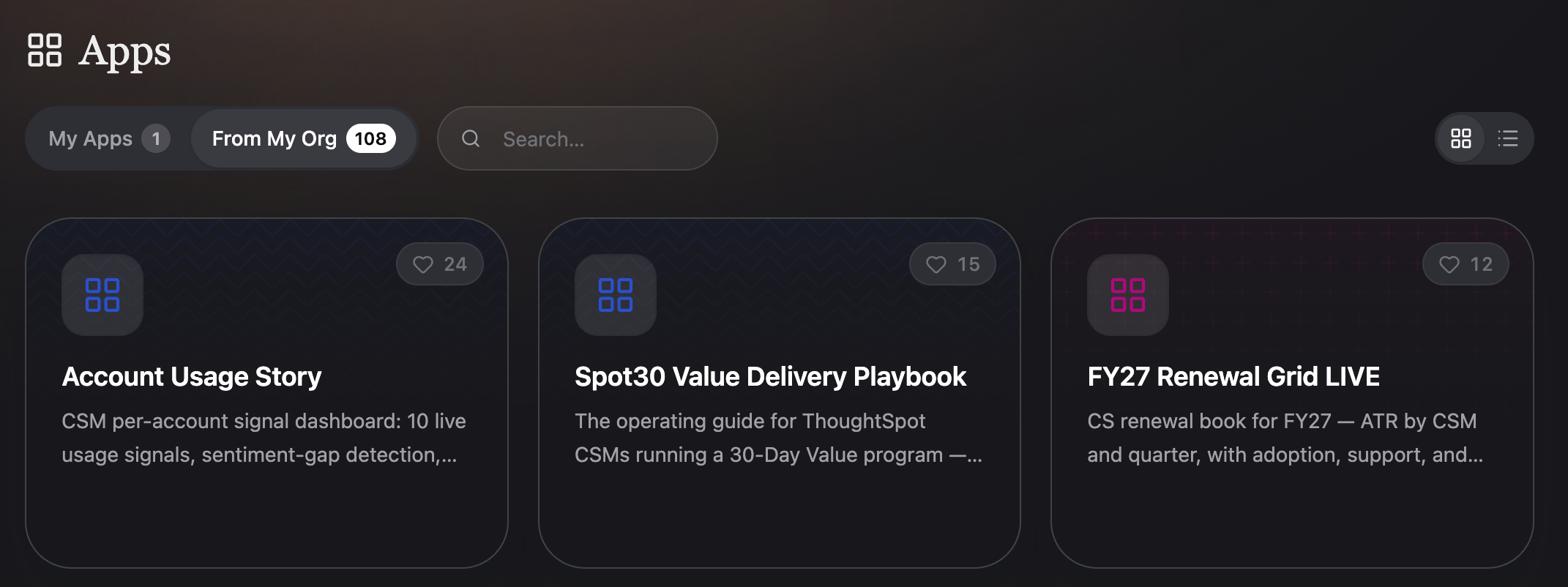
| A dedicated section within My apps shows only the Apps you have created, making it easy to manage and return to your own work. |
Opening and using an App
To open an App, click it from the My Apps or From My Org tabs. The App loads and displays its full interactive experience.
Once inside an App, here are examples of things you can do:
| Interaction | What it does |
|---|---|
Click a filter control (e.g. a quarter selector) |
Filters the data shown across the App to that selection |
Click a card or data point |
Drills into underlying detail for that metric or record |
Scroll through sections |
Explores different topic areas or data sources within the same App |
Because Apps are not bound by a fixed set of components or interaction patterns, the specific controls available will vary by App. Explore what each App offers by interacting with its elements directly.
Data sources in Apps
A single App can connect to multiple data sources at the same time. Supported source types include:
-
Data sources — worksheets and governed semantic models from your ThoughtSpot instance
-
Connectors — Google Workspace, Microsoft 365, Jira, Slack, Salesforce, and other services connected to AgentSpot. For the full list, refer to AgentSpot connector reference.
All sources are blended together within the App. The data each user sees is always governed by their individual permissions across every source — there is no separate layer of access management inside the App itself.
Creating your own App
Any user can create a new App directly from the My Apps section. For a full walkthrough of the creation process, see Creating an App in AgentSpot.
Summary
| Question | Answer |
|---|---|
What is an App? |
An interactive, multi-source data experience built on your organisation’s governed data |
Where do I find Apps? |
AgentSpot home screen → My Apps or Browse Apps |
Who can see an App? |
Anyone it has been shared with — but each person only sees data they have permission to access |
What data sources can an App use? |
ThoughtSpot models, Google Sheets, Jira, Slack, and other AgentSpot connectors — simultaneously |
Can I create my own App? |
Yes — from the My Apps section. See Creating an App in AgentSpot. |