Change the join rule or RLS setting for a Model
| Worksheets are now referred to as Models. |
As long as you have permissions to edit a Model, you can always go into it and set a different join or RLS rule.
If you find that the charts and tables built on a Model contain a large number of null values (which display as a blank in the web browser), you can modify the join of the Model.
If you have the Can administer ThoughtSpot privilege or the Can manage data plus edit privilege on a Model, you can edit the Model and change its RLS or other key settings.
Change/configure a Model
Before working through this procedure, make sure you are familiar with how the following affect data:
To configure these values for a Model:
-
Select Data on the top navigation bar and then on Models.
-
Select the name of the Model you want to edit from the list.
-
Select the Edit Model button in the upper-right side of the screen.
-
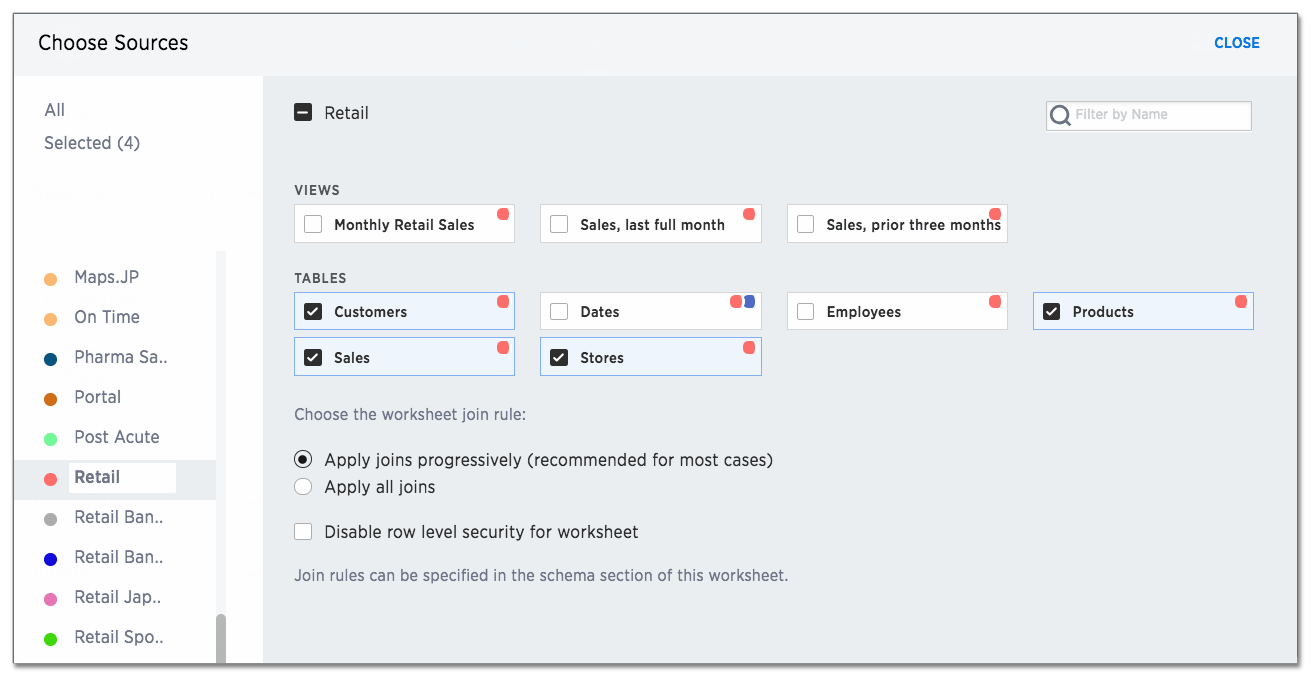
Select the + icon next to Sources.
-
Scroll to the bottom of the page.
-
Configure the Model join rule and RLS setting as needed.
-
Select CLOSE.
-
Click the More menu icon
 , and select Save.