Spotter memory levels and permissions
When you coach Spotter, whether through reference questions, business terms, or data model instructions, that memory can apply to just you or to everyone who searches on the Model. Understanding these levels helps you manage memory effectively across your organization.
Understanding memory levels
Spotter memory operates at two levels:
- User level
-
Memory applies only to your own Spotter experience. Other users querying the same Model won’t see your memory. This is the default for business users with view-only access.
- Global level
-
Memory applies to all users querying the Model. This represents verified, organization-wide definitions and rules. Global memory is the default for Model editors and administrators.
How levels apply to memory tools
| Memory tool | User level | Global level |
|---|---|---|
Reference questions |
Your curated question and answer pairs apply only to you. |
Question and answer pairs apply to all users of the Model. |
Business terms |
Your term definitions apply only to you. |
Term definitions apply to all users of the Model. |
Data model instructions |
Not available at user level. |
Instructions apply to all users (applied at global level only). |
Memory roles
Your role determines what memory you can create and at what level.
- Business users (view access)
-
-
Can create reference questions and business terms at user level.
-
Cannot create data model instructions.
-
Cannot see or change memory created by others.
-
- Users with Manage memory access on a data model
-
-
Can create reference questions and business terms at global level.
-
Can write data model instructions.
-
Can view, modify, and delete all memory on the specific data model.
-
Can promote user-level memory to global level.
-
Can grant manage memory access to other users.
-
Cannot modify Model metadata or generate/modify AI context.
-
- Model editors (edit access)
-
-
Can create all memory types at global level.
-
Can view, edit, and delete memory from all users.
-
Can promote user-level memory to global level.
-
Can modify Model metadata and AI context.
-
- Administrators (admin privilege)
-
-
Have full memory permissions across all Models in the Org.
-
Can manage memory from an user on any Model.
-
- Can manage Spotter (privilege)
-
A product-level privilege that applies broadly across data models. Holders can manage global coaching and memory on any data model they can read, and manage Spotter instructions and Spotter Analysts across the Org. Memory access continues to work exactly as before, scoped to the Model it was granted on — Can manage Spotter is additive, for users who govern Spotter across many Models.
Grant Manage memory access
You can delegate memory responsibilities to power users without giving them full data model editing permissions. This allows them to create global-level memory while keeping the Model’s structure protected.
| Manage memory access can be granted on non-editable data models, such as system data models (like Query Stats), and published data models on secondary Orgs. |
Prerequisites
You must have edit access to the data model, be an administrator, or have Manage memory access to the Model. For non-editable data models, admin access is required.
The data model must be Spotter-enabled.
Steps
To grant Manage memory access to a user or group, follow these steps:
-
Navigate to the Model in the Data workspace.
-
Click the More menu
 and select Manage memory access.
 -
Click the Add users or groups dropdown and search for the user or group name.
-
If you see a yellow warning icon next to the name, the user doesn’t have view access to the Model. Select Give view access to the model for the added users or groups to resolve this.
-
Click Save.
Manage memory
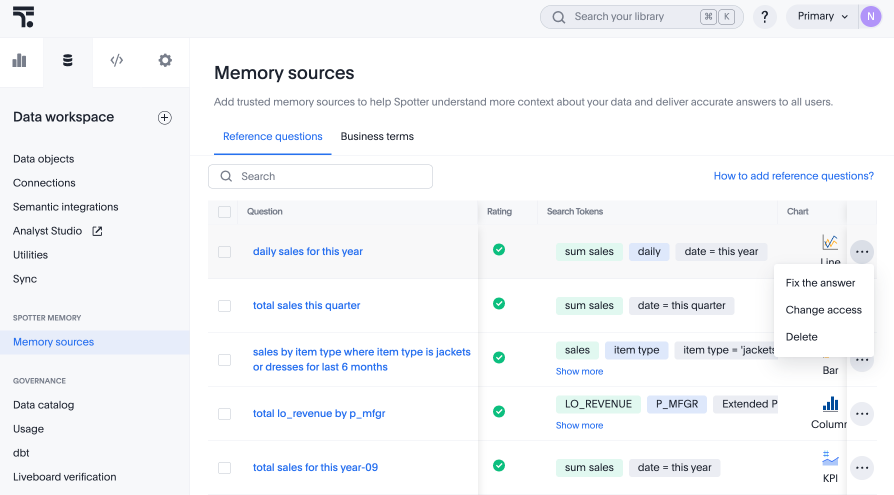
Model editors and administrators can fix, promote, or delete memory entries from all users.
-
Navigate to the Data workspace and scroll to the Memory sources section.
-
Select the Reference questions or Business terms tab.
-
Find the entry you want to manage.
-
Click the More menu icon
and select an action:-
Fix the answer: Edit the memory entry to improve accuracy.
-
Change access: Promote user-level memory to global, or vice versa.
-
Delete: Remove the memory entry.
-
-
Save your changes.
Permissions reference
The following table provides a detailed breakdown of permissions by access level.
| Access level | Can view | Can do |
|---|---|---|
No access |
Nothing (including previously submitted memory) |
Nothing |
View access |
Your own memory only |
Create user-level memory |
Manage memory access |
All memory on the Model |
Create global-level memory |
Edit access |
All memory on the Model |
All memory actions |
Administrator |
All memory across all Models in the Org |
All memory actions across all Models |
| For Org-enabled instances, you can only view and manage memory from the currently selected Org. |
Related information