Manage users and groups with SCIM
System for Cross-domain Identity Management (SCIM) allows you to synchronize user management between your IdP and ThoughtSpot. SCIM automates identity management and user provisioning across different identity management systems so that you no longer need to manage users, groups and privileges in multiple platforms. If you use an IdP like Okta, Azure, or Active Directory, with SCIM you can provision users to groups and Orgs and ensure they remain in sync with changes made in the IdP.
|
By default, SCIM is enabled for a cluster. If your ThoughtSpot instance uses Orgs, you must enable SCIM at the Org level to ensure that users are provisioned to a particular group in a particular Org. To enable SCIM per Org, contact ThoughtSpot Support. + For more information, see Configuring SCIM for multi-Org deployments. |
ThoughtSpot supports the following:
-
Automatic provisioning of users with their corresponding groups and Orgs when the users authenticate via SSO.
-
Automatic updates of user attributes in ThoughtSpot when they are updated in the IdP.
-
When you delete a user from IdP, they are automatically deleted from ThoughtSpot.
Configure SCIM
To configure SCIM on your cluster and automate updates between your IdP and ThoughtSpot, complete the following:
-
Provision capabilities in ThoughtSpot
-
Connect your IdP
Provisioning capabilities in ThoughtSpot
-
Sign in to ThoughtSpot and navigate to the Admin portal.
-
Select All Orgs.
-
Under Authentication select Provisioning.
Before you configure, ensure that your IdP supports SCIM 2.0 for a seamless integration with ThoughtSpot. -
Enter the SCIM Base URL. This URL identifies the SCIM API endpoint your Identity provider communicates with for every user management and user provisioning change.
-
Click Generate Token to generate and copy the authentication token. This token is used to authenticate the SCIM service (ThoughtSpot application) in your IdP.
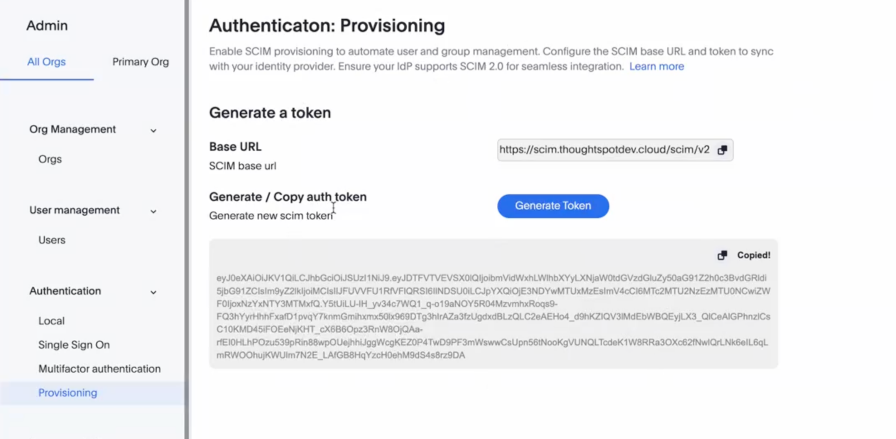
Each SCIM token has a validity of only six months.
Connecting to Okta
-
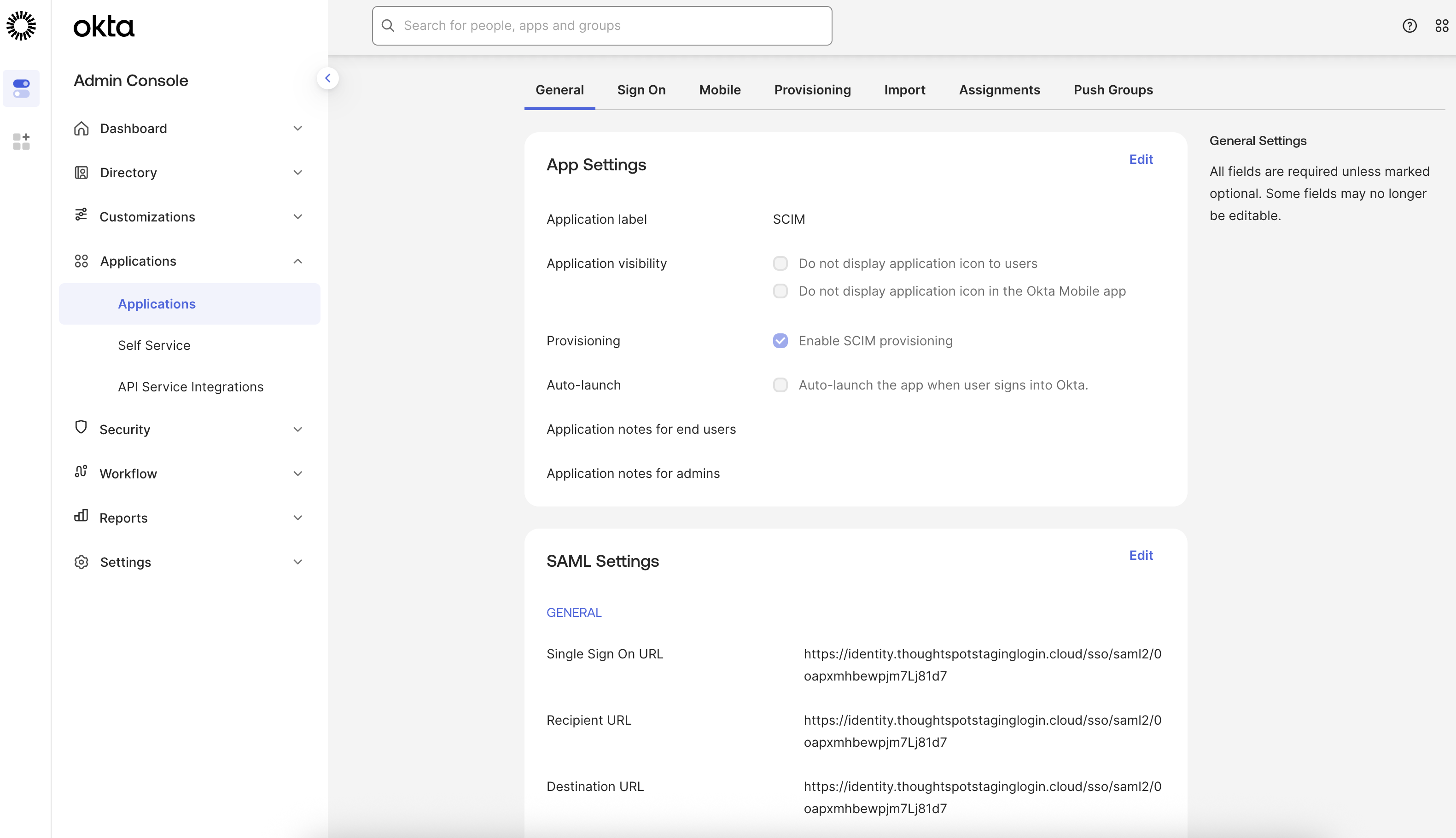
Check if SCIM provisioning is enabled in Okta.
-
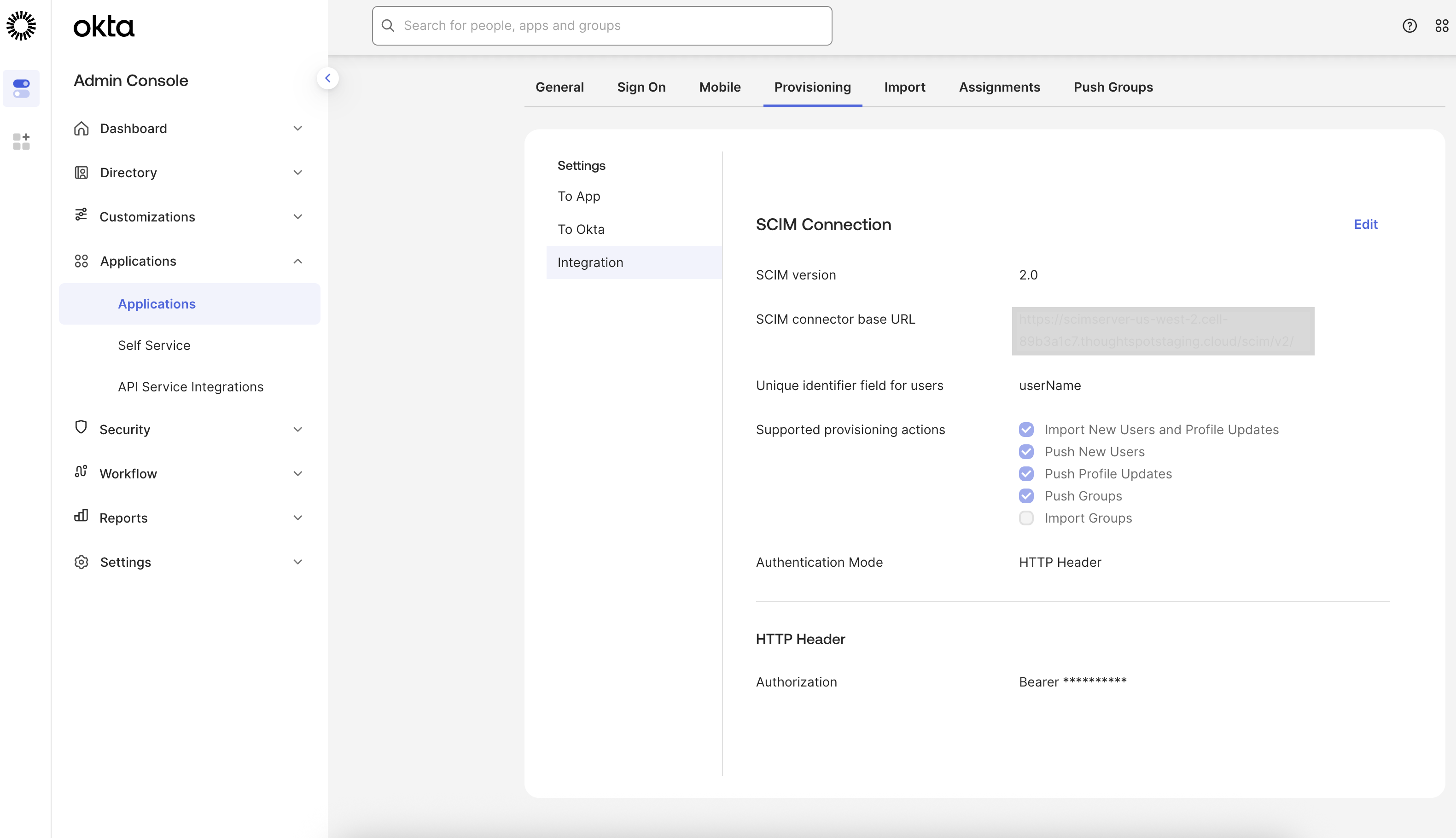
Use the token you generated and copied in ThoughtSpot to set up the authentication between your Okta and ThoughtSpot. Copy the token from ThoughtSpot in the bearer token field provided in the Okta interface.
-
You can then select which user management actions are synced with ThoughtSpot.
ThoughtSpot supports create, read, update, and delete of users and groups, and provisioning users to groups within Orgs. -
You will have to enable the syncing of the create, read, update, and delete of users and groups, between ThoughtSpot and your IdP.
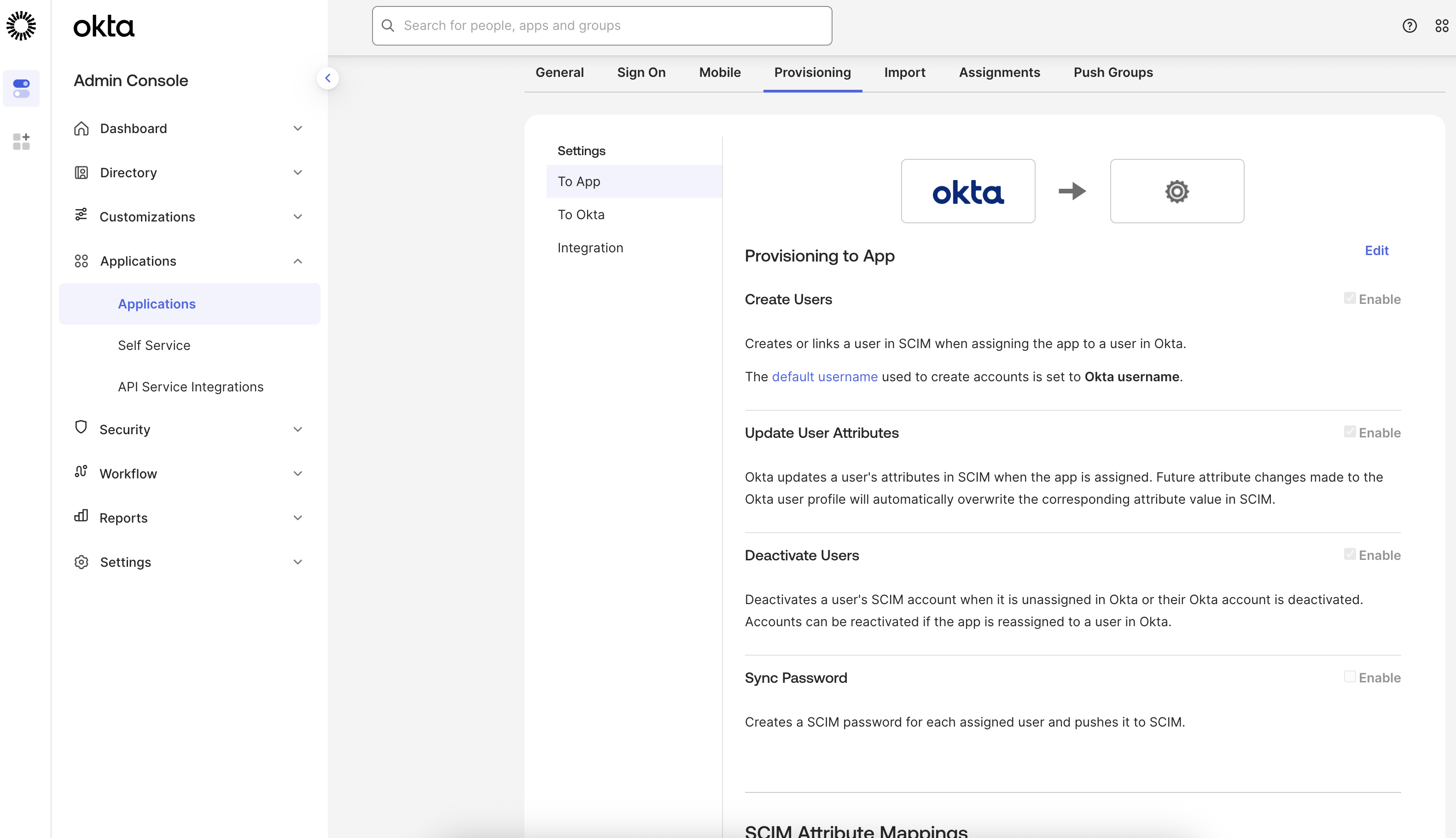
You can add users or create user groups in Okta, assign them to an application and the same will reflect in your ThoughtSpot instance, without having to explicitly sign in to ThoughtSpot.
For more information, see:
Connecting to Microsoft Entra (Azure Active Directory)
For detailed information on enabling SCIM provisioning in Microsoft Entra, see SCIM provisioning in Microsoft Entra.
Testing your configuration
-
Once the configuration and authentication are complete, you can test the configuration by assigning a new user to your ThoughtSpot application in the IdP.
-
Navigate to ThoughtSpot cluster and refresh the page.
-
You should see the newly created user in the user management page in your cluster.
Any of the configured changes done on IdP are reflected on your ThoughtSpot cluster.
| Low volume changes made in IdP may be reflected immediately in ThoughtSpot. Larger volume changes are usually reflected within 20 to 40 minutes. |
User deactivation and de-provisioning behavior
When you configure SCIM provisioning with an Identity Provider (IdP) such as Microsoft Entra ID (formerly Azure AD) or Okta, the IdP controls de-provisioning events. ThoughtSpot receives and processes the SCIM requests that the IdP sends. The following sections explain what happens in common de-provisioning scenarios.
Unassigning a group from the SCIM application
When you unassign or disable a group from the SCIM application in your IdP, the IdP sends a de-provisioning request to ThoughtSpot for every user who falls out of provisioning scope as a result of that action.
|
ThoughtSpot’s SCIM implementation treats a de-provisioning request as a permanent (hard) delete. When ThoughtSpot receives a de-provisioning signal from your IdP — indicating that a user is no longer active or in scope — the user account is permanently deleted from ThoughtSpot. The user is not suspended or soft-deactivated. There is currently no SCIM configuration or workaround to change this behavior so that de-provisioned users are deactivated instead of deleted. |
The following table summarizes the end-to-end behavior:
| Action in IdP | De-provisioning signal sent to ThoughtSpot | Result in ThoughtSpot |
|---|---|---|
Unassign or disable a group from the SCIM application |
ThoughtSpot is notified to deactivate each user who is no longer in scope |
All affected users are permanently deleted from ThoughtSpot |
Disable a specific user account in the IdP (while the user remains in provisioning scope) |
ThoughtSpot is notified to deactivate that individual user |
The user is permanently deleted from ThoughtSpot |
Remove a user from an assigned group, but the user remains in scope via another group or a direct assignment |
No de-provisioning signal is sent — the user is still in scope |
No change — the user account in ThoughtSpot is unaffected |
The exact de-provisioning signals that your IdP sends depend on your IdP configuration — for example, scoping filters, provisioning settings, and group assignment type. ThoughtSpot only receives and processes the signals that the IdP sends.
For Microsoft Entra: In the attribute mapping for your ThoughtSpot app:
-
Go to Enterprise Apps → ThoughtSpot → Provisioning → Mappings → Provision Microsoft Entra ID Users
-
Under Target Object Actions, uncheck Delete. This prevents Entra from sending SCIM DELETE requests when a user is unassigned — Entra will only update/disable, never delete in ThoughtSpot.
For Okta: In your ThoughtSpot app → Provisioning → To App → uncheck Deactivate Users. This stops Okta from sending de-provisioning signals to ThoughtSpot on unassignment.
Refer to your IdP documentation for more details on how de-provisioning events are triggered:
|
When a user is removed from ThoughtSpot through SCIM de-provisioning, their content — including personal Liveboards, saved Answers, and scheduled jobs — is automatically transferred to the
|
Protecting users from accidental deletion
Because ThoughtSpot permanently deletes users when it receives a de-provisioning signal from an IdP, consider the following precautions before making group changes in your IdP:
-
Review provisioning scope before unassigning a group. Verify that the users in the group are not uniquely assigned through that group alone. If a user belongs to multiple groups or has a direct assignment in your IdP, unassigning one group will not trigger a de-provisioning signal for that user — and their ThoughtSpot account will remain intact.
-
Use IdP scoping filters. Configure attribute-based scoping filters in your IdP to control which users are in provisioning scope, reducing the risk of unintentional de-provisioning events being sent to ThoughtSpot.
-
Audit before making changes. Use your IdP’s provisioning logs to preview which users will be affected before unassigning or disabling a group.
Best Practices
-
Manage user and group provisioning exclusively from the Identity Provider (IdP). ThoughtSpot should not be used as the source of truth for SCIM managed/ IdP managed users and groups.
-
Regularly rotate SCIM tokens to maintain security and reduce risk from compromised credentials.
-
Monitor audit logs and set up alerting for critical events such as high failure rates, authentication issues, and provisioning delays within your ThoughtSpot instance.
-
Document and follow a structured incident response plan for SCIM-related issues.
-
Use group based access control to simplify user management—add or remove users from groups in the IdP to control their access in ThoughtSpot.
-
Avoid enabling both SAML group mapping and SCIM provisioning simultaneously, as SAML group mapping will override SCIM group assignments on user login.
-
com.thoughtspot.callosum.common.config.OIDCConfiguration#oidcOrgDelimitermust be reviewed to ensure compatibility with groups provisioned via SCIM. If a group name contains this delimiter, the name may be truncated. You can either remove this flag or replace it with an alternative value. Note that each SCIM token has a validity of only six months.
FAQs
-
What are common issues and troubleshooting steps while using SCIM in ThoughtSpot?
-
User not created:
-
Check if the SCIM token is valid and active.
-
Review API logs for errors related to user creation.
-
Verify IdP settings, ensuring the user is assigned to the correct application and SCIM is enabled for the app.
-
Confirm that the user exists and is active in the IdP and that the correct attributes are being sent
-
-
Group not syncing:
-
Validate group mapping in both ThoughtSpot and the IdP.
-
Ensure the group exists in ThoughtSpot if required, or that group creation via SCIM is enabled.
-
Check user assignments to the group in the IdP.
-
Review API logs for group sync errors.
-
-
High provisioning latency:
-
Check ThoughtSpot database performance and health.
-
Review API logs for delays or timeouts in SCIM processing.
-
Monitor for bulk operations or high-volume syncs that may impact performance.
-
-
Unauthorized API requests:
-
Regenerate the SCIM token in ThoughtSpot and update the token in the IdP configuration.
-
Ensure the token has not expired or been revoked.
-
Review API logs for 401/403 errors and confirm the IdP is using the correct endpoint and credentials
-
-
-
How does group and role assignment work with SCIM?
Groups and roles can be managed via SCIM. Membership in a group in the IdP can automatically assign the corresponding role in ThoughtSpot, controlling access levels. When a user is added to a group in the IdP, SCIM syncs this membership to ThoughtSpot, and the user inherits the role privileges assigned to that group.
-
Is SCIM provisioning unidirectional or bidirectional?
SCIM provisioning in ThoughtSpot is unidirectional; changes in the IdP are pushed to ThoughtSpot, but not vice versa. This is a standard for SCIM integrations.
-
What monitoring and alerting are available with SCIM?
Key metrics, including API request success and failure rates, latency, and authentication failures, are closely monitored. Alerts are configured for high failure rates and provisioning issues. This ensures that issues like high error rates, increased latency, or authentication problems are detected and addressed promptly to maintain reliability and performance.
-
Can SCIM be used with SAML or other SSO solutions?
SCIM can be used alongside SAML. SAML group mapping is also supported, which may be simpler if SAML is already configured.
Limitation
ThoughtSpot does not support a suspended or soft-deactivated user state. When a de-provisioning signal is received, users are permanently deleted. There is no intermediate state. This means controlling your IdP’s signals is critical — ThoughtSpot cannot selectively ignore de-provisioning requests.
Related information